 DigiGrowvity
Most small businesses do not have an invoicing problem, they have a chasing problem: who has paid, who is late, and which supplier bill falls due on Friday. Invoicing software for small business should answer those three questions without a spreadsheet. In JULIO ERP the Invoicing module keeps customer invoices, vendor bills and payments together. Because it shares customers, products and orders with the other modules, an invoice usually starts from a sale instead of a blank page.
What invoicing software for small business does
Invoicing software for small business has three jobs: money coming in, money going out, and proof that each rupee was matched to a document. The module is organised around exactly those.
Customer invoices with a plain-language due date
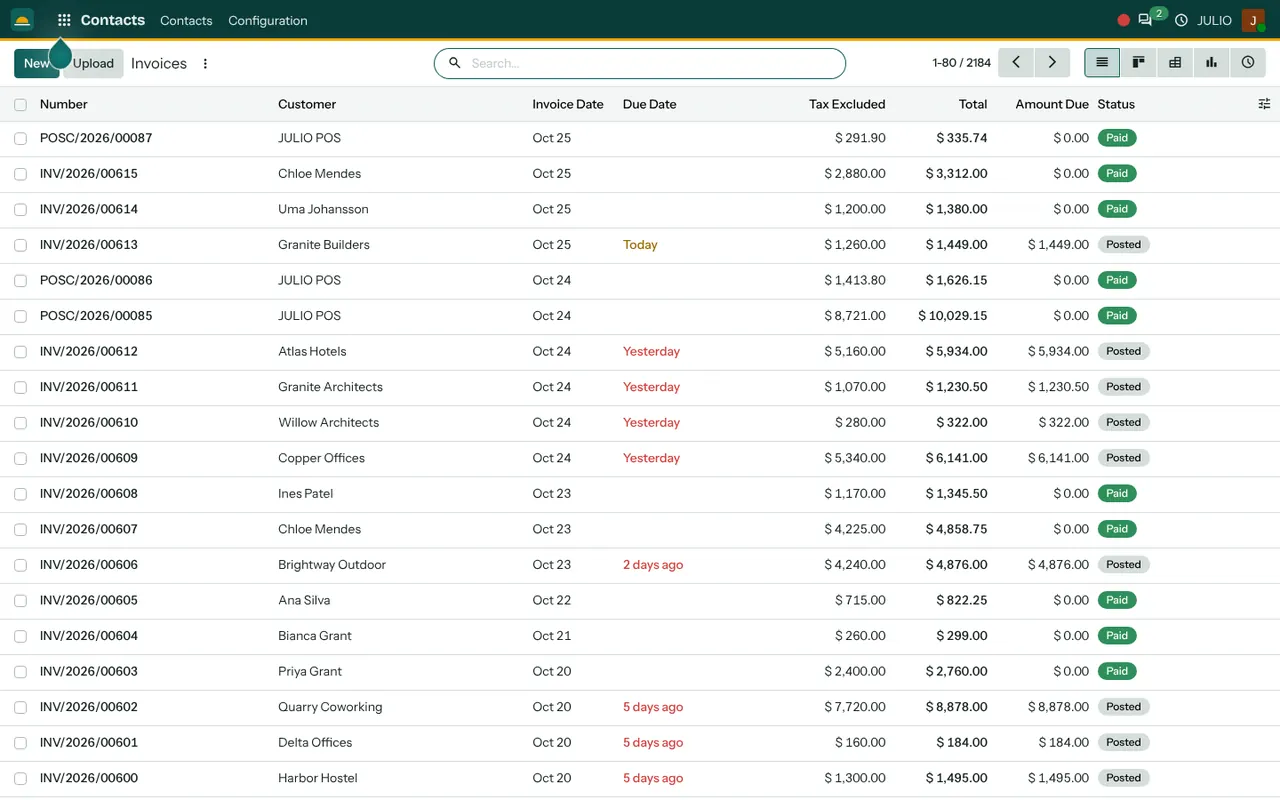
The invoice list in the demo screen shows Number, Customer, Invoice Date, Due Date, Tax Excluded, Total, Amount Due and Status. Status reads Draft, Posted or Paid. The due date does not show a date to decode: it says Today, Yesterday or 2 days ago, and turns red once an invoice is late. Whoever opens the list in the morning sees at a glance which customers need a call. Invoices raised from the point of sale land in the same list under their own number prefix.
Vendor bills beside the invoices
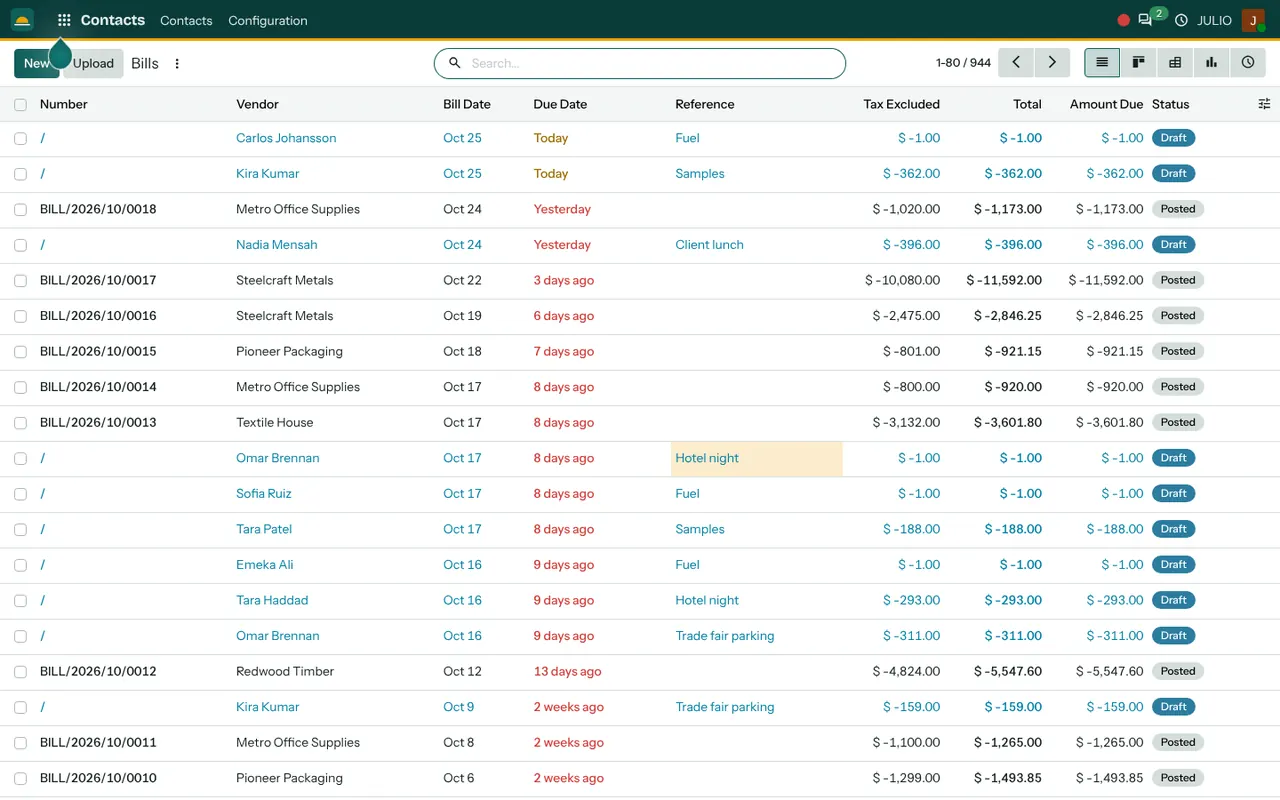
Bills have their own list with Vendor, Bill Date, Due Date, Reference, amounts and Status, plus an Upload button next to New for starting a bill from a file. In the demo database, claims such as Fuel and Hotel night also appear as draft bills under the employee's name, waiting to be posted.
Payments matched to documents
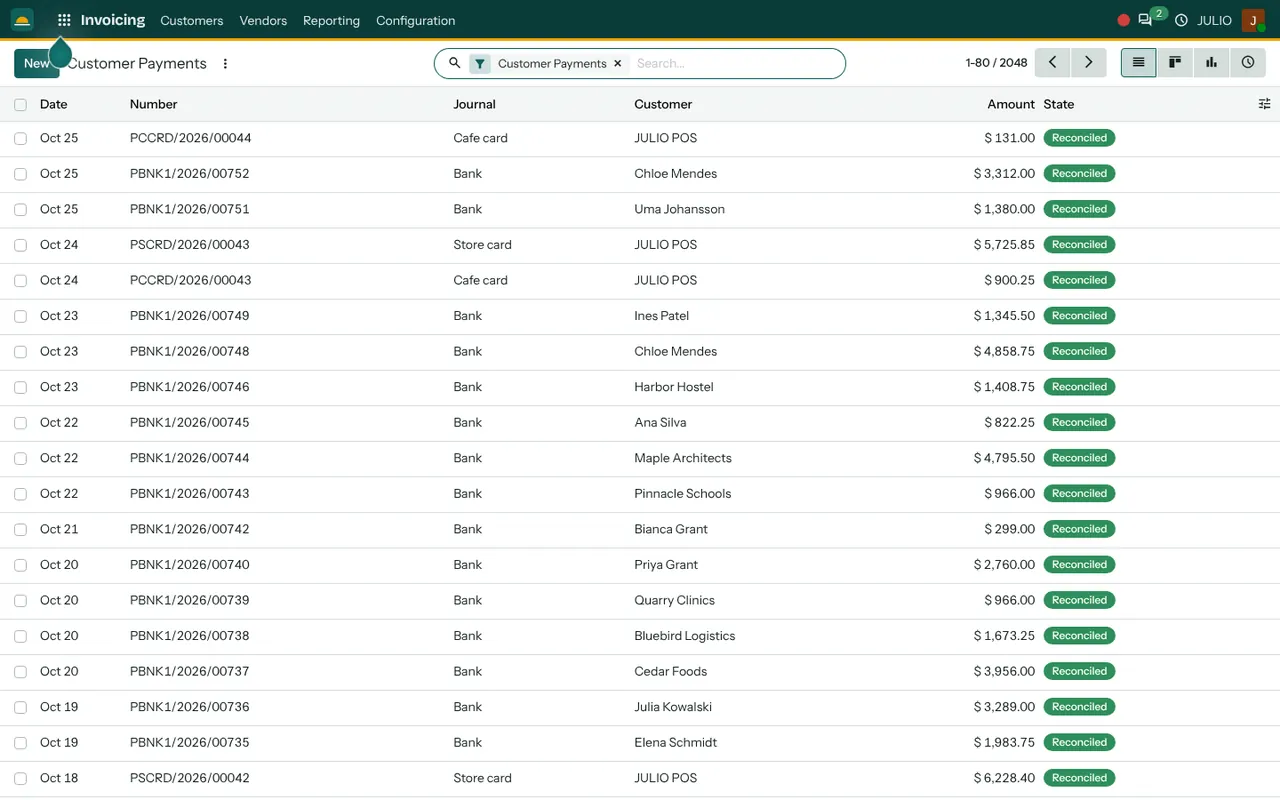
The Customer Payments list shows Date, Number, Journal, Customer, Amount and State. A journal is a separate book for each way money moves, for example Bank or a card terminal, and a Reconciled state means the payment has been matched to the invoice it settles. Nobody has to wonder whether a deposit belongs to last month's job.
Indian tax set up by us
In our implementation projects we configure the Indian chart of accounts, GST taxes and HSN codes before the first invoice is raised. The Tax Excluded and Total columns then keep tax separate from the sale value. Requirements that depend on turnover, such as e-invoicing, are scoped with your accountant during discovery rather than assumed.
An analysis of what you billed
The invoice analysis report plots untaxed amounts month by month. The demo screen shows a line across three years, with filters for Invoiced and Customers, switches for Cumulative and Stacked, and bar, line and pie views. A busy December and a quiet September become visible without exporting anything.
How invoicing software for small business connects to JULIO
Invoicing is where other modules end. A confirmed order in Sales becomes an invoice, so prices and quantities are never retyped. A counter sale in the Point of Sale shows up in the same invoice list. Goods that left the warehouse in Inventory can be invoiced against the delivery. Supplier orders from Purchase become vendor bills, and approved claims from Expenses reach the bill list as drafts. Customers and suppliers come from Contacts, so a name is typed once.
A short walk through one sale and one bill
Take a workshop that sells to offices on credit and uses invoicing software for small business to keep the books straight. The order is confirmed in Sales and the goods are delivered. The accounts person opens the order, creates the invoice, checks the tax and posts it. The status moves from Draft to Posted, and the due date counts down. Two weeks later the bank payment arrives, is recorded against the invoice and reconciled, and the status becomes Paid. On the other side, a timber supplier's bill arrives, is entered from the purchase order, and waits in the bill list with its own due date.
Here is where invoicing software for small business answers the daily questions.
| Question | Where you look |
|---|---|
| Who owes me money today? | Customer invoices, Amount Due column |
| What must I pay this week? | Vendor bills, Due Date column |
| Has this deposit been matched? | Payments, Reconciled state |
| Which month was strongest? | Invoice analysis report |
Who starts with invoicing software for small business
Invoicing is the most common companion module: almost every business type on the list below keeps it in its first release, usually next to the module that creates the sale.
- E-commerce
- Retail stores
- Point of sale counters
- Supermarkets and grocery
- Fashion and garments
- Jewellery
- Clinics
- Hospitals
- Pharmacies
- Distribution centres
- Manufacturing
- Wholesale and trading
- Automotive and workshops
- Agriculture and food
- Hotels and resorts
- Travel and tourism
- Gyms and fitness
- Schools and training
- Agencies and services
- Real estate
Before you switch on invoicing software for small business
Billing rules are cheap to settle on paper and expensive to change after a year of documents. These choices shape how the invoicing software for small business behaves from day one.
- Payment terms. Decide the usual credit period per customer type, because the due date column depends on it.
- Numbering. Agree how invoice and bill numbers run, and whether each branch or brand keeps its own series.
- Opening balances. List what customers owe you and what you owe suppliers on the day you start, so the first reports are not empty.
- Who may post. Drafts can be prepared by anyone, but posting an invoice is a decision, so name the people who do it.
- Your accountant's role. Share the chart of accounts and tax set-up with your chartered accountant early.
Conclusion
Good invoicing software for small business is not about a prettier PDF. It is about knowing, every morning, what is owed to you and what you owe. At DigiGrowvity, in our experience setting up ERP projects, the businesses that get the most from billing are the ones that fix payment terms and numbering first and then let the order flow into the invoice on its own. Start with Sales and Invoicing together, and add the rest as you grow.
Key Takeaways
- Customer invoices, vendor bills and payments live on one set of screens.
- Due dates read as Today, Yesterday or days ago, and late items turn red.
- Payments are reconciled against the documents they settle.
- Invoices flow from sales, point of sale, inventory and purchase.
- Invoicing software for small business works best when terms and numbering are agreed first.
- It is included in the ₹10,000 JULIO Local plan.