 DigiGrowvity
Most small businesses count stock in two places: the shelf and a spreadsheet, and the two drift apart by Friday. Inventory software for small business should end that drift. In JULIO ERP the Inventory module keeps one record of every product in every location, shows how much of it is already promised to a customer, and updates itself when goods arrive, leave or move. The same record serves sales, purchase, manufacturing and the shop counter.
What inventory software for small business should do
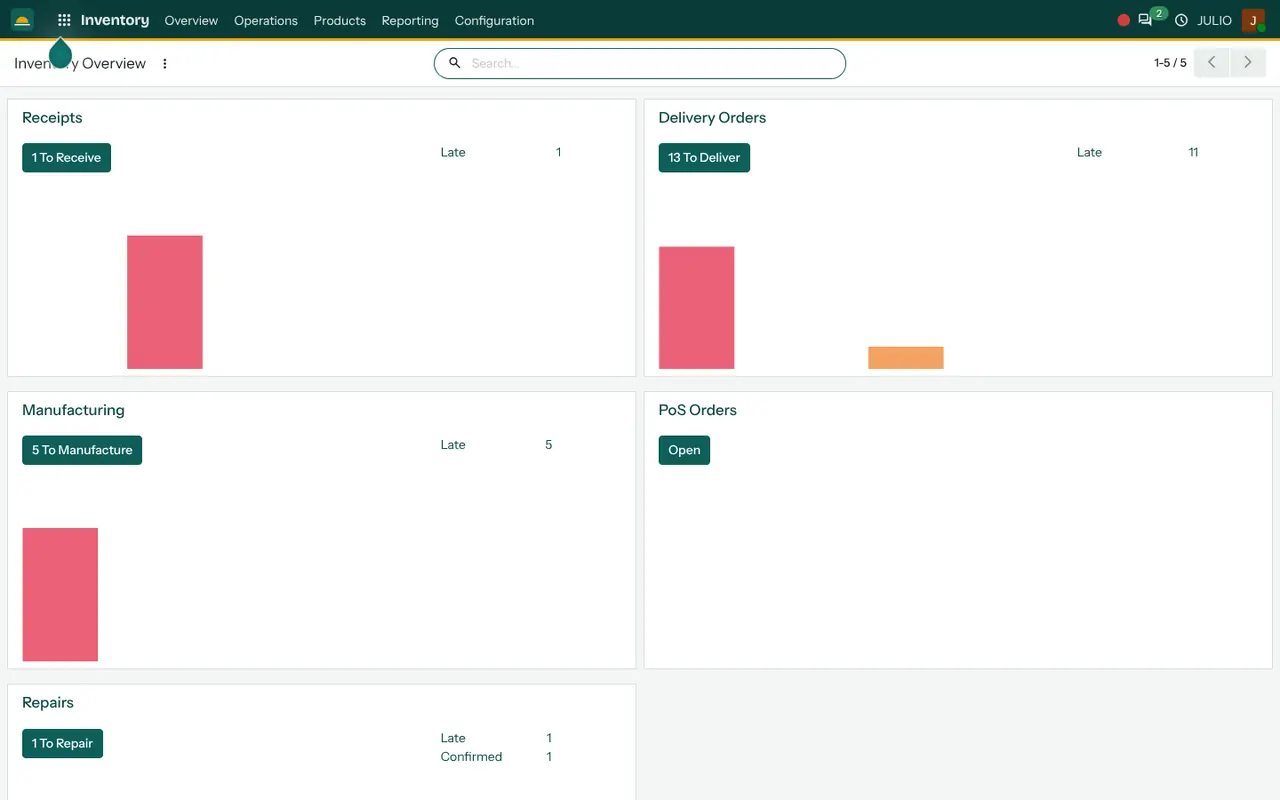
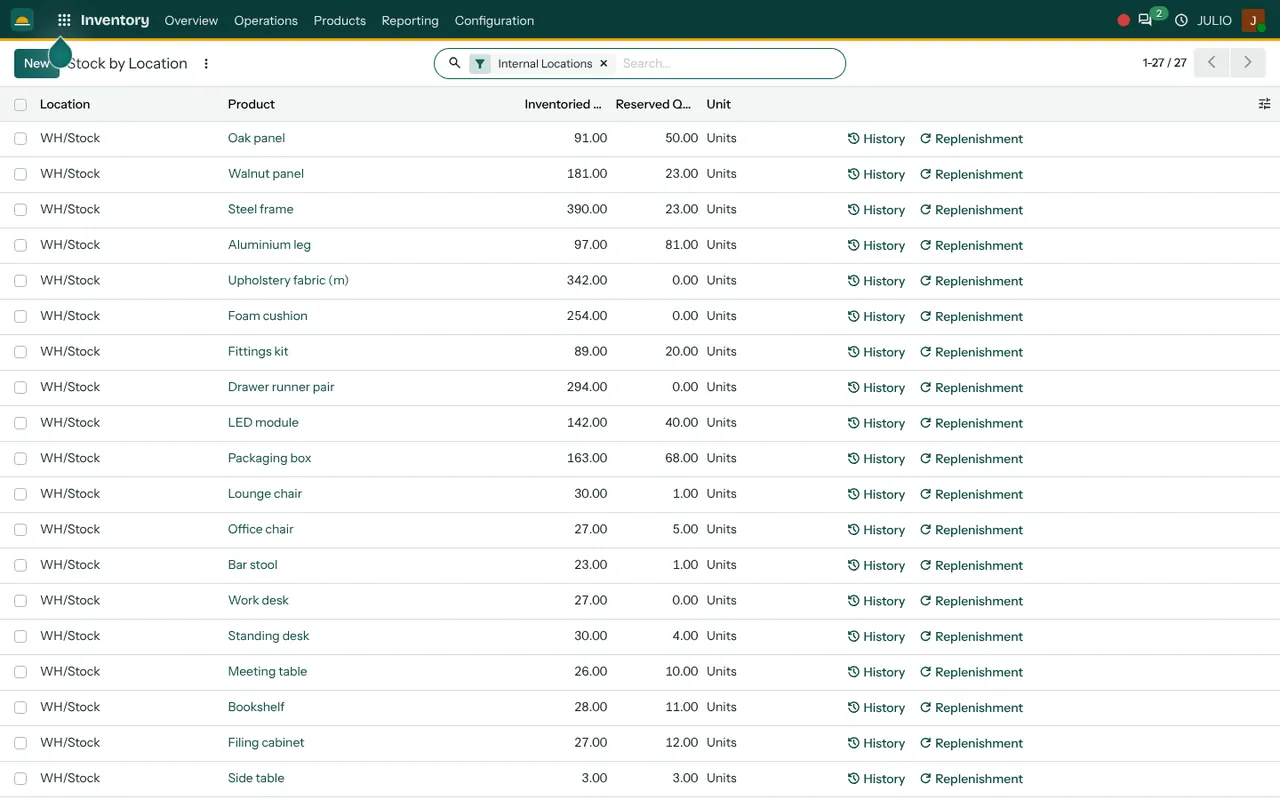
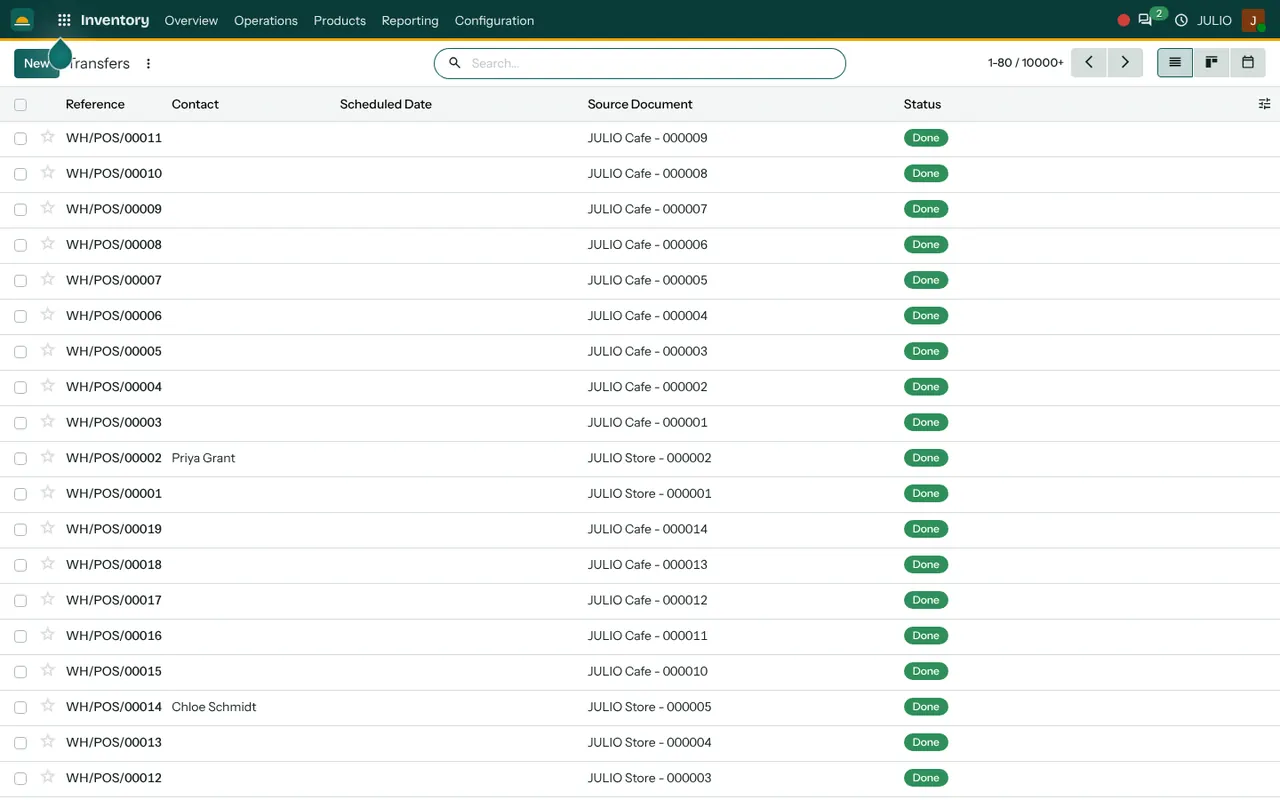
The screens above show the module as it is used day to day: an overview page, a stock list and a log of transfers.
An overview that starts the day
The overview is a set of cards, and it is the first thing inventory software for small business should show you: Receipts, Delivery Orders, Manufacturing, PoS Orders and Repairs. Each card carries a button with a count, such as "13 To Deliver", and a line showing how many of those are Late. A storekeeper opens it first thing and knows which parcels are behind before anyone phones to ask.
Stock by location, with reserved quantity
The stock list has one row per product and location. Two numbers sit side by side: the quantity counted and the quantity reserved. The gap between them is what you can still promise. An oak panel with 91 on hand and 50 reserved really has 41 free, and the screen says so without a calculator.
Transfers for every movement
A receipt from a supplier, a delivery to a customer and a shop sale are all transfers, each with a reference, a contact, a scheduled date, a source document and a status. The list can be flipped to a board or a calendar. Because a point-of-sale sale also creates a transfer, the counter and the warehouse never disagree.
A history behind every product
Each stock row has a History link that opens every movement of that product: what came in, what went out, and which document caused it. When a count looks wrong, you trace it instead of guessing.
Physical counts and corrections
Sooner or later a count will not match the screen. Good inventory software for small business lets you enter the counted figure and records the correction as its own movement, with a date and a person, so the difference is explained instead of overwritten.
Replenishment from the same row
Beside History sits a Replenishment link. Minimum and maximum levels can be set per product, so low stock raises a suggestion to buy or make more rather than a surprise on a busy afternoon.
How inventory software for small business joins JULIO
Stock is the centre of the system, so almost every module touches it, and the inventory software for small business never asks you to copy figures between them. A confirmed order in Sales reserves stock and creates a delivery. An order raised in Purchase creates the matching receipt. A job in Manufacturing consumes components and adds finished goods. A sale at the Point of Sale reduces the same quantity the website shows. The invoice in Invoicing follows the delivery. For a deeper look at stock and buying together, read our inventory and purchase implementation page.
A short walk through one stock cycle
Take a shop that sells office chairs and runs on inventory software for small business from the first day. A supplier delivers thirty, and the storekeeper validates the receipt against the purchase order, so thirty are added to the main stock location. Next morning a customer order reserves five, and the reserved column moves from zero to five while the on-hand figure holds steady. When the van leaves, the delivery is validated and on-hand drops to twenty-five. Later the history link on the chair shows all three movements in order, each tied to its document.
| Question | Where it is answered |
|---|---|
| How many are on the shelf? | Stock by location, on-hand column |
| How many are promised? | Same list, reserved column |
| What is late today? | Overview cards |
| Where did it go? | History link on the product |
Who starts with inventory software for small business
These kinds of business commonly begin with inventory software for small business alongside other modules. Open a page to see the common starting set for that business.
- E-commerce
- Retail stores
- Point of sale counters
- Supermarkets and grocery
- Fashion and garments
- Jewellery
- Hospitals
- Pharmacies
- Warehouses
- Distribution centres
- Manufacturing
- Wholesale and trading
- Automotive and workshops
- Agriculture and food
- Cafés
- Restaurants
- Salons and spas
Before you use inventory software for small business
A little preparation makes the first count far cleaner.
- Your locations. Decide whether you track one store, several rooms, or separate branches, and name each place the way staff already say it.
- Your product codes. Every item needs a unique code before it is loaded. Messy codes become messy stock.
- The opening count. Pick one day, count everything, and load that figure as the starting balance.
- Reorder levels. Choose a minimum for the fast movers first. You can add the rest later.
- Who validates receipts. One named person confirming goods in keeps the record honest.
Conclusion
Inventory software for small business works when it is boring: one count, one list, and every movement tied to a document. At DigiGrowvity we set up JULIO ERP for growing businesses, and in our experience setting up ERP projects the first month goes best when a single location is counted properly before more are added. From there Sales, Purchase and Manufacturing all draw on the same stock.
Key Takeaways
- Inventory software for small business should show one record of on-hand and reserved quantity for every product and location.
- Receipts, deliveries and shop sales are all transfers with a status and a source document.
- The overview shows late receipts and deliveries as soon as you log in.
- Every product has a history of movements, so counts can be traced.
- It is included in the ₹10,000 JULIO Local plan.