 DigiGrowvity
A fashion label does not sell one thing. It sells a style in six sizes and four colours, each made from fabric, thread, labels and buttons bought from different people on different days. ERP for fashion brands keeps that tangle in one place, so a production order knows what it consumes, a purchase order knows what it replaces, and the stock list shows what is actually ready to ship. We know this world first hand, because we built the ERP for LAMBLILY, a garment manufacturer.
What ERP for fashion brands needs to do
The hard part of apparel is not the sale. It is the number of small parts behind every piece.
| Need | Module that covers it |
|---|---|
| Fabric, trims and finished stock | Inventory |
| Parts list for every style | Manufacturing |
| Fabric and trim buying | Purchase |
| Orders from stores and buyers | Sales |
| Bills, payments and GST | Invoicing |
- A parts list for each style. A shirt is fabric, buttons, thread, a label and a polybag. Quantities per piece are the base of costing and buying.
- Sizes and colours without clutter. One style with many sizes and colours should not become dozens of unrelated products.
- Buying in time. Fabric takes time to arrive, so a shortage found at cutting stage is already too late.
- Orders that follow a style. A buyer's order should flow into production and then into delivery without being retyped.
- Billing that matches goods. What left the warehouse should be what you invoice, with the right GST on each line.
The common starting set for ERP for fashion brands
Fashion and garment businesses usually begin ERP for fashion brands with the five modules below. The exact set is agreed in discovery, because a label that outsources stitching needs different things from one with its own floor.
 ManufacturingBills of materials and work orders
 InventoryStock across every warehouse
 PurchaseOrders to suppliers, on time
 SalesQuotations, orders and follow-ups
 InvoicingInvoices, bills and payments
Manufacturing, where a style becomes a plan
In ERP for fashion brands, a bill of materials lists what goes into a style, and a manufacturing order says how many to make. The order list shows reference, start date, product, component status, quantity and state, and can also be viewed as a board, a calendar or a chart. Component status is the field a merchandiser watches, since it says whether the parts are in. See the Manufacturing module.
Inventory for fabric, trims and finished goods
A label running ERP for fashion brands holds three kinds of stock: raw fabric, small trims and finished pieces. Inventory keeps each by location, and products can carry variants such as size and colour, so one style stays one style. See the Inventory module.
Purchase, so fabric arrives before cutting
Purchase orders carry a vendor, an expected arrival date and a billing status. When a manufacturing order shows missing components, this is where the fix begins. See the Purchase module.
Sales for buyer and store orders
A quotation becomes a sales order, and the order list shows what is still to deliver and what is still to invoice. That removes the guesswork between the showroom and the factory in ERP for fashion brands. See the Sales module.
Invoicing for bills and GST
Customer invoices and vendor bills live in the same place as the orders they came from. We configure GST taxes and HSN codes in our implementation projects. See the Invoicing module.
What ERP for fashion brands looks like
These are real screens of ERP for fashion brands from the JULIO demo database. The demo is a furniture business with a workshop, so the products are chairs and desks, but the bills of materials and manufacturing orders work the same way for a style made of fabric.
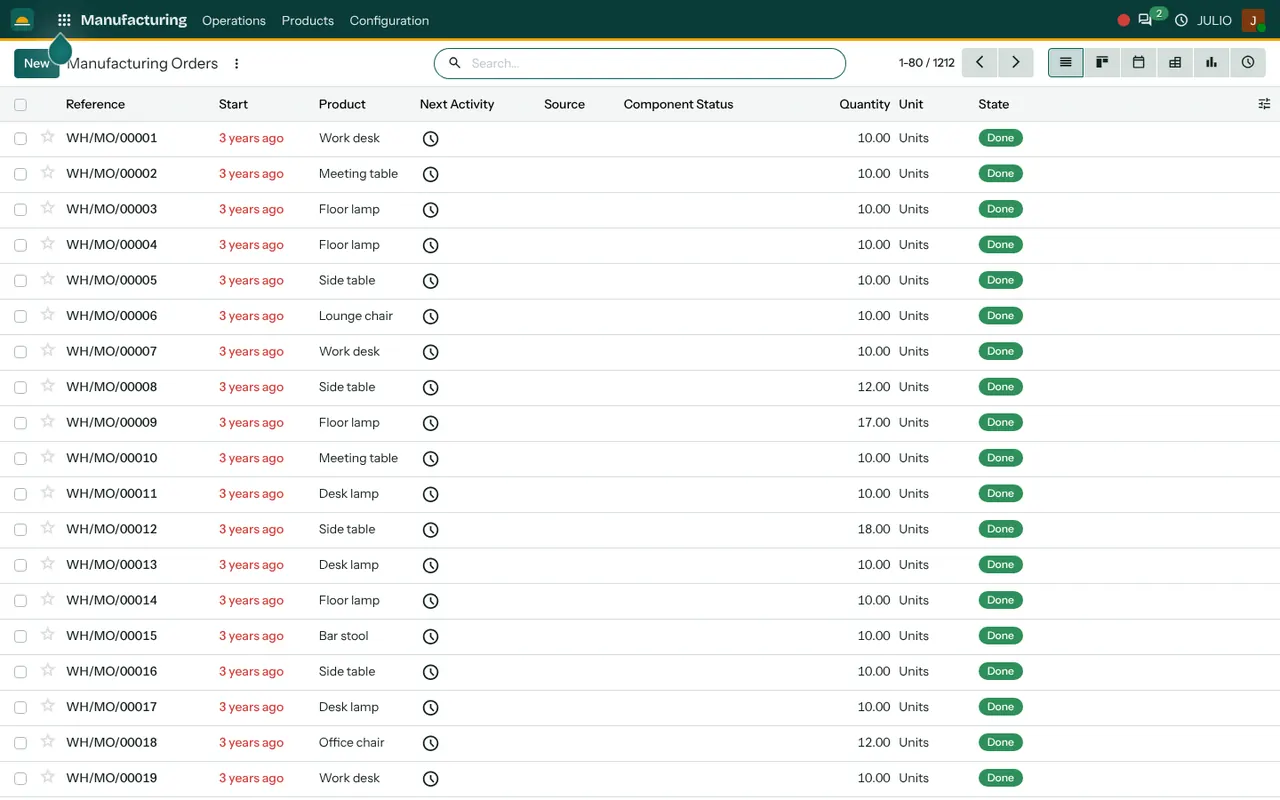
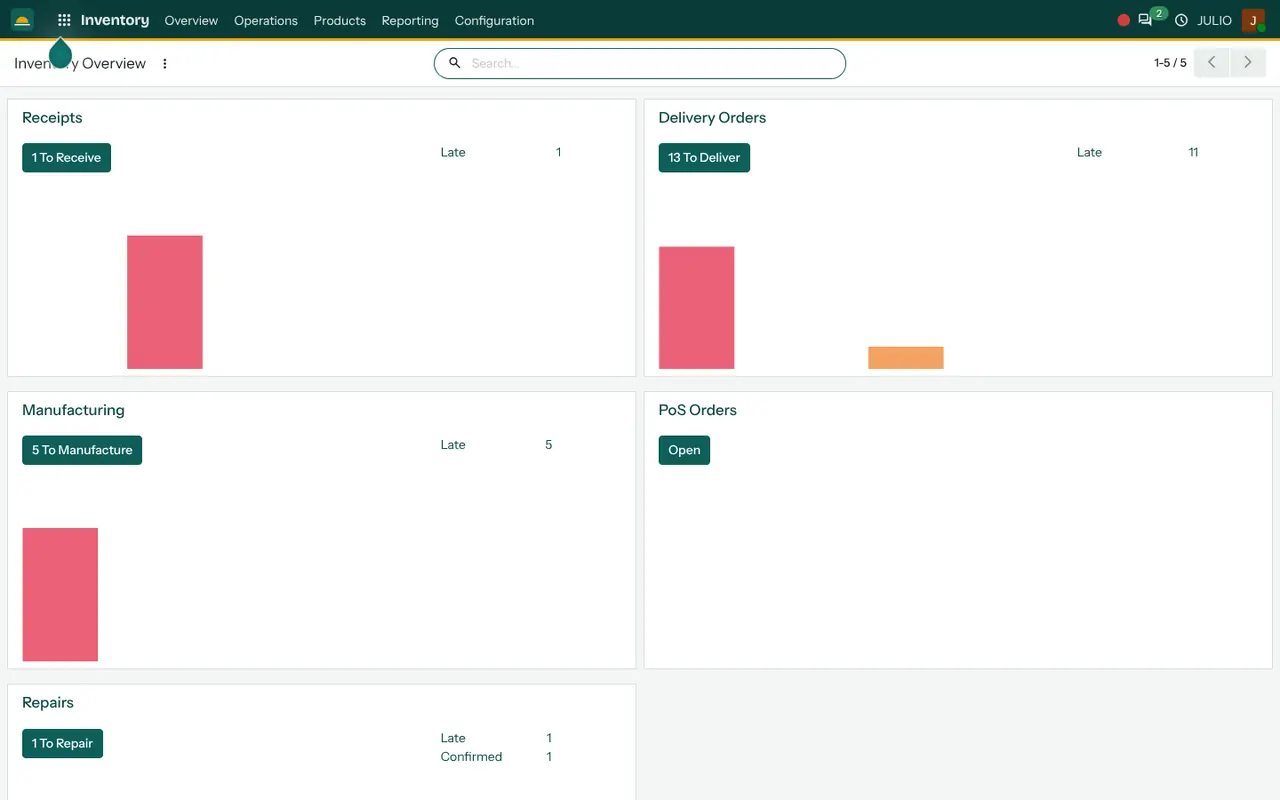
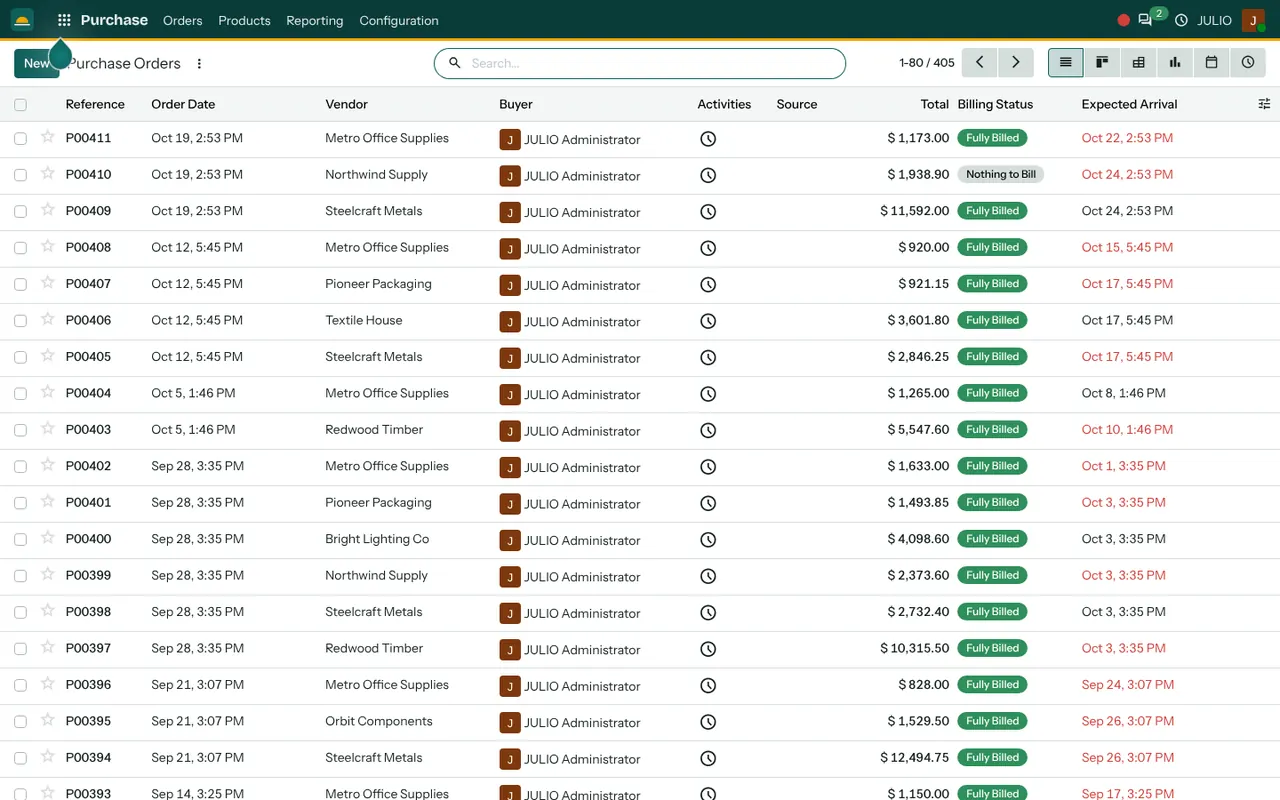
The manufacturing screen lists orders such as WH/MO/00001 with product, quantity and a green Done state. The inventory overview shows tiles for receipts, deliveries and manufacturing, each with a count of late items. The purchase screen lists vendors with totals, billing status and expected arrival dates, and late dates appear in red.
What we have run ourselves
For LAMBLILY, a garment manufacturer, we built the ERP that runs on this same engine, including production and stock, and the online store sends its orders into it every hour. That link is read-only, so the shop is never changed from the ERP side. You can read the story on the LAMBLILY ERP case page, and the garment manufacturer implementation page explains how we approach such projects.
What JULIO does not do for fashion brands
Here is where the boundaries of ERP for fashion brands sit in JULIO.
- Design and pattern work. Sketching, pattern making, grading and tech-pack drawing happen in your design tools, not here.
- Marketplace links. Connections to marketplaces and courier portals are custom work, quoted separately.
- Stage tracking on the floor. Cutting, stitching and finishing can be modelled, but how finely depends on your process and is settled in discovery. Handheld shop-floor apps are custom.
- Tax filing. GST is configured, and returns are filed by you or your accountant.
- Retail displays and merchandising plans. Not part of the starting set.
How a first release of ERP for fashion brands could look
A first release of ERP for fashion brands starts with the product master: styles, sizes, colours and the parts list for each. Opening stock of fabric and finished goods is counted and loaded. Purchase and manufacturing orders then run for one season's styles while the old sheets stay alive for a short parallel run. Sales orders and invoicing join once the production side reads correctly. Keeping the first release this narrow is what lets a small team finish it.
Conclusion
ERP for fashion brands pays off when the parts list is right. At DigiGrowvity we set up JULIO ERP for growing businesses, and in our experience of setting up ERP projects, the labels that settle in fastest are the ones that spend their first week on the product master rather than on screens. Get the styles, sizes and bills of materials right, and buying, making and billing follow.
Key Takeaways
- ERP for fashion brands ties a parts list to production orders, purchasing and stock.
- The common starting set is Manufacturing, Inventory, Purchase, Sales and Invoicing.
- Products can carry size and colour variants, so one style stays one record.
- We run this ourselves for LAMBLILY, a garment manufacturer, with an hourly read-only order feed from its online store.
- The plan is ₹10,000 once, with unlimited users and 1 year of free support.