 DigiGrowvity
Buying is where small businesses quietly lose money: an order placed by phone, a delivery nobody chased and a bill that arrives with a price nobody remembers agreeing. Purchase order software for small business puts every order to a supplier on one list, with a date it is due and a status that says whether it has been billed. In JULIO ERP the Purchase module does exactly that, and it hands its work to stock and accounts instead of leaving you to retype it.
What purchase order software for small business shows
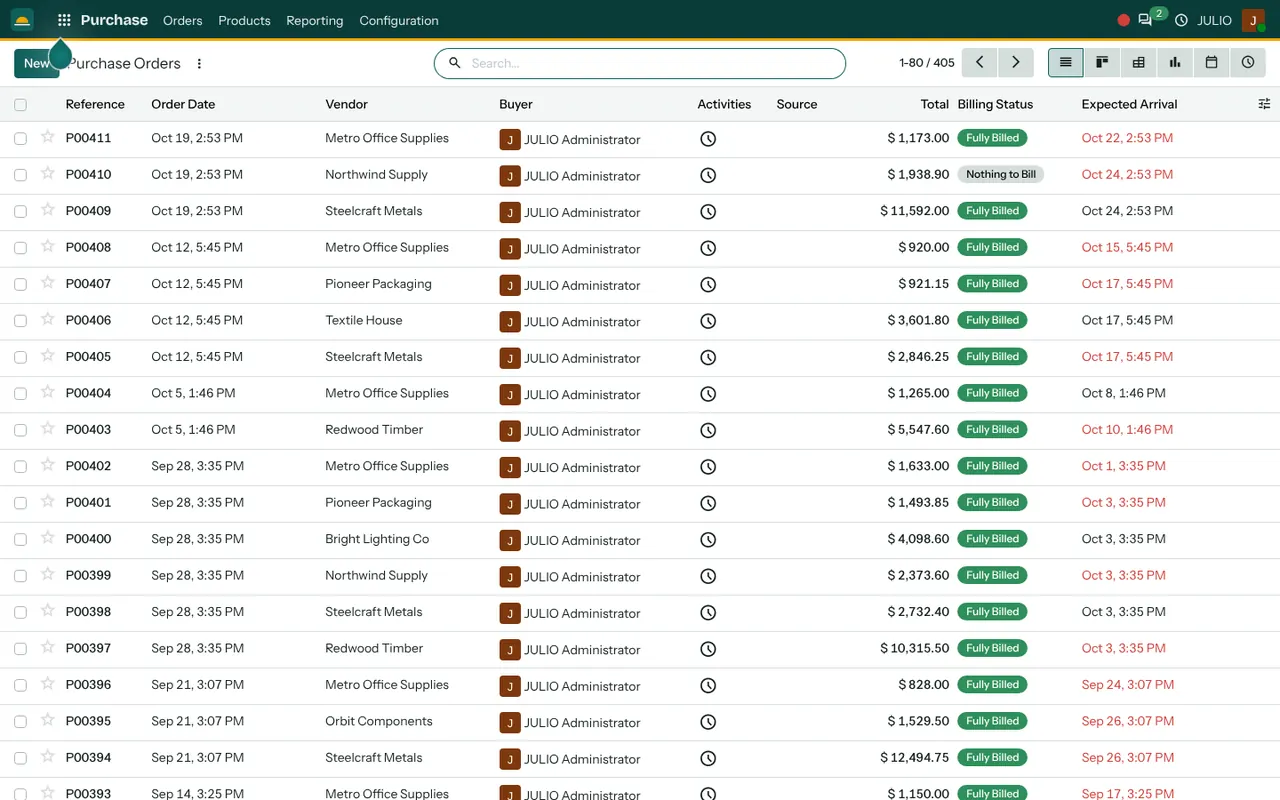
The screen above is the orders list of a busy buyer. Here is what each part of the purchase order software for small business gives you.
One list of every order
Each row is an order with a reference, an order date, the vendor, the buyer, the total and a source column that records which document triggered it. A search box and filters narrow it down by vendor or by period. The demo list runs to hundreds of orders, and it still reads cleanly because the columns are few and the same on every row.
Expected arrival, with late dates in red
The last column is the date the goods are due. When the date has passed and the goods have not arrived, it turns red. A buyer scanning the list sees which supplier to ring first without opening a single order.
Billing status on the order itself
A small badge on each row reads Fully Billed or Nothing to Bill. You can tell at a glance whether the supplier's bill has been entered. That is the check that stops a bill being paid twice, or never being raised at all.
Quotation first, order second
A request for quotation can be prepared and sent to a supplier, then confirmed as an order when the price is agreed. The same record carries on as the order, so nothing is retyped between the two stages.
Other ways to read the same orders
Good purchase order software for small business answers questions as well as storing records. Beyond the list, the same records can be shown as a board, a pivot table, a graph of spend, a calendar of arrival dates and a list of scheduled activities. A purchase manager can ask "how much did we spend with each vendor this quarter" and see the answer as a chart.
How purchase order software for small business links up
With purchase order software for small business inside the ERP, an order confirmed here creates a receipt in Inventory, so the storekeeper sees what is coming and checks it in on arrival. The vendor's bill is created in Invoicing from the order, which keeps the price and quantity consistent. If you buy raw materials for production, the need can come from a Manufacturing order. If a salesperson sells something you do not stock, a Sales order can trigger the purchase. Our inventory and purchase implementation page shows how these fit together.
A short walk through buying timber
A furniture workshop using purchase order software for small business is down to its last few boards. The buyer prepares an order to a timber supplier, adds the products with their agreed prices, and confirms it. The order date and a due date appear on the list, and the workshop owner can read the position without calling the buyer. When the lorry arrives, the storekeeper validates the receipt, and the stock figure rises. A few days later the supplier's bill is created from the same order, matched to what was received. The badge on the row changes to Fully Billed, and the list shows the cycle complete.
| Stage | What you see |
|---|---|
| Quotation | A draft with prices, not yet binding |
| Purchase order | Confirmed, with an expected arrival date |
| Receipt | Goods checked in at the store |
| Vendor bill | Billing status moves to Fully Billed |
Who starts with purchase order software for small business
Businesses that buy goods to sell or to make commonly begin here. Open a page to see the common starting set for that kind of business.
- Supermarkets and grocery
- Fashion and garments
- Hospitals
- Pharmacies
- Warehouses
- Distribution centres
- Manufacturing
- Wholesale and trading
- Construction
- Agriculture and food
- Cafés
- Restaurants
Before you use purchase order software for small business
A few rules agreed early make the list trustworthy. Most of them are habits rather than settings, so they cost nothing to adopt, and each one removes a common source of arguments with suppliers when the first bills arrive.
- Who may confirm an order. Decide whether any buyer can commit the business, or whether larger orders need a second person.
- Your supplier list. Clean up names and addresses before loading, so one supplier does not appear three ways.
- Agreed prices. Prices can sit against each product and supplier, so a quotation starts with the figure you negotiated.
- How you receive goods. Decide who checks deliveries in and whether partial deliveries are common.
- Bill matching. Agree who enters supplier bills and how quickly after receipt.
Conclusion
Purchase order software for small business is not about approvals and ceremony. It is about knowing, on any morning, what you have ordered, what is late and what has not been billed. At DigiGrowvity we set up JULIO ERP for growing businesses, and in our experience setting up ERP projects the buying list is often the first screen owners open daily. Because the purchase order software for small business links to Inventory and Invoicing, the work done here is not repeated elsewhere.
Key Takeaways
- Purchase order software for small business keeps every supplier order on one list with a total, a buyer and a source.
- Late arrival dates turn red, so chasing starts with the right supplier.
- A billing badge shows whether the supplier's bill has been entered.
- Orders create receipts in stock and bills in accounts.
- It is included in the ₹10,000 JULIO Local plan.