 DigiGrowvity
A workshop sells two things at once: the labour of a mechanic and the parts in the rack. The trouble starts when one is billed and the other is forgotten, or when a customer rings to ask whether the car is ready and nobody can say. ERP for auto workshops keeps the job, the parts and the bill together. JULIO ERP gives a garage repair orders, stock, quotations, invoices and customer records, with no limit on staff users on your own Wi-Fi.
What ERP for auto workshops needs to do
A garage is busy, noisy and cash-driven, so the system has to be quicker than the notebook it replaces. Here is what ERP for auto workshops must cover.
| Need | Module that covers it |
|---|---|
| Job from drop-off to delivery | Repairs |
| Spare parts and consumables | Inventory |
| Estimates for the customer | Sales |
| Final bill and payment | Invoicing |
| Customer and supplier details | Contacts |
- A job that can be found. When a customer rings, someone must be able to say what stage the repair is at in seconds.
- Parts that are not forgotten. Filters, pads and bulbs fitted but never billed are a quiet leak.
- An estimate before work begins. Customers approve a figure first, and the figure should become the bill.
- History per customer. Knowing what was done last time saves argument and repeat diagnosis.
- Supplier contacts at hand. Parts dealers and their numbers should not live in one person's phone.
The common starting set for ERP for auto workshops
Most ERP for auto workshops begins with the five modules below. That is a common set, and we confirm yours in discovery.
 RepairsRepair orders for customers
 InventoryStock across every warehouse
 SalesQuotations, orders and follow-ups
 InvoicingInvoices, bills and payments
 ContactsCustomers and suppliers
Repairs, the job from start to finish
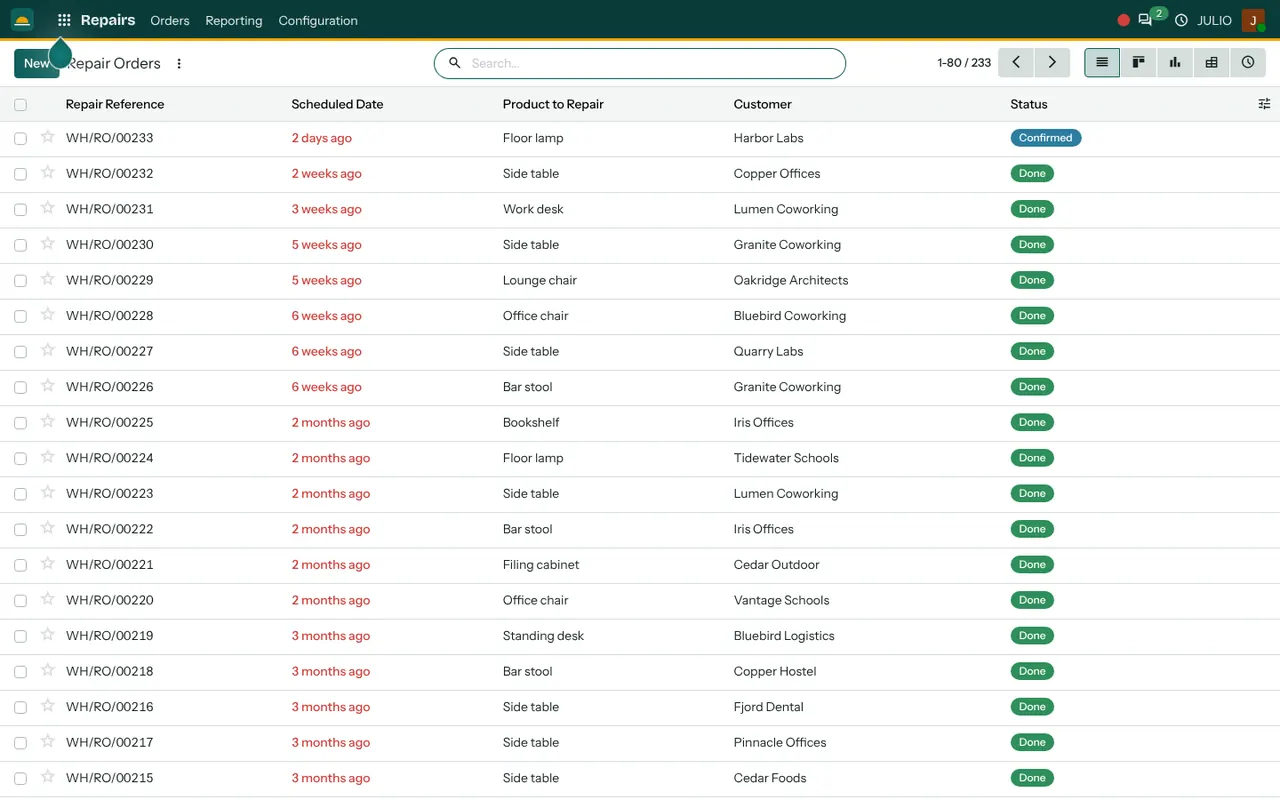
The repair orders list shows a reference, a scheduled date, the product to repair, the customer and a status such as confirmed or done. The same orders can be seen as a board, a graph or a pivot. See the Repairs module.
Inventory for spare parts
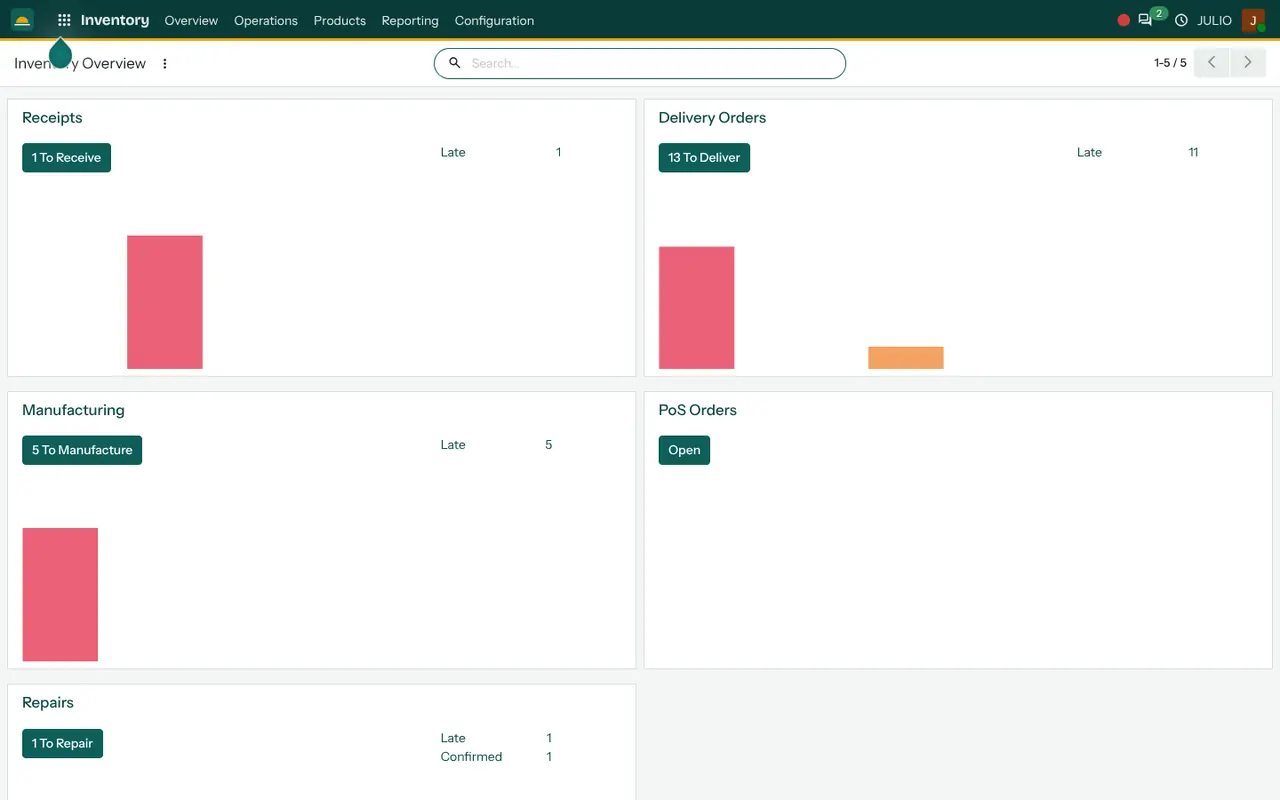
Parts are kept by item and location, and the overview card for repairs counts the orders still waiting. Stock on hand shows which parts are low before a job stalls. See the Inventory module.
Sales for estimates and parts counter sales
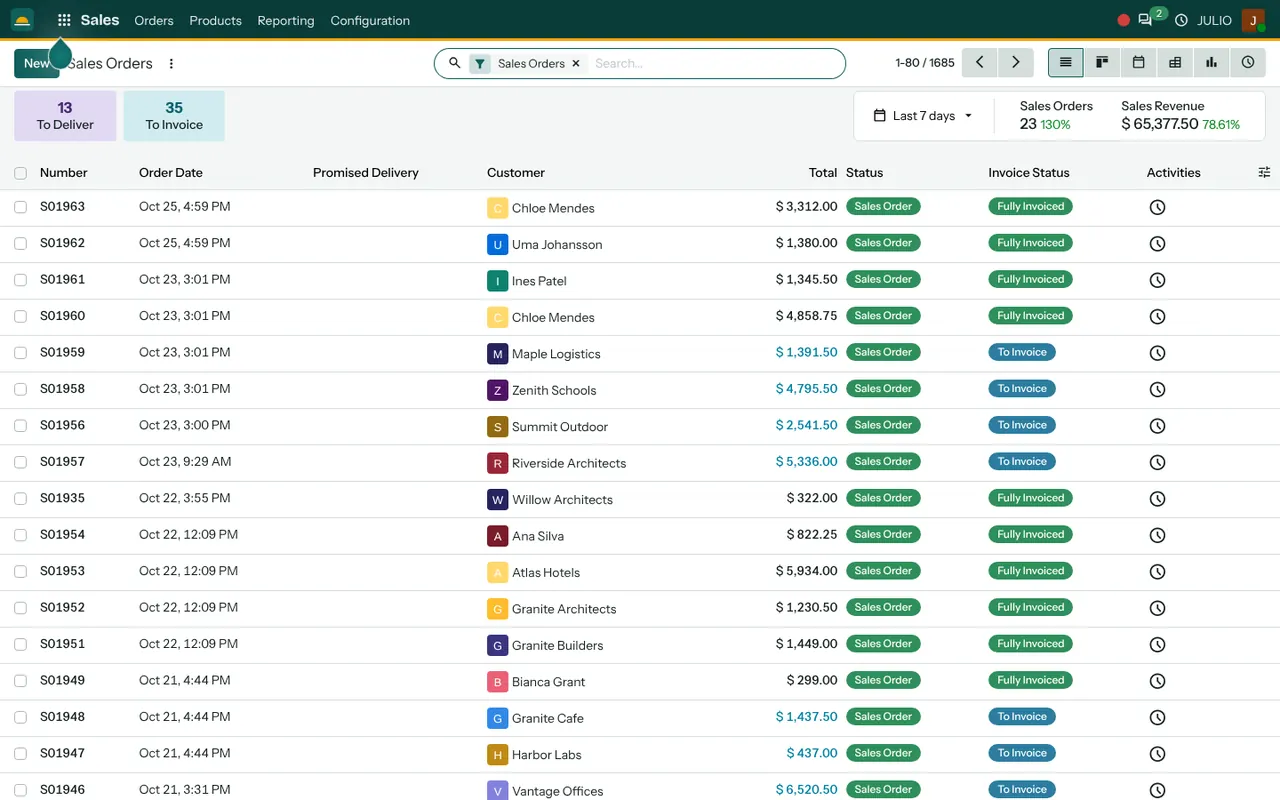
A quotation can be sent to the customer, confirmed as an order and then invoiced. The sales list shows counters for orders still to deliver and still to invoice. See the Sales module.
Invoicing for the final bill
Customer invoices show the due date and the amount due, with overdue ones in red. Supplier bills for parts and payments are in the same module. See the Invoicing module.
Contacts for customers and suppliers
One list holds customers and suppliers with their details, so a number is typed once and used everywhere. See the Contacts module.
What ERP for auto workshops looks like in JULIO
Look at the screens below, taken from the JULIO demo database. The repair orders are for furniture, since the demo business is a fit-out firm, but the list is the same one a garage would use.
What JULIO does not do for auto workshops
Be clear about the edges before you commit. The repair screen is general, so it is not built around cars. Fields for registration number, chassis number and odometer reading, a vehicle service history by number plate, a diagnostic scanner link and insurance claim handling are not in the standard set. SMS reminders for the next service are not either. These can be built as custom work, quoted separately, and we say plainly in discovery what is practical before you commit.
How a first release of ERP for auto workshops could look
A first release of ERP for auto workshops begins with repair orders and the parts list. The front desk opens an order at drop-off, the mechanic updates it, and the bill is made from it at delivery. Load your regular spare parts with opening quantities, then add quotations for bigger jobs. Customer and supplier records come across from your existing contact lists at the start, so the front desk is not typing everything again. Decide early who is allowed to close a repair order, because that step triggers the bill. Run it beside the notebook for a short while, and drop the notebook once the numbers match.
A busy Saturday, handled
Picture ten cars in the bay and a parts dealer on the phone. The service advisor opens the repair list, filters for confirmed jobs and sees which ones are waiting. A customer calls about his job, and the advisor reads its status without walking to the bay, which spares the mechanic an interruption. Later, the parts counter finds that a brake pad is low and raises a purchase order straight away. The owner reviews unpaid invoices before settling the parts dealer's bill. That is ERP for auto workshops at ordinary scale: the same few records, read by everyone, instead of a pile of job cards.
Conclusion
ERP for auto workshops should make the workshop quieter, not louder. At DigiGrowvity, we set up JULIO ERP for growing businesses, and in our experience of setting up ERP projects, a garage gets the best start from repair orders and the parts list alone. We have not published a workshop project, so we offer a common starting set and confirm it with you.
Key Takeaways
- ERP for auto workshops ties the repair, the parts, the estimate and the bill together.
- The usual starting set is Repairs, Inventory, Sales, Invoicing and Contacts.
- The repair list shows reference, date, product, customer and status.
- Vehicle-specific fields, scanner links and service reminders are custom work, quoted separately.
- The plan is ₹10,000 once, with unlimited users and 1 year of free support.