 DigiGrowvity
A property sale is slow, and a lot happens between the first phone call and the key handover. A buyer visits twice, a spouse needs convincing, a booking amount is paid, and an instalment falls due eight months later. ERP for real estate keeps that long story in one place. JULIO ERP combines a sales pipeline, a visit calendar, bookings, invoices and project boards, with no limit on users on your own network.
What ERP for real estate needs to do
Brokers, small developers and property consultants share one habit: they juggle many long conversations. ERP for real estate has to handle five needs well.
- Enquiries from many sources. Portals, hoardings, referrals and walk-ins all arrive as phone numbers that someone must call back.
- Site visits that are scheduled and remembered. Who showed what, to whom and when, so the next call is relevant.
- Bookings with a clear price. A quotation that the buyer accepts, with the booking amount and terms in writing.
- Payments in milestones. A booking, a stage payment and a final amount each need an invoice and a due date.
- Work after the sale. Snag lists, fit-outs and handover tasks need owners and deadlines.
| Need | Module that covers it |
|---|---|
| Buyer enquiries and follow-ups | CRM |
| Quotations and bookings | Sales |
| Site visits and meetings | Calendar |
| Milestone and booking invoices | Invoicing |
| Handover and snag tasks | Project |
The common starting set for ERP for real estate
This is the usual first set for ERP for real estate. A broker, a developer and a property manager need different emphasis, so we confirm yours in discovery.
 CRMTrack leads and close deals
 SalesQuotations, orders and follow-ups
 CalendarMeetings and schedules
 InvoicingInvoices, bills and payments
 ProjectTasks, boards and deadlines
CRM for buyers and the long chase
The pipeline board carries each enquiry as a card in a stage with a value, and totals sit above each column. A property desk would rename stages to something like Enquiry, Site visit, Negotiation and Booked. See the CRM module.
Sales for quotations and bookings
A quotation lists the unit, the price and the terms, and becomes an order when the buyer says yes. The orders list shows what is still to be invoiced. See the Sales module.
Calendar for site visits
A visit is a meeting with an organizer, attendees, a start time and a duration, so the person who took the buyer round is recorded. Visits can be reviewed in a list or a calendar view. See the Calendar module.
Invoicing for payment milestones
Each milestone is an invoice with a due date, and the invoice list shows which are paid and which are posted and still owing. Overdue ones are marked in red. See the Invoicing module.
Project for handover and fit-out work
The sale does not end at the booking. Snagging, interior work and possession checks go on for months, and they are easy to lose when the sales team has moved to the next launch.
Tasks are grouped by project with assignees, time spent, progress and stages such as New and In Progress. See the Project module.
What ERP for real estate looks like on screen
These are real screens from the JULIO ERP demo. Its sample company sells fit-outs and furniture to businesses, so all names and figures are demo data and none of it is a property business.
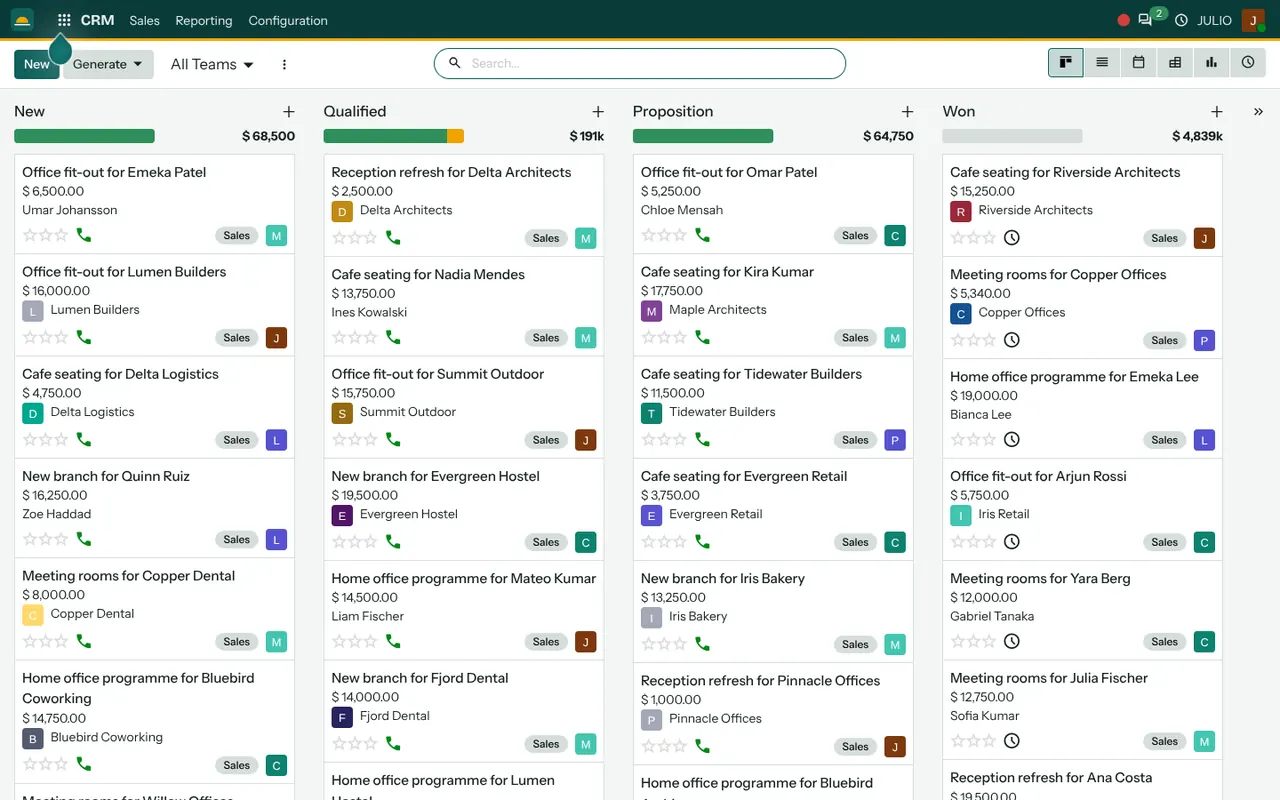
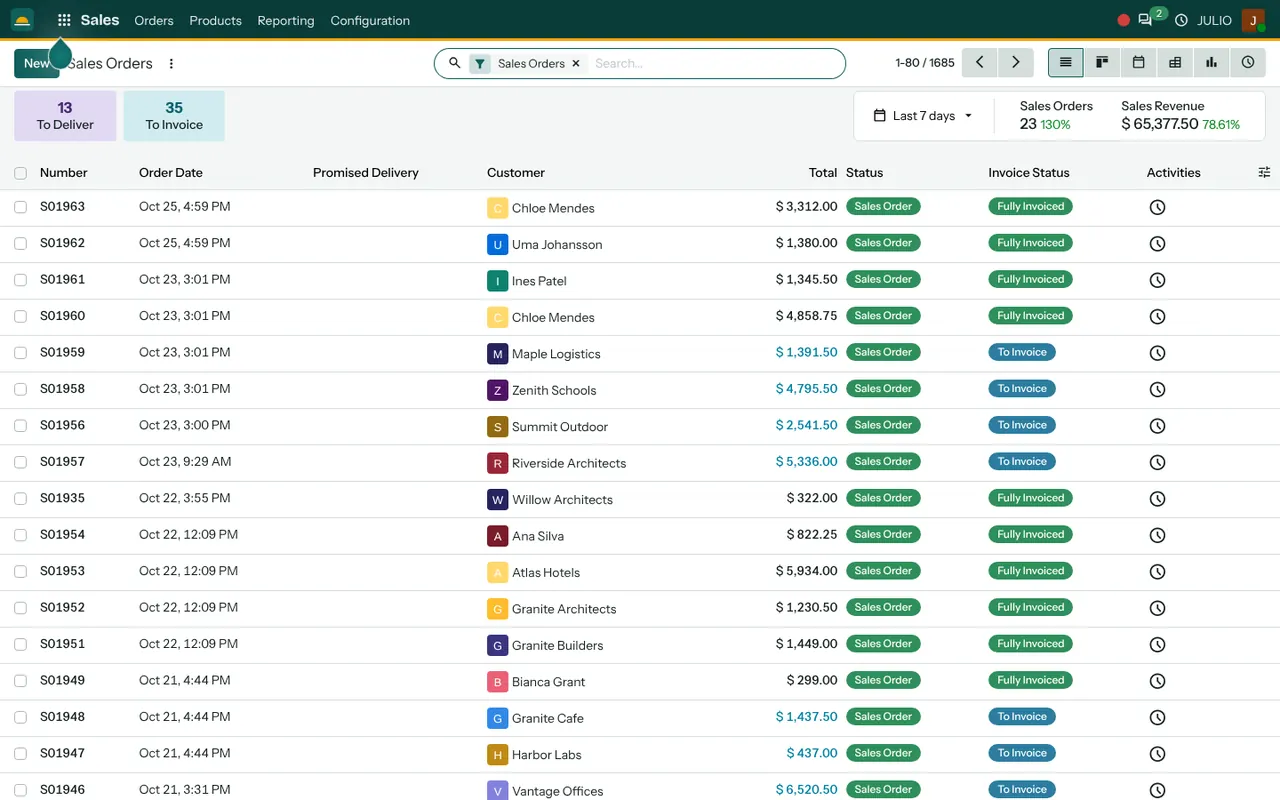
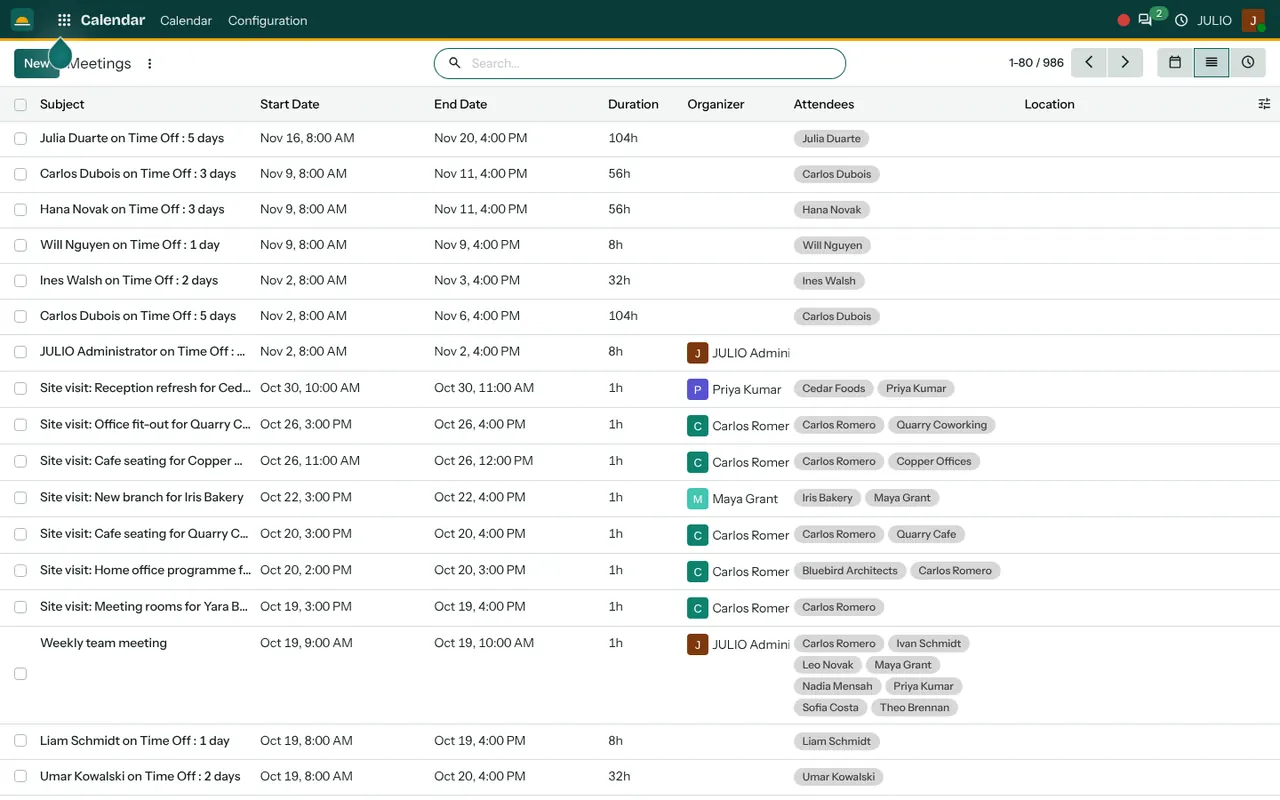
The first screen is the pipeline board, with columns labelled New, Qualified, Proposition and Won and a money total above each. The second is the sales orders list, with a status and an invoice status for every order. The third is a list of meetings, including site visits with an organizer and the customer as an attendee.
What JULIO does not do for real estate
Better to be plain about this than to leave you to find it out after buying.
- It is not a property listing portal and has no unit-by-unit availability map. A visual inventory of towers and floors is custom work, quoted separately.
- It does not file RERA registrations, project updates or tax returns. Those stay with you and your advisers.
- It does not draft sale agreements or handle registration at the sub-registrar's office.
- It does not post to property portals, and importing leads from them automatically is custom work.
How a first release of ERP for real estate could look
For a small broker or developer, a first release of ERP for real estate is the pipeline board and the site-visit calendar. Load the current enquiries, one card per buyer, and put every scheduled visit on the calendar. Within a couple of weeks the desk stops asking who called whom. A good habit to build early is writing the buyer's budget and preferred locality in the card, because that is what a colleague needs when you are on leave.
In the next step, bookings and milestone invoices follow once the team agrees how a sale is described. The project board for handover work, the last step of ERP for real estate, comes last, usually just before the first possession date, when its value is easiest to see.
Conclusion
ERP for real estate is a memory aid with an accounting spine. It remembers the buyer who wanted an east-facing flat, the visit that happened on Sunday and the instalment due next month. At DigiGrowvity, in our experience setting up ERP projects, the first release works best when it is small and used daily. Start with the pipeline and the visit calendar, then add bookings, invoices and handover tasks as the team grows comfortable.
Key Takeaways
- ERP for real estate should follow buyers from enquiry to visit, booking, payment milestones and handover.
- The common starting set is CRM, Sales, Calendar, Invoicing and Project.
- Listing portals, unit maps and RERA filings are not included, and portal links are custom work.
- JULIO runs on your own network, with no limit on users.
- The plan is ₹10,000 once, with 1 year of free technical support.