 DigiGrowvity
Every team has the same Friday scene: a pile of fuel slips, a hotel receipt photographed at an angle, and a message asking when the money will come back. An expense module for small teams replaces that pile with one queue. In JULIO ERP, the Expenses module lets an employee record a claim, a manager approve it, and accounts reimburse it, while the totals at the top of the screen show how much sits at each stage.
What an expense module for small teams does
An expense module for small teams is really a short assembly line with three stops, and the screen is built to show where each claim is standing.
Three stages, three totals
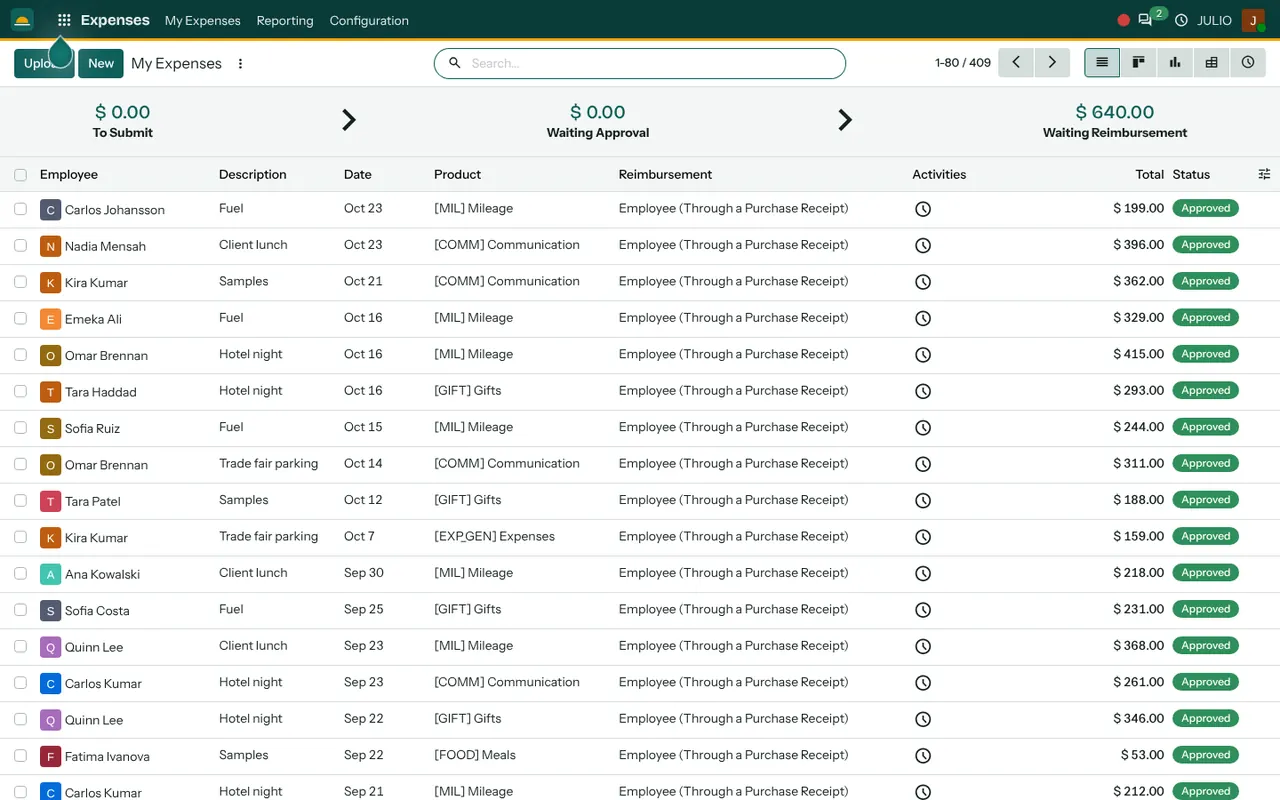
The demo screen opens with a strip across the top: To Submit, Waiting Approval and Waiting Reimbursement, each with an amount beneath it. In the demo, the first two read zero and the last one holds an amount still to be paid back. An owner can see the backlog in one glance, before reading a single line. A small team rarely needs more than that to keep claims from ageing.
A claim that reads like a sentence
Each row carries the Employee, a Description such as Fuel, Client lunch, Samples or Hotel night, the Date, the Product category, the Reimbursement method and the Total. The status here is Approved. Because the category is picked from a short list rather than typed, the claims can later be grouped properly.
Categories with their own rules
The demo categories include Mileage, Communication, Gifts, Meals and a general Expenses line. Each category is a product, so it can carry a fixed price per unit, which suits a mileage rate, or leave the amount open for a receipt. Taxes can be attached to a category as well, so a claim does not have to be corrected by the accountant.
Upload a receipt, then fill the claim
The Upload button next to New starts a claim from a file, and a claim can hold the receipt as an attachment. Whoever approves it can open the document instead of asking for a better photo. Fewer messages go back and forth, and the claim moves on the same day.
Views for the person approving
The same claims can be switched to a kanban board, a pivot and a chart, so a manager can group a month of claims by employee or category before approving them. This is where an expense module for small teams starts to give answers, not just a list: who spends most on fuel, and which category keeps growing.
How the expense module for small teams connects to JULIO
Claims do not stay inside the module. In the demo database, approved items such as Fuel and Hotel night also appear in Invoicing as draft vendor bills under the employee's name, ready for the accountant to post. The people come from Employees, so a claim is tied to a real record and department. A trade-fair trip can sit alongside a Project, and the leave dates in Time Off help a manager see who was travelling and who was not. Dashboards can show the totals.
A short walk through one sales trip
Suppose a salesperson drives to a trade fair for two days, and the expense module for small teams has to cope with a messy bundle of slips. On the way back they open the Expenses module and add three lines: fuel, a hotel night and a parking fee. Each is given a category, a date and an amount, and the receipts are attached. The lines are submitted as one report, and the To Submit total drops. The manager opens it, sees the category and the receipt, and approves it. The amount moves into Waiting Reimbursement until accounts pays it and the claim closes.
In the expense module for small teams, each stage has one owner.
| Stage | Who acts | What changes |
|---|---|---|
| To Submit | Employee | Lines are collected |
| Waiting Approval | Manager | The claim is checked |
| Waiting Reimbursement | Accounts | The money is paid back |
Who starts with an expense module for small teams
Businesses whose people spend money on the road or on site tend to add claims early. The starting sets below include it, and we confirm yours in discovery.
What to decide before switching on an expense module for small teams
A claim policy written down in plain words saves more arguments than any software setting. Settle these points before the expense module for small teams goes live, and the first month of claims will be calm.
- The category list. Keep it short. Mileage, meals, lodging, communication and gifts cover most teams, and you can add more later.
- Rates and limits. Decide the rupees per kilometre and any daily meal limit, so a category can carry them.
- Who approves. Name one approver per person or department, and a back-up for leave.
- How you pay back. Decide whether staff are reimbursed by bank transfer, with the monthly salary or from petty cash.
- Receipt discipline. Agree the rule that no receipt means no claim, and the module makes that easy to follow. That is why a written policy matters.
Conclusion
An expense module for small teams works when claiming is easier than skipping the receipt. At DigiGrowvity, in our experience setting up ERP projects, the teams that succeed here write a one-page claim policy first, then set the categories to match it. After that, the three totals at the top of the screen do the chasing for you, and the figures flow on to Invoicing without retyping.
Key Takeaways
- Claims move through To Submit, Waiting Approval and Waiting Reimbursement.
- Categories such as Mileage and Meals keep claims comparable.
- Receipts can be attached, so the approver sees the proof.
- An expense module for small teams replaces the Friday pile of slips with one queue.
- Approved claims reach the accounts as draft bills.
- It is part of the ₹10,000 JULIO Local plan.