 DigiGrowvity
At a shop counter, every second shows. A customer waits with a basket, a barcode will not scan, and the owner is not sure the till and the stock room still agree. Good pos software for small shops keeps the queue moving and keeps the books honest at the same time. The Point of Sale module in JULIO ERP is a touch-friendly till that records each sale as a numbered receipt and feeds it straight into stock and accounts.
What pos software for small shops should do at the counter
The till is the part your staff use all day, so pos software for small shops has to be built for speed.
Product tiles and a search box
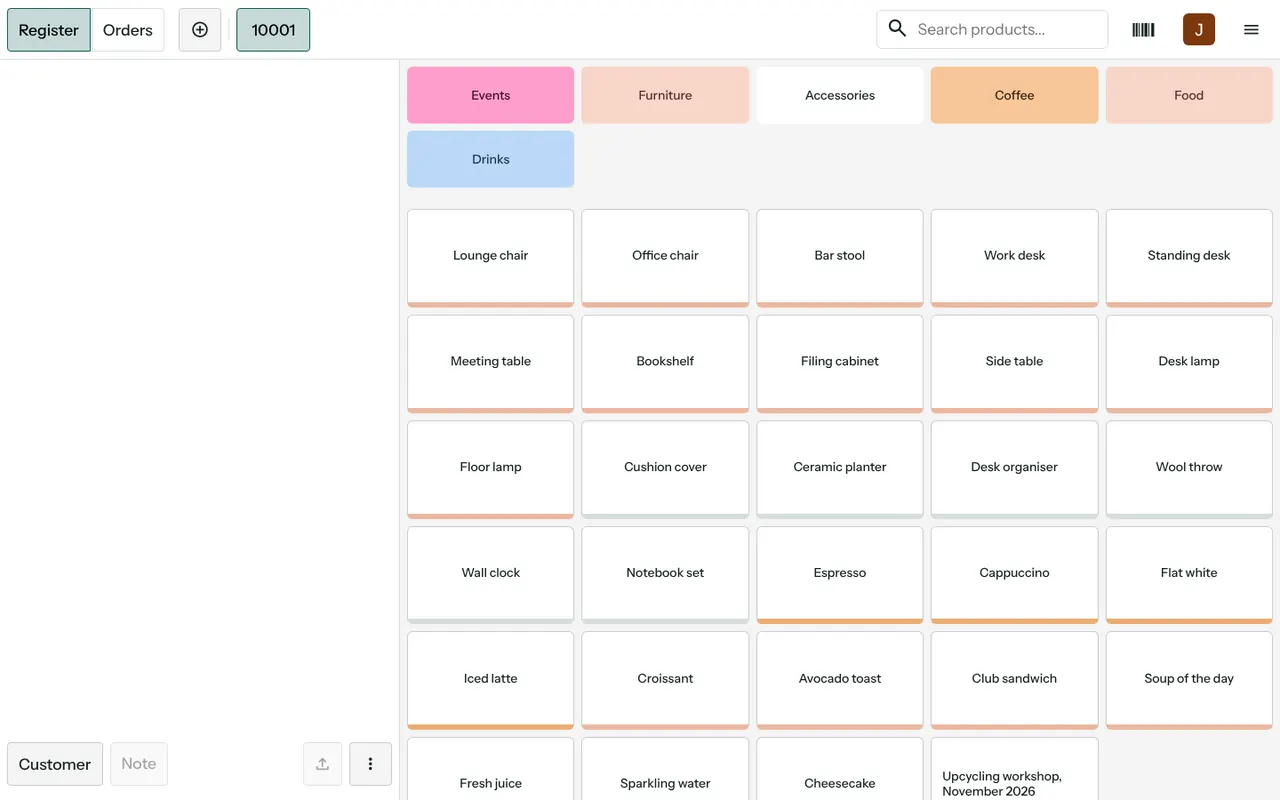
The demo till shows coloured category tiles across the top, such as Furniture, Accessories, Coffee, Food and Drinks. Below them sit the product tiles. A cashier taps a tile, or types in the search box, and the item joins the bill on the left. A barcode icon in the corner is for scanning, so packaged goods can be rung up without hunting for a tile.
Registers, orders and sessions
Each till runs in sessions. A session opens when the cashier starts the shift and closes when they cash up, and every sale belongs to one session. The register and orders tabs sit side by side, so a cashier can step back and look at recent bills without leaving the screen.
Numbered receipts and a customer on the bill
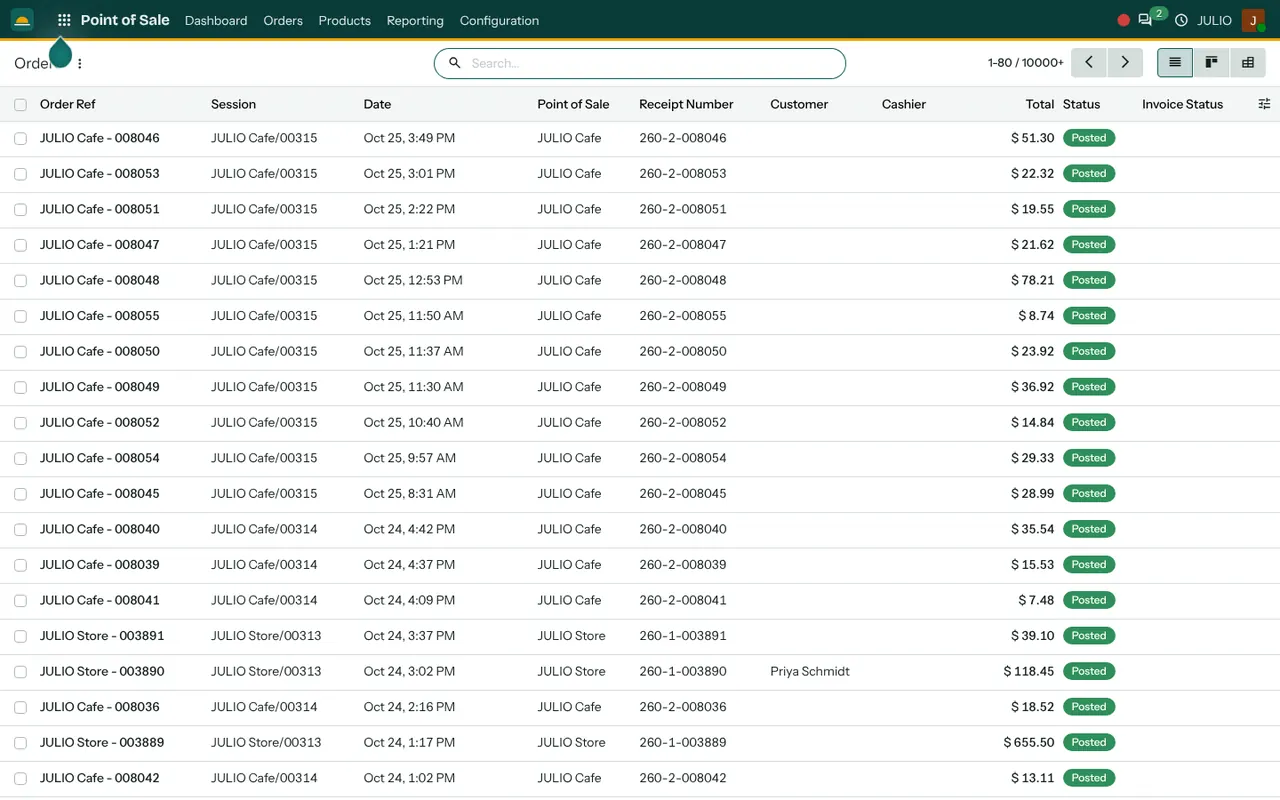
Every sale gets a receipt number built from the shop code and a running count. A Customer button on the till lets the cashier attach a named buyer to a bill, and a Note button records a comment such as a gift wrap request. The order list shows the receipt number, the customer, the total and a Posted status, so a disputed bill can be found in seconds.
More than one point of sale
The demo has two counters in the same system, a store and a cafe. Each has its own sessions and its own receipt series, but both appear in one order list. A business with a shop and a tea counter next door can therefore see both without exporting anything.
A sales report by product category
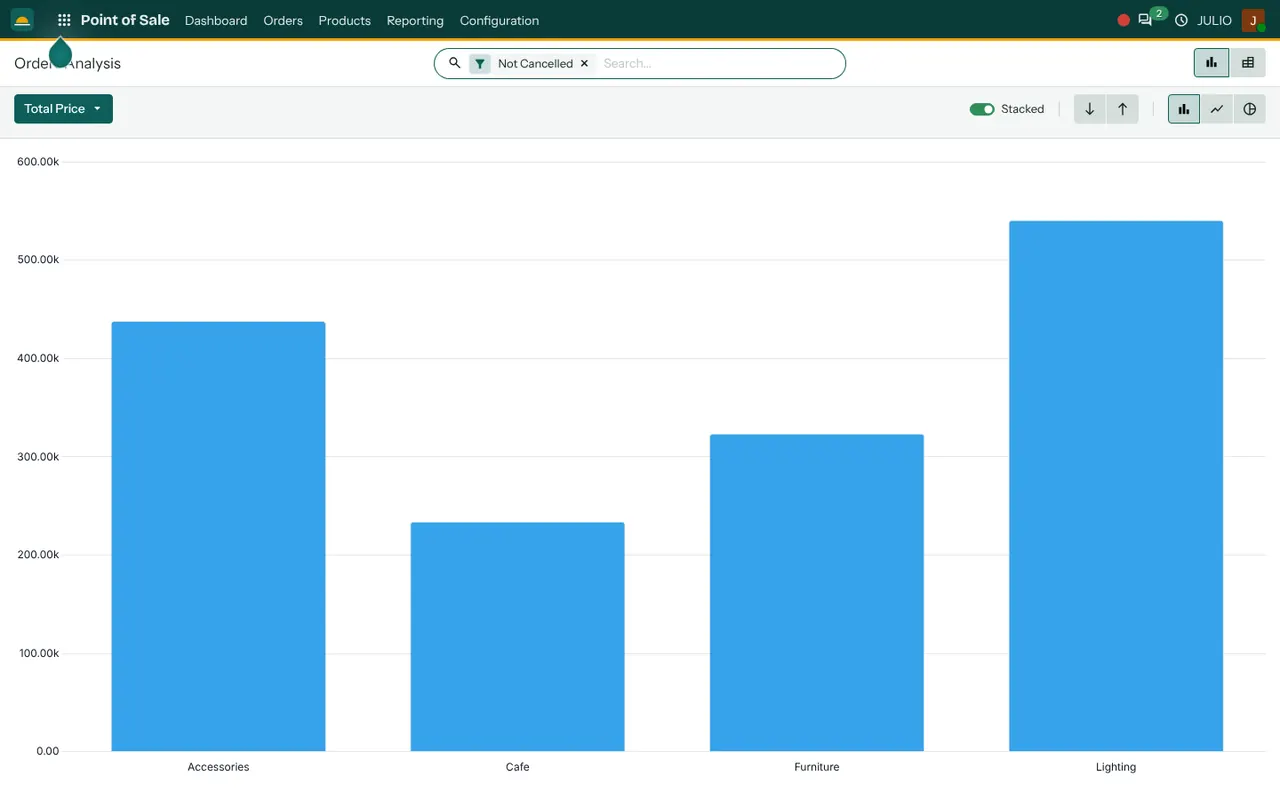
Pos software for small shops also reports: the analysis screen charts total sales by product category, as a bar chart that can switch to a line or a pie. It tells you at a glance which part of the shop earns the most.
How pos software for small shops links to stock and accounts
A till that stands alone just moves the problem. In JULIO, pos software for small shops is not a separate box: the Point of Sale shares its product list with Inventory, so selling a unit lowers the stock figure for that item. The same products appear in Sales, so a price changed once changes everywhere. Cashiers are people from Employees, and the day's takings are visible in the Dashboards. If a customer wants a full tax invoice, the sale can be billed through Invoicing.
A short walk through pos software for small shops
Here is pos software for small shops at work in a small gift shop at seven in the evening. A customer picks a lamp and a planter. The cashier taps Furniture, then the lamp tile, then searches for the planter. A regular customer is attached to the bill using the Customer button. Payment is taken, a receipt number is issued and the order lands in the list as Posted. A second customer arrives with a wrapped item to return. The cashier opens the orders tab, finds the bill by its receipt number and handles it from there. At closing, the session is cashed up and closed.
What each part of the till is for
| Part | Purpose |
|---|---|
| Category tiles | Jump to a group of products |
| Search and barcode | Find or scan an item quickly |
| Customer button | Attach a named buyer to the bill |
| Orders tab | Look back at recent receipts |
| Session | Cash up one shift |
Who starts with pos software for small shops
Retail shops, supermarkets, pharmacies, jewellers and cafés commonly start with pos software for small shops. Open a page to see the full starting set for that business.
- Retail stores
- Point of sale counters
- Supermarkets and grocery
- Jewellery
- Pharmacies
- Cafés
- Restaurants
- Salons and spas
Before you switch on pos software for small shops
These choices make the first week with pos software for small shops calmer.
- Your categories. Decide the tile groups your staff will tap. Five or six clear groups work better than twenty.
- Barcodes. If your goods already carry printed barcodes, plan to scan them. If not, decide who prints and sticks labels.
- Shifts and cashing up. Agree who opens and closes the session and who counts the cash.
- Receipt wording. Decide what the shop name and footer on the receipt should say.
- One counter or several. List every place that sells, so each gets its own point of sale from the start.
Conclusion
Pos software for small shops earns its keep by being quick when the queue is long and accurate when the day ends. At DigiGrowvity, we set up JULIO ERP for growing businesses, and in our experience ERP projects start well when the till is tried on a quiet afternoon first, with real products and a real barcode scanner. Because the Point of Sale shares products and stock with Inventory and Invoicing, the evening's sales are already in the books when the shutter comes down.
Key Takeaways
- Pos software for small shops should be fast at the counter and tied to stock.
- Tiles, search and barcode scanning cover both loose and packaged goods.
- Every sale in pos software for small shops gets a numbered receipt and sits in one order list.
- A shop and a cafe can run as separate counters in one system.
- It is included in the ₹10,000 JULIO Local plan, for every counter you run.