 DigiGrowvity
Every business has the same customer written four ways: once in the billing software, once in a phone, once in a spreadsheet of dealers and once on a delivery slip. Each copy drifts a little, until nobody can say which phone number is right. The contacts module for customers and suppliers in JULIO ERP keeps a single record for each person and company, and every other module reads from it, so a correction made once is correct everywhere.
What the contacts module for customers and suppliers does
The contacts module for customers and suppliers is the address book that the rest of the system stands on. It is quiet, and nearly everything else depends on it.
One list for people and companies
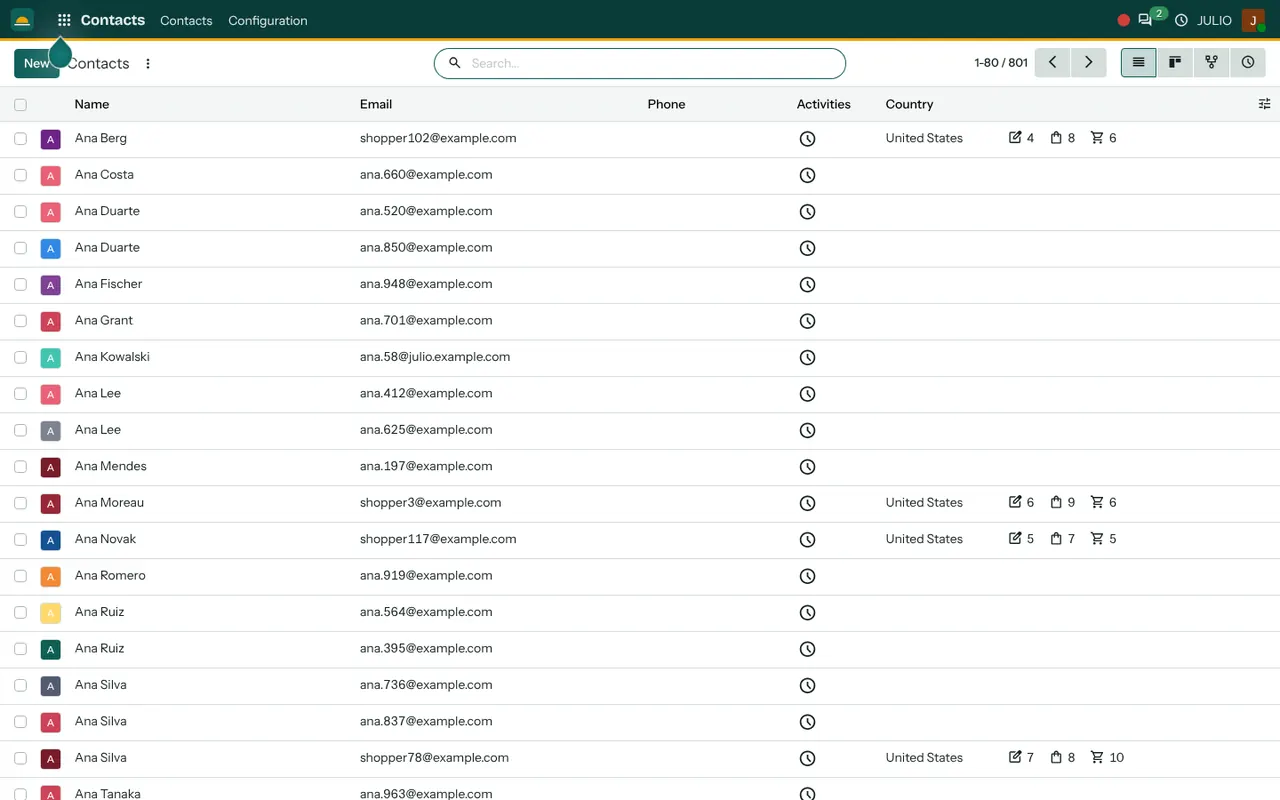
The demo screen shows a list of about eight hundred contacts, with name, email, phone, country and a column for activities. The same list holds customers, suppliers and staff contacts, and one company can have several people under it, such as the owner, the accountant and the person who receives deliveries.
Four ways to view it
In the contacts module for customers and suppliers, icons at the top right switch between a list, a card view, a hierarchy and an activity view. The hierarchy shows which people belong to which company, which helps when a large customer has many buying contacts. The activity view lists follow-ups still due.
Counters beside the name
Some rows carry small counters next to the country, showing how many linked records that contact has. You can see at a glance that a customer is active without opening a report. A contact with no counters is one nobody has traded with yet.
A look at the duplicates problem
The demo list happens to show the same name twice, with different email addresses: two Ana Duartes, two Ana Lees, three Ana Silvas. In real data this is common, and it is exactly why a business needs a shared list that staff search before they add a new entry. Typing a name into the search box first is a ten-second habit that prevents a messy list.
Search, filter and group
The search box finds a contact by name or email, and filters and grouping let you list, for example, all customers in one country. Cleaned lists can also be loaded in from a spreadsheet at set-up.
How the contacts module for customers and suppliers links up
This is the module that every other one leans on. A deal in CRM points to a contact, the order in Sales bills one, and a supplier order in Purchase goes to another. Invoicing uses the same record for invoices, bills and payments, so a statement of what a customer owes is simply a view of one record. Appointments in the Calendar invite people from the same list.
A short walk through one new customer
A trader in a market town, using the contacts module for customers and suppliers, is called by a new buyer who wants a quotation. The salesperson first searches the contacts list and finds nobody with that name, so she creates the company, adds the buyer as a person under it, and enters the delivery address. The quotation, later the invoice and the payment, all attach to that company. Six months on, when the buyer's colleague calls with a query, the whole history is one click from the contact.
Fields to fill in for customers and suppliers
| Field | Why it earns its place |
|---|---|
| Company and person | Separates who pays from who you talk to |
| Email and phone | Used for quotations and follow-ups |
| Address and country | Printed on documents and used for delivery |
| Tax identifier | Needed on invoices to business customers |
| Tags | Lets you group dealers, vendors and VIPs |
Who starts with a contacts module for customers and suppliers
Almost every business needs a contacts module for customers and suppliers, but some depend on the list more than others. These kinds of business commonly begin with it in their first set. Open a page to see the full list for that business.
Before you use the contacts module for customers and suppliers
The list in the contacts module for customers and suppliers is only as good as the first load. A little care before it goes live saves months of tidying.
- Which sources to import. Phone contacts, billing exports and dealer spreadsheets can each be a source, but merge them first so the same person is not loaded three times.
- How to name a company. Pick a rule, such as the registered name, and keep to it, so a search finds one record, not three.
- Who may create contacts. Letting everyone add contacts is quick but invites duplicates. Many businesses let two or three people create and the rest search.
- What to capture. GST number, delivery address and a contact person usually matter. Anything else can wait.
Conclusion
A contacts module for customers and suppliers is easy to overlook, because it has no pipeline to watch and no chart to admire. At DigiGrowvity, we set up JULIO ERP for growing businesses, and in our experience the quality of this one list sets the quality of everything built on it. Clean it once at the start, keep to a naming rule, and CRM, Sales and Invoicing will all agree about who your customers are.
Key Takeaways
- The contacts module for customers and suppliers keeps one record per person or company for sales, purchase and invoicing.
- A company can hold several people, such as buyer, accountant and receiver.
- List, card, hierarchy and activity views suit different jobs.
- Search before you add: duplicates are the main enemy of a clean list.
- It is included in the ₹10,000 JULIO Local plan.