 DigiGrowvity
A small school or coaching institute handles an odd mix of work. There are lessons to deliver, fees to collect, an open day to fill, teachers to keep track of and parents who want to be heard. ERP for schools is not about replacing the classroom. It is about taking the administration off the principal's desk. JULIO ERP offers courses, invoicing, events, surveys and staff records in one system, on your own network.
What ERP for schools needs to do
Education has its own rhythm: terms, batches, fee dates and intake seasons. ERP for schools should be measured against five practical needs.
- Learning material that students can reach. Notes, videos and short quizzes that stay available after the class ends.
- Fees that are billed and followed up. Term fees, workshop fees and admission fees each have a different date and a different amount.
- Events that fill up. An open day, a parent meeting or a weekend workshop needs a registration list and a headcount.
- Feedback that is collected, not guessed. Parents and students will tell you what is working, if you ask in a form they can finish in a minute.
- A clean record of teachers and staff. Who teaches, who administers and who joined when.
| Need | Module that covers it |
|---|---|
| Courses and learning material | eLearning |
| Open days and workshops | Events |
| Teacher and staff records | Employees |
| Fee invoices and receipts | Invoicing |
| Parent and student feedback | Surveys |
The common starting set for ERP for schools
This is the usual first set for ERP for schools, and we confirm yours in discovery, because a CBSE school, a tuition centre and a skills institute each need a different emphasis.
 eLearningOnline courses and training
 EventsTickets, registrations and attendees
 EmployeesStaff records in one place
 InvoicingInvoices, bills and payments
 SurveysForms, quizzes and feedback
eLearning for lessons that outlast the class
A course is a card showing its views, number of contents and duration, with counts of people invited, ongoing and finished. Teachers can see at a glance who has not started, which is usually the first question a parent asks. See the eLearning module.
Events for open days and workshops
An event has a venue, a start and end time, a responsible person and a count of attendees. A registration desk screen sits in the same module for the day itself. See the Events module.
Employees for teachers and staff
Each person has a record with a job title and a department, and the directory can be filtered by department. See the Employees module.
Invoicing for fees
A fee is an invoice with a due date and an amount due, so you can see who has paid and who has not. Payments are recorded against each invoice. See the Invoicing module.
Surveys for feedback
A survey shows how many were registered and how many finished, with buttons to test it, see results or start a live session. See the Surveys module.
What ERP for schools looks like on screen
The screens below are from the JULIO ERP demo. Its sample company sells fit-outs and furniture, so the course names and figures are demo data, and none of it is a school.
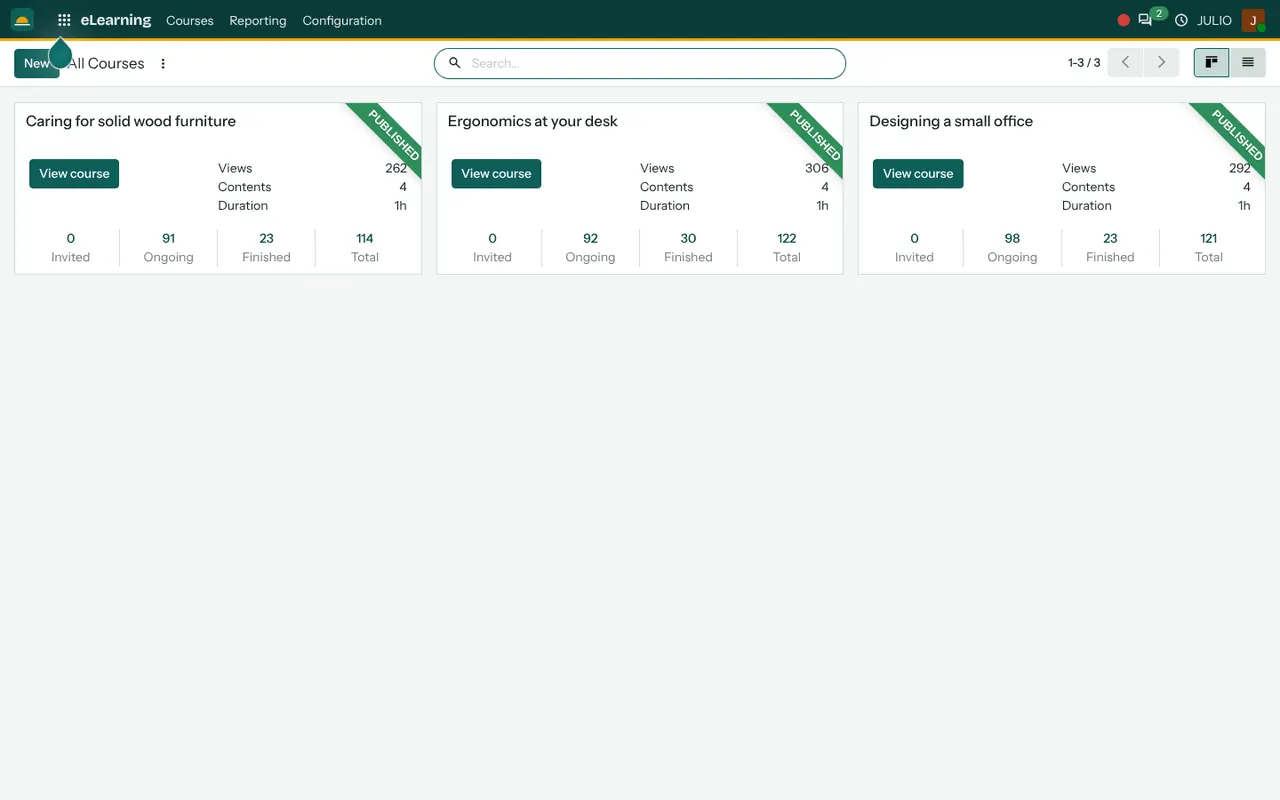
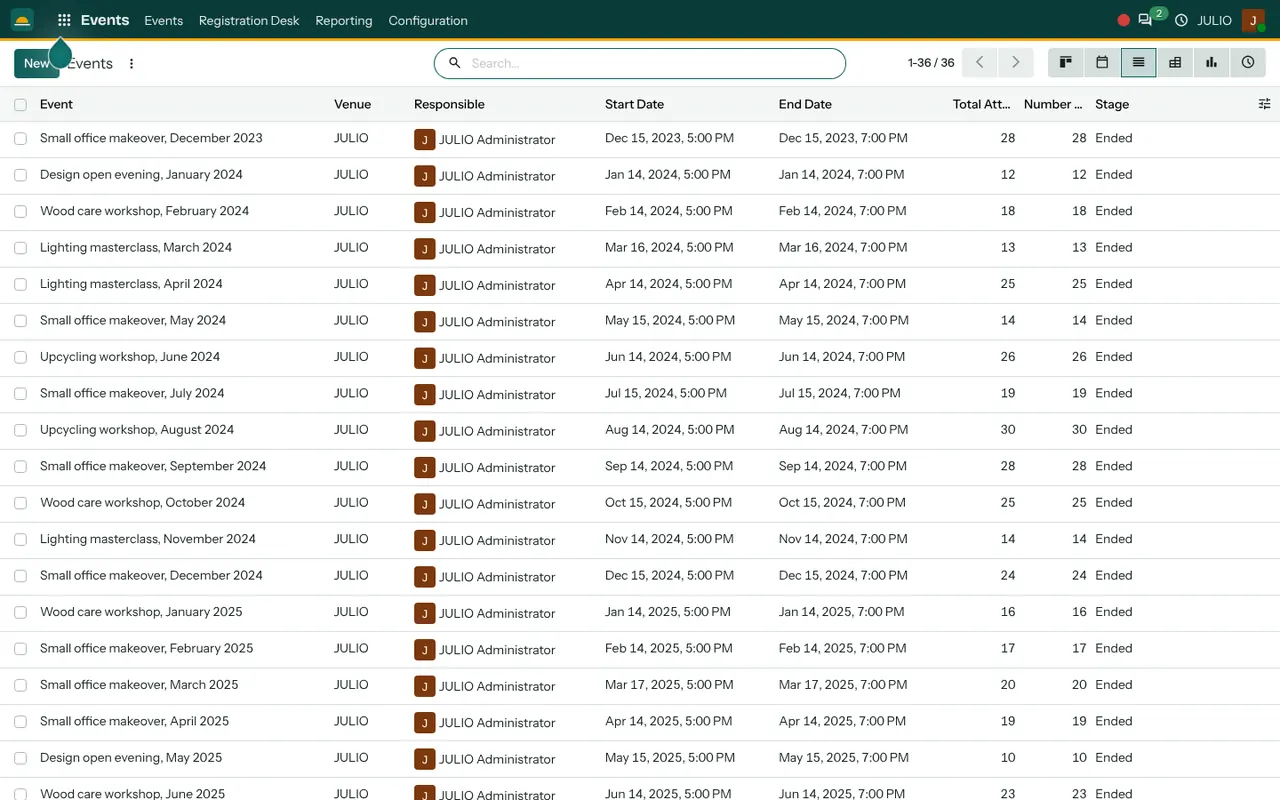
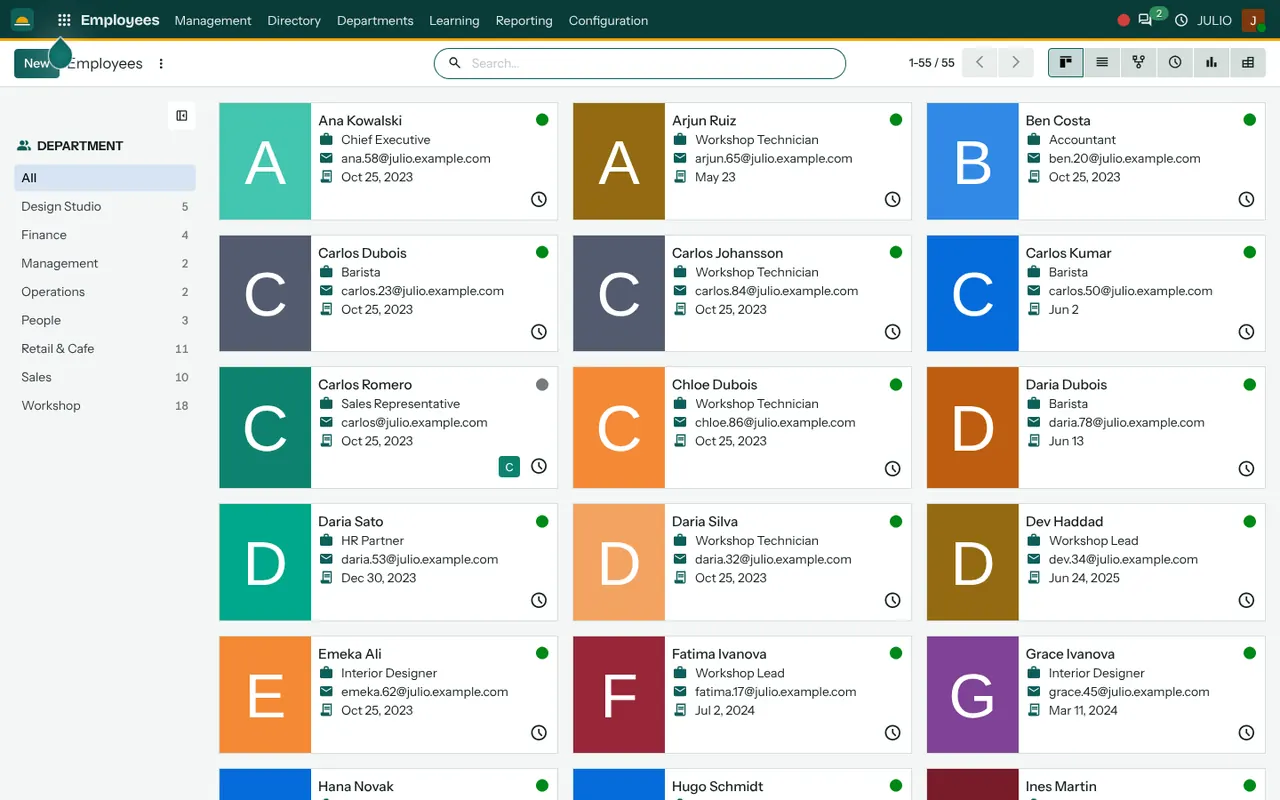
The first screen is the course list, with three published courses as cards and four small counters under each. The second is the events list, with a venue, a responsible person, start and end dates, attendee counts and a stage such as Ended. The third is the staff directory, shown as cards with a department list beside it.
What JULIO does not do for schools
JULIO is an administration and learning system. It is not a student information system, and you should know where that line sits.
- It does not keep student attendance, marks, report cards or a class timetable as a ready-made school module. That is custom work, quoted separately.
- It does not handle board registration, exam seating or hall tickets.
- It does not provide a parent mobile app. Parents reach surveys and courses through web links.
- Fee reminders by text or WhatsApp are not set up out of the box. Text messaging is also available as a separate module, but a school-specific reminder routine is a scoping conversation.
How a first release of ERP for schools could look
Pick the job that causes the most arguments, and begin there. For many institutes that is fee collection, so a first release of ERP for schools might be the invoice list and a clean record of who owes what for the term.
Next, move one real course into eLearning and ask a single batch to use it. Run the next open day through the events screen, and send one feedback survey afterwards. By then the staff directory is already filled, since it takes an afternoon. Resist the urge to switch every module on in the first month: an institute that changes everything at once in the middle of a term usually reverts by the next one.
Conclusion
ERP for schools should free teachers from paperwork rather than add more of it. At DigiGrowvity, in our experience setting up ERP projects, institutes do best when they begin with one routine that everyone already dislikes doing by hand, such as fee follow-up, and prove the system there. The courses, events, surveys and staff records can follow in whatever order the term allows.
Key Takeaways
- ERP for schools should cover learning material, fees, events, feedback and staff records.
- The common starting set is eLearning, Events, Employees, Invoicing and Surveys.
- Student marks, attendance and report cards are custom work, quoted separately.
- JULIO runs on your own network, with no limit on users.
- The plan is ₹10,000 once, with 1 year of free technical support.