 DigiGrowvity
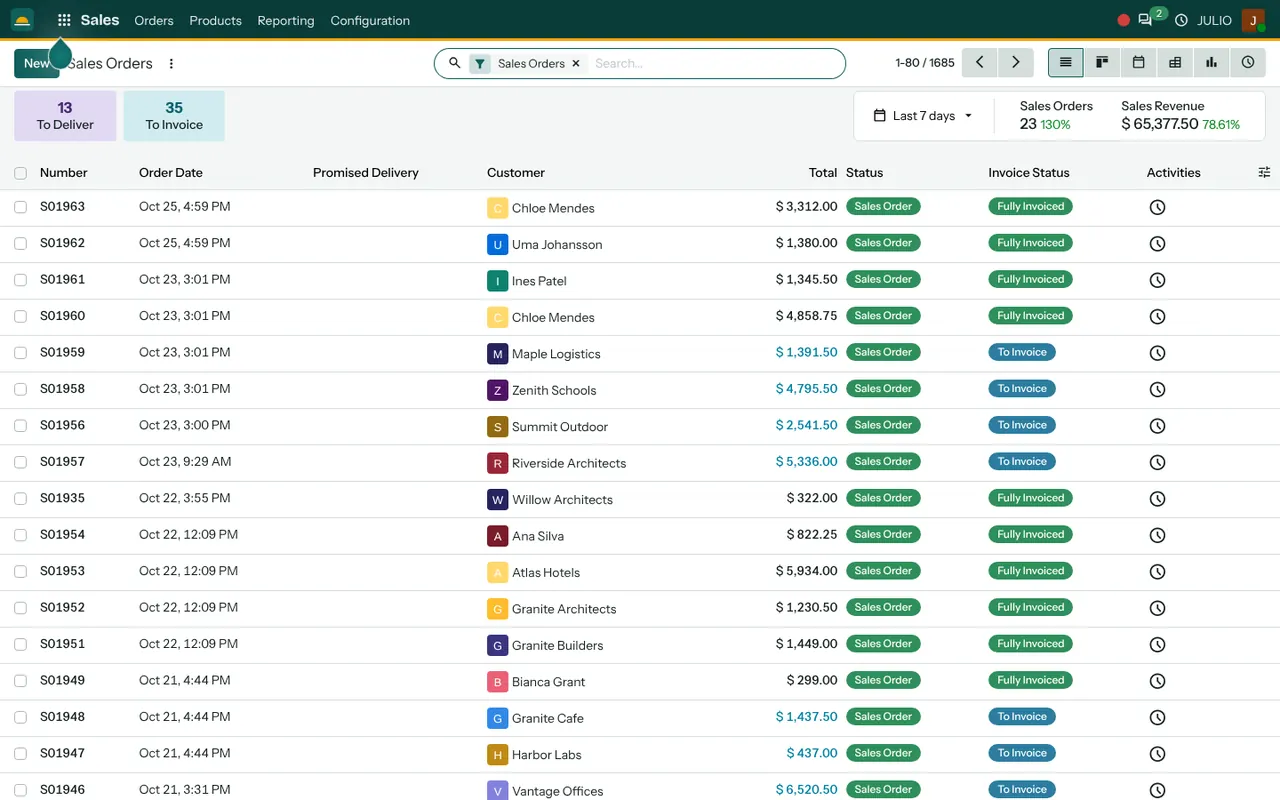
Many small firms run sales from a spreadsheet and a chat window. A quotation is a Word file, the order is a message, and nobody is sure whether the goods went out or the bill was raised. The sales module for small business in JULIO ERP replaces that with one list of orders. Each row shows the customer, the total, whether the goods are delivered and whether the invoice is raised, so the next action is always visible.
What the sales module for small business does
The sales module for small business sits between the enquiry and the invoice. It owns the quotation, the confirmed order and the product catalogue that feeds both.
Quotations that become orders
You build a quotation by picking a customer and adding products from the catalogue, each with a quantity and a price. Discounts and taxes are set per line. The quotation can be sent to the customer by email as a PDF. When the customer agrees, one click confirms it and the same record turns into a sales order. You do not copy anything into a new document.
An order list that shows what is pending
The orders screen in the demo lists the number, order date, promised delivery, customer, total, status and invoice status. Two tiles at the top count the orders still to deliver and the orders still to invoice. Clicking a tile filters the list to exactly those orders, which makes it a daily to-do list for whoever dispatches and whoever bills.
One catalogue with stock on the card
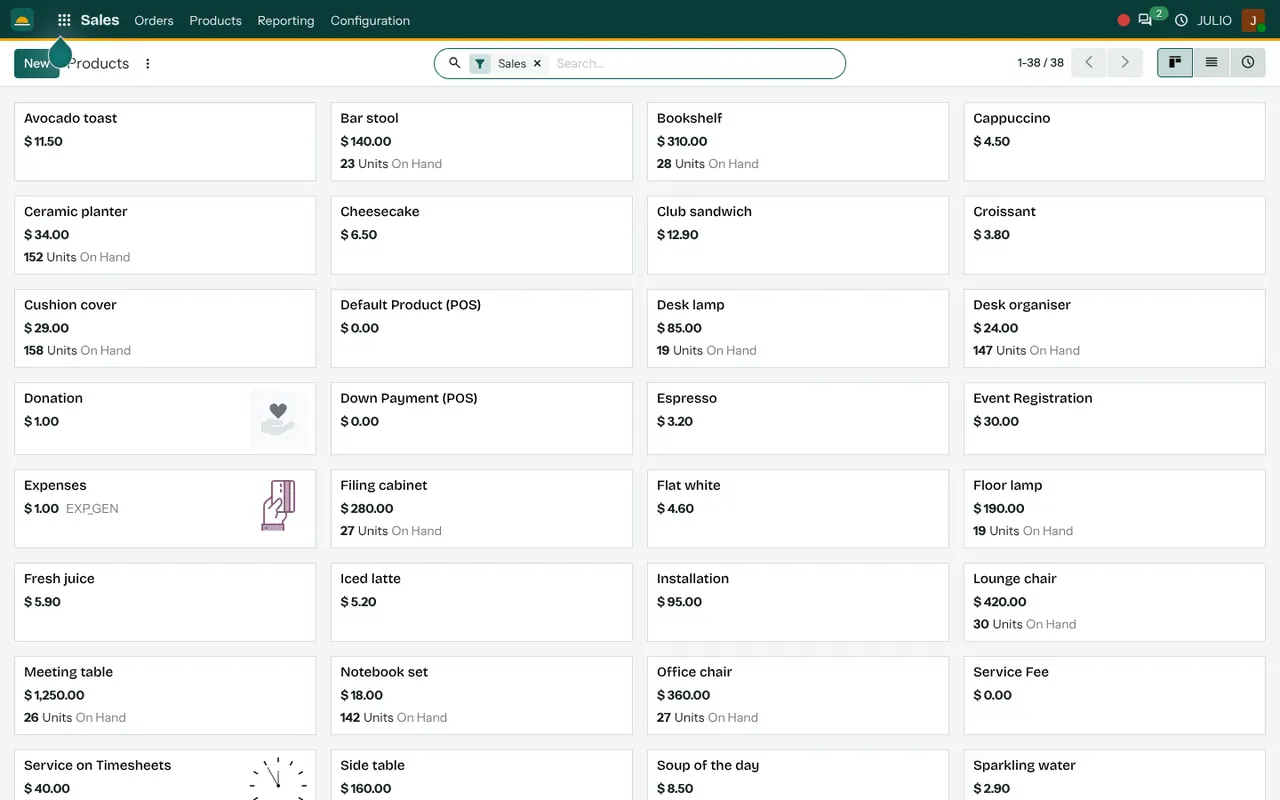
The product catalogue shows each item with its sales price and, for stocked goods, the units on hand. A salesperson on a call can see that twenty chairs are in the warehouse before promising twenty chairs. Services such as installation sit in the same catalogue, so a quotation can carry goods and labour together.
Several ways to look at the same orders
The order list can also be shown as a board, a calendar, a pivot table, a chart or a list of scheduled activities. The calendar suits a dispatcher planning the week. The pivot suits an owner who wants totals by customer.
Sales analysis month by month
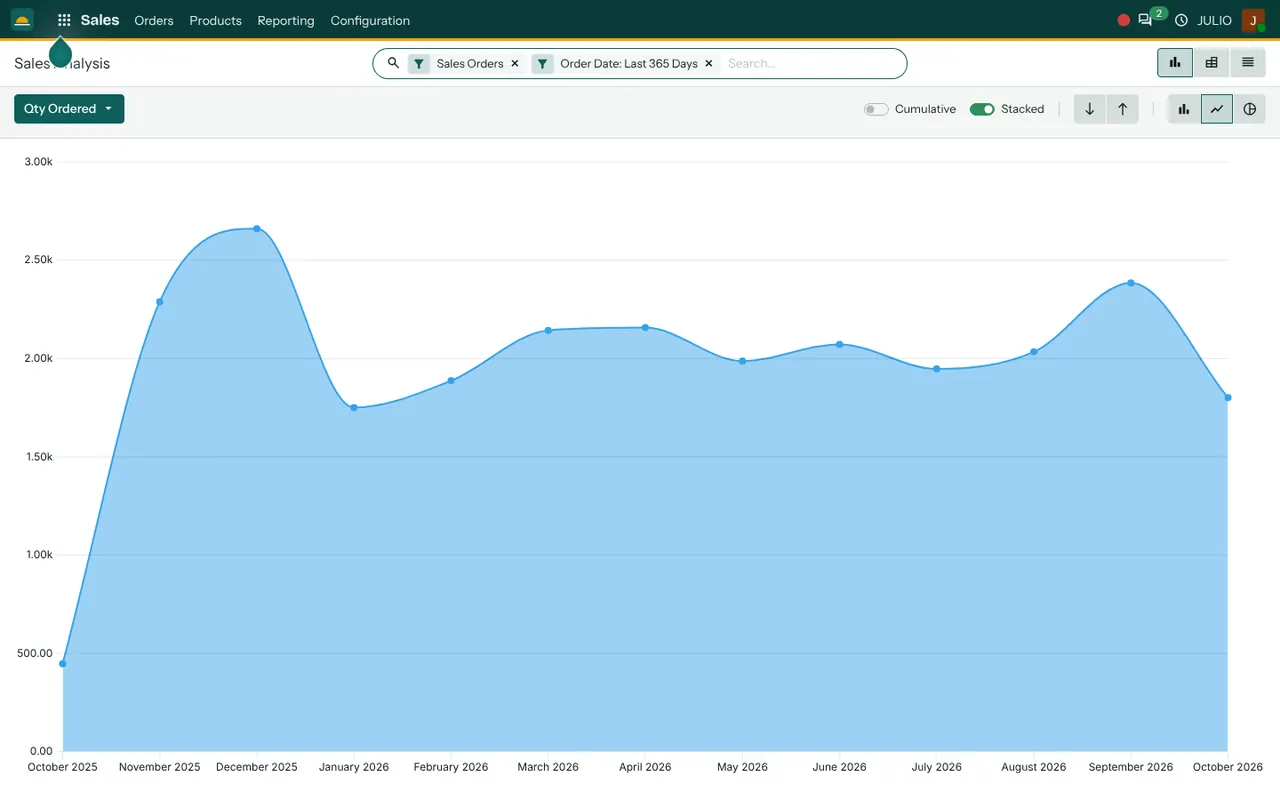
The analysis report charts quantities ordered across the last twelve months. In the demo it is a smooth area chart with a toggle for cumulative and stacked views, and it can switch to bars, a line or a pie. It answers a plain question: is this month stronger or weaker than the one before?
How the sales module for small business connects to JULIO
Sales is the hinge of the system, so most of the other modules touch it. This is how the sales module for small business hands work on.
- A won deal in CRM becomes a quotation with the customer already filled in.
- A confirmed order creates a delivery in Inventory, so the warehouse sees what to pack.
- The order feeds Invoicing, where the invoice is raised from the order lines.
- Customers come from Contacts, so a buyer is entered once for sales, billing and everything else.
- Orders and quotations feed the sales view of the Dashboards module.
If an item is short, the Purchase module is where you order more.
A short walk through one order
With the sales module for small business, take a trader who sells office furniture to small companies. A buyer asks for twelve chairs and four desks. The salesperson opens a new quotation, picks the customer, adds the chairs and the desks and sees stock on hand beside each. They add an installation service line and send the PDF by email. The buyer agrees by phone, so the salesperson confirms the quotation. The order appears in the list under To Deliver. The warehouse packs it, the status moves on, and the order then appears under To Invoice until the bill is raised.
The order states at a glance
| Status | What it tells you |
|---|---|
| Quotation | Not yet agreed, nothing reserved |
| Sales Order | Confirmed, ready to deliver |
| To Deliver | Goods still to leave the warehouse |
| To Invoice | Delivered or ordered, bill not raised |
| Fully Invoiced | Nothing left to do |
Who starts with a sales module for small business
Traders, retailers, wholesalers and service firms commonly begin with a sales module for small business. Open a page to see the full starting set for that kind of business.
- Retail stores
- Fashion and garments
- Jewellery
- Warehouses
- Distribution centres
- Wholesale and trading
- Automotive and workshops
- Agriculture and food
- Hotels and resorts
- Travel and tourism
- Real estate
Before you switch on the sales module for small business
A few small choices at the start keep the order list of your sales module for small business clean.
-
Your product list. Decide the names, units and prices of what you sell. A tidy catalogue makes quotations quick; a messy one makes every quotation slow.
-
Quotation versus order. Agree who may confirm an order. Some owners keep that to themselves until a customer has paid an advance.
-
Discount rules. Decide how much discount a salesperson may give without asking.
-
Delivery promises. The promised delivery column is only useful if people fill it in, so agree who does it.
-
Services alongside goods. If you also sell installation or repairs, set them up as services so they appear on the same quotation.
Conclusion
A sales module for small business should make the next step obvious, not add paperwork. At DigiGrowvity, we set up JULIO ERP for growing businesses, and in our experience ERP projects go best when the order list is the first screen people learn: quote, confirm, deliver, invoice, in that order. Once that rhythm is steady, CRM, Inventory and Invoicing join it without anyone retyping a customer or a price.
Key Takeaways
- The sales module for small business turns a quotation into an order in one click, with nothing retyped.
- The order list shows delivery status and invoice status side by side.
- The catalogue shows units on hand, so promises match the shelf in the sales module for small business.
- Analysis charts show sales by month, with bar, line and pie views.
- It is included in the ₹10,000 JULIO Local plan.