 DigiGrowvity
A distributor earns in the gap between one truckload arriving and a hundred small orders leaving. ERP for distributors is a single system that records both ends of that gap, so the godown count, the retailer orders and the invoices you are waiting to be paid on all agree. JULIO ERP gives a distribution business stock, purchasing, sales orders, a vehicle register and invoicing, with no limit on how many people sign in on your own Wi-Fi.
What ERP for distributors needs to do
The work looks simple from outside. ERP for distributors has to cope with the same few pressure points, day after day.
| Need | Module that covers it |
|---|---|
| Receive and issue stock | Inventory |
| Reorder from principals | Purchase |
| Retailer and dealer orders | Sales |
| Vans, tempos and trucks | Fleet |
| Credit and overdue dues | Invoicing |
- Bulk in, small lots out. Cartons arrive from a principal and leave split across many shops, so units and locations must be clean.
- Late deliveries must be visible. A dealer who waits two days for goods quietly starts buying from someone else.
- Buying that follows demand. You reorder before the shelf is empty, not after the customer has already walked away.
- Vehicles that cost money. Fuel, servicing dates and insurance renewals decide whether a van is an asset or a worry.
- Credit that runs for weeks. Retailers pay late, so the question each Monday is who owes what and for how long.
The common starting set for ERP for distributors
Most ERP for distributors begins with these five modules. That is a common starting set, and we confirm yours in discovery.
 InventoryStock across every warehouse
 PurchaseOrders to suppliers, on time
 SalesQuotations, orders and follow-ups
 FleetVehicles, fuel and servicing
 InvoicingInvoices, bills and payments
Inventory, because the godown is the business
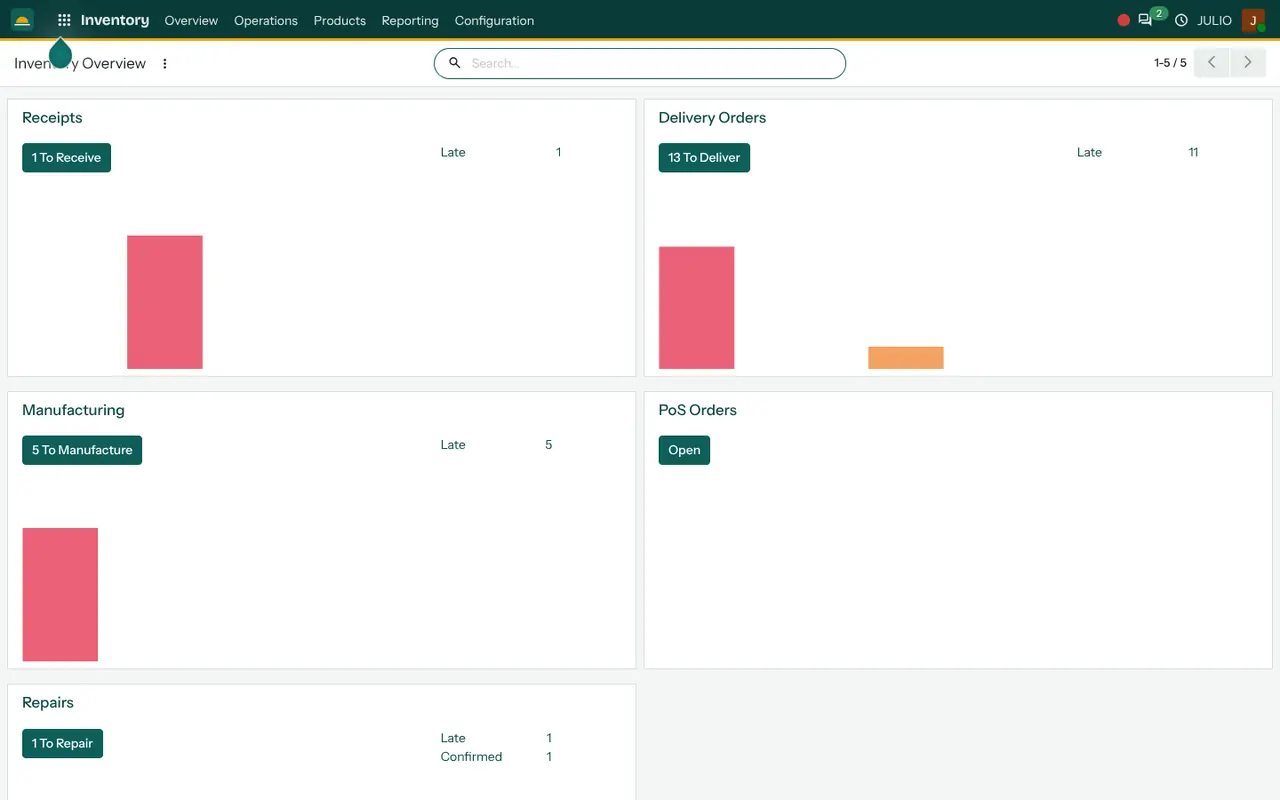
Stock is held by item and by location, with receipts coming in and delivery orders going out. The overview screen shows Receipts and Delivery Orders as separate cards, each with a count of what is waiting and how much is late. Moves between locations are recorded as transfers. See the Inventory module.
Purchase for principals and suppliers
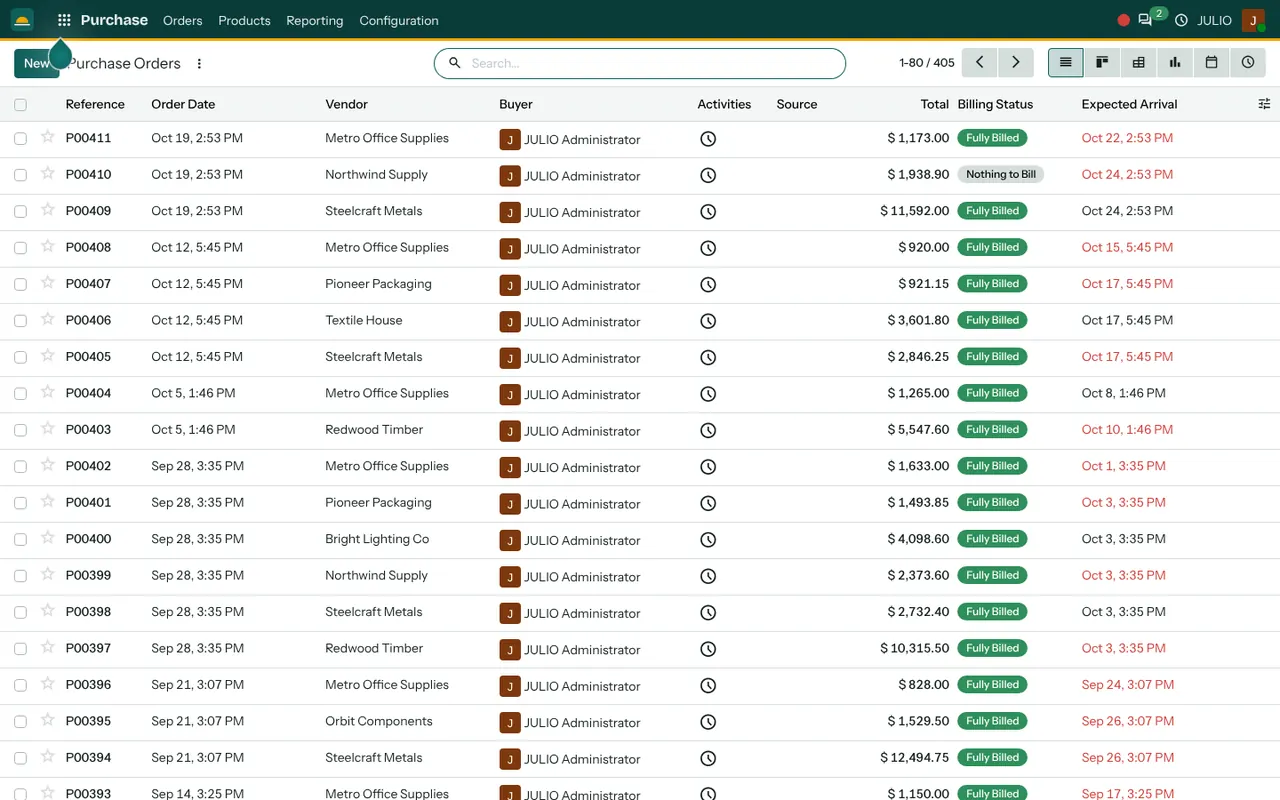
Replenishment orders go to principals, are received against the delivery and are matched to the supplier bill later. Nothing is bought on memory alone. See the Purchase module.
Sales for retailer orders
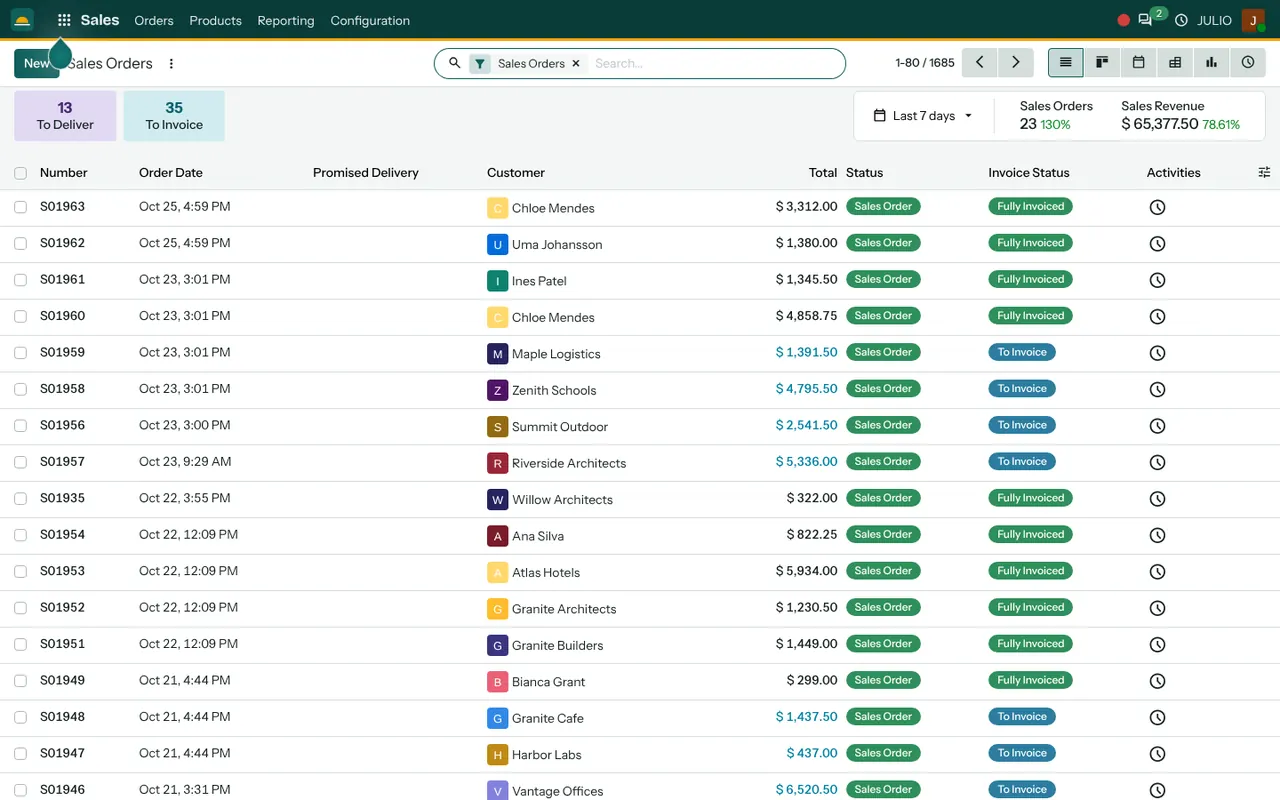
Quotations turn into confirmed orders, and confirmed orders feed the delivery list in Inventory. The sales orders list gives the sales team a single place to look. See the Sales module.
Fleet for the vehicles that deliver
The vehicle board shows each vehicle as a card with the model, the person assigned and its contracts, with a warning marker when something needs attention. Fuel and servicing are tracked per vehicle. See the Fleet module.
Invoicing for dues and bills
Customer invoices, supplier bills and payments live in one place, and the finance dashboard groups unpaid invoices by age. See the Invoicing module.
What ERP for distributors looks like in JULIO
The three screens below are the first view of each of the first three starting modules: the stock overview, the purchase orders list and the sales orders list.
These are real screens from the JULIO demo database, which holds demo data for a furniture business, not a distributor.
A Monday morning with ERP for distributors
Picture the start of a week. A truck from a principal is waiting at the gate, and the godown supervisor opens the receipts card to see what was ordered and what is late. He receives the cartons against the order, and the stock figure moves at once. By ten, the sales desk has confirmed a dozen retailer orders, and each one lands on the delivery list. The owner glances at unpaid invoices grouped by age before deciding whose next order waits. Nobody asks for a spreadsheet, because the same records feed every screen, which is the whole point of ERP for distributors.
What JULIO does not do for distributors
A system for stock and orders is not a logistics platform. Live GPS tracking, route planning for deliveries and a handheld app for van salesmen working offline are not part of the standard set. The same goes for principal scheme claims and trade-discount engines, and for filing GST returns or generating e-way bills on the government portal. Each can be built as custom work, quoted separately, and we say plainly in discovery what is practical.
How a first release of ERP for distributors could look
A first release of ERP for distributors usually starts narrow. Load your item list and opening stock, then run receipts and delivery orders through Inventory while the old register keeps running alongside for a short while. When the counts match, move sales orders and purchase orders across. Invoicing and the vehicle register come last, because they depend on clean stock and clean customers. Stopping at any step still leaves you with a working system.
Conclusion
Good ERP for distributors is mostly about trust in the numbers: the stock you think you have, the orders you promised and the money you are owed. At DigiGrowvity, we set up JULIO ERP for growing businesses, and in our experience distributors do best when stock and orders go live first and everything else follows. We have not published a distribution project, so we treat your set as a common starting point and confirm it with you.
Key Takeaways
- ERP for distributors means one record of stock, orders, vehicles and dues. A distributor needs bulk-in, small-out stock, reorder discipline, vehicles and credit control.
- The usual starting set is Inventory, Purchase, Sales, Fleet and Invoicing.
- Receipts and delivery orders sit on one overview, with late items counted.
- Tracking, route planning and van-sales apps are custom work, quoted separately.
- The plan is ₹10,000 once, with unlimited users and 1 year of free support.