 DigiGrowvity
Agriculture runs on a calendar that does not bend. You buy heavily for a few weeks at harvest, hold stock in the godown, then sell and process it for the rest of the year. ERP for agri businesses gives that cycle one shared record, so what you bought, what you packed, what is left and what customers owe are never four separate notebooks. JULIO ERP offers stock, purchasing, sales, invoicing and production recipes, with no limit on users on your own Wi-Fi.
What ERP for agri businesses needs to do
Farm-linked trade has its own rhythm, and it affects every screen. These five needs shape ERP for agri businesses more than anything else.
| Need | Module that covers it |
|---|---|
| Stock held through the year | Inventory |
| Heavy buying at harvest | Purchase |
| Selling to traders and retailers | Sales |
| Bills and payments | Invoicing |
| Turning raw produce into packed goods | Manufacturing |
- A season that compresses buying. Most of the year's raw material arrives in a few weeks, so receiving must be quick.
- Stock that lasts months. The godown figure has to stay right while quantities sit untouched.
- One raw product, several outputs. Cleaned, graded, ground or packed lots come from the same input.
- Customers across channels. Wholesale traders, shops and institutions buy in different pack sizes.
- Payments that stretch. Both sides of the trade run on credit, so dues need to be visible.
The common starting set for ERP for agri businesses
Most ERP for agri businesses begins with the modules below. That is a common set, and we confirm yours in discovery.
 InventoryStock across every warehouse
 PurchaseOrders to suppliers, on time
 SalesQuotations, orders and follow-ups
 InvoicingInvoices, bills and payments
 ManufacturingBills of materials and work orders
Inventory, the godown in numbers
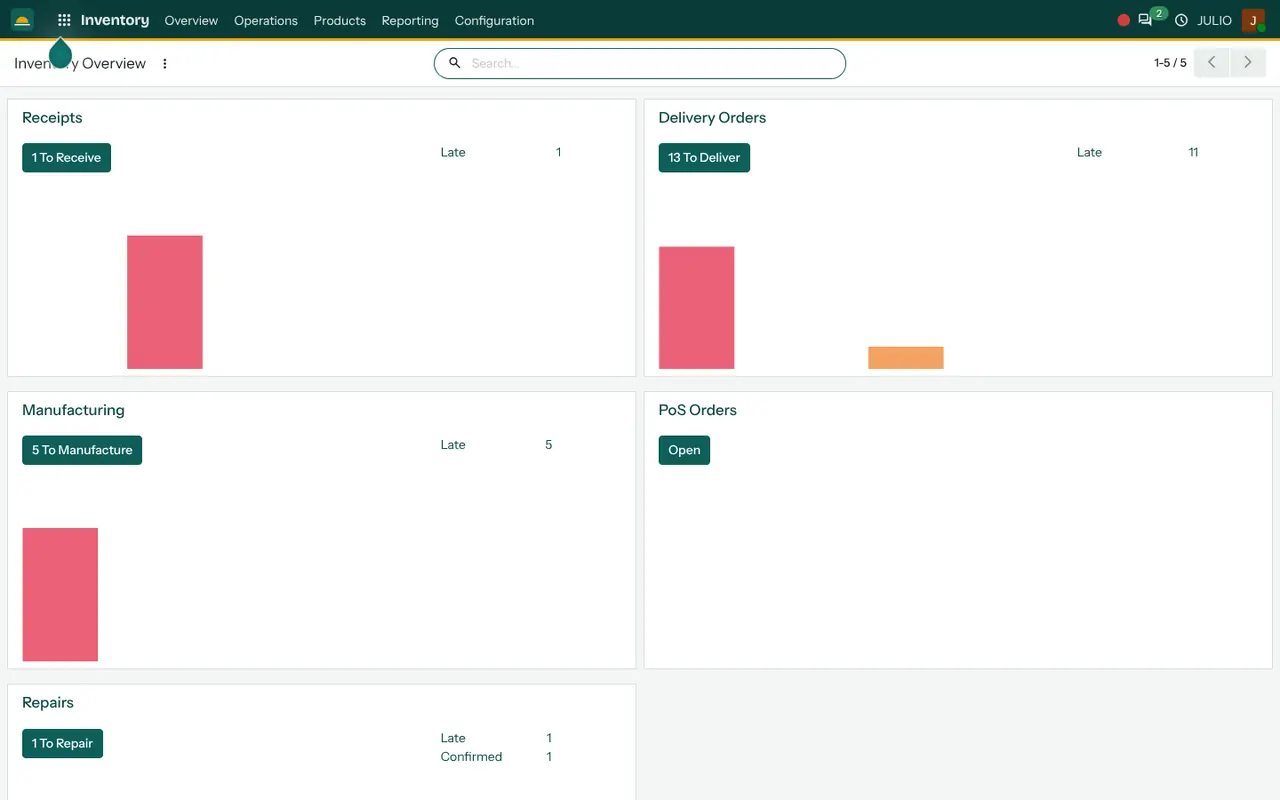
Stock is held by item and location, and receipts and delivery orders appear as separate cards on the overview. Transfers between locations are recorded, so a move from the main godown to a packing area is visible. See the Inventory module.
Purchase for harvest-season buying
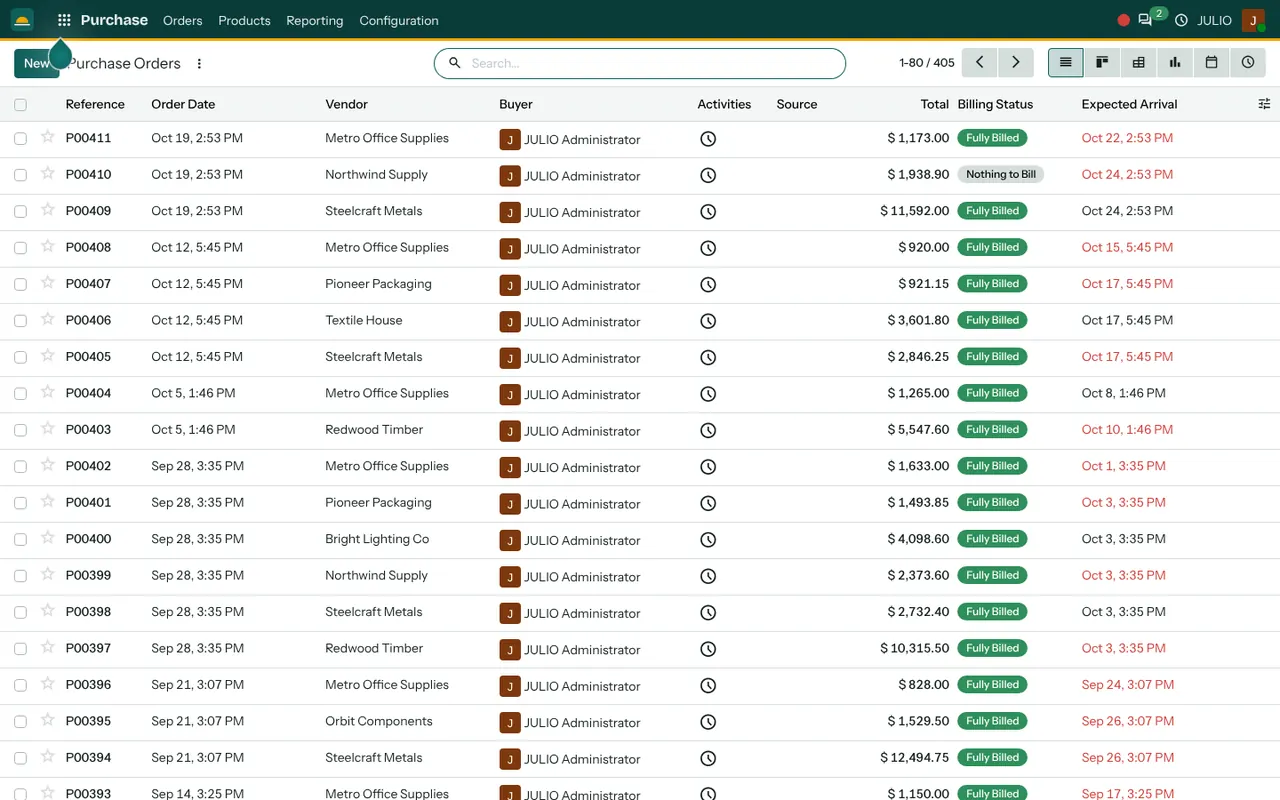
Purchase orders show the vendor, total, billing status and expected arrival. Receiving against the order brings stock in, and the supplier bill is matched afterwards. See the Purchase module.
Sales for orders out
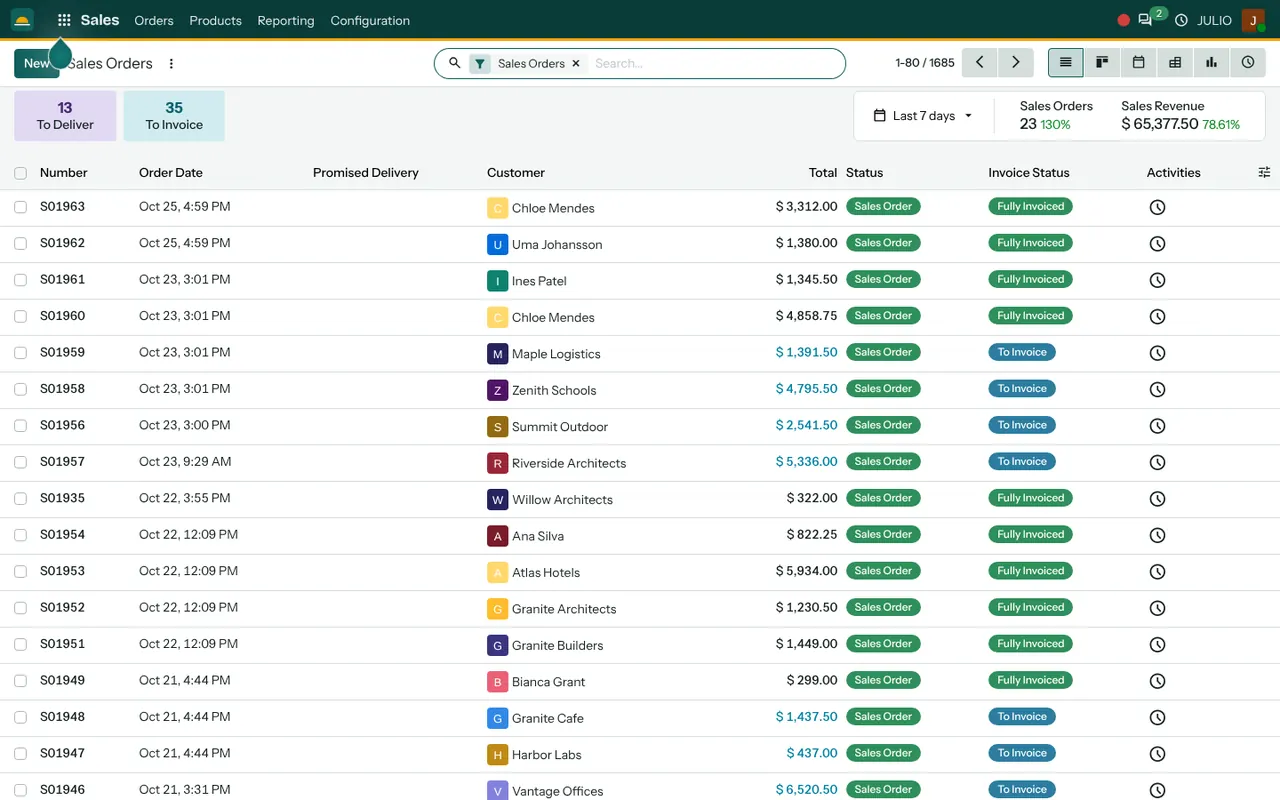
Sales orders list the customer, date, total and invoice status, with counters for orders still to deliver and to invoice. See the Sales module.
Invoicing for dues and bills
Customer invoices carry a due date and an amount due, so late-paying buyers stand out. Supplier bills and payments are in the same place. See the Invoicing module.
Manufacturing for processing
A bill of materials describes what goes into a finished product, and a manufacturing order records how many to make. For a processor, that is where raw produce becomes packed goods. See the Manufacturing module.
What ERP for agri businesses looks like in JULIO
The three screens below are real, from the JULIO demo database. The data is for a furniture business, so read the structure, not the product names. Each screen is the first view of one of the first three starting modules, and each one answers a daily question: what came in, what was ordered and what is left.
What JULIO does not do for agri businesses
JULIO is a back-office system for stock, orders and money, so farm-side tools are outside it. Weighbridge and mandi arrival slips, a ledger of advances to individual farmers, crop planning, cold-store temperature sensors, and food-safety labelling or licence filings are not in the standard set. Whether batch numbers and expiry dates are needed is a question we settle in discovery. Anything extra is custom work, quoted separately.
How a first release of ERP for agri businesses could look
A first release of ERP for agri businesses should be timed away from harvest. Start in the quiet months, ideally just after the last big sale, with the item list, the godown locations and opening stock counted by hand. Run purchase and receipts for a few weeks before the season rush, so the team is comfortable. Add sales and invoicing next.
Treat the first season as a trial run for ERP for agri businesses, not a final verdict. Bring in recipes and manufacturing orders last, once packed goods are being made and you know what each batch should consume. Keep the paper register for one full cycle of receipts and sales, then compare it with the system before retiring it.
A harvest week, step by step
Take a spice or oil processor in the middle of the season. Trucks arrive daily, each against a purchase order raised by the buying manager. The godown clerk receives them, and stock rises at once. Two days later, the production head opens a manufacturing order for a packed product, and the system shows whether enough raw material is on hand. Sales takes an order from a trader, and the invoice follows delivery. This simple chain is what ERP for agri businesses keeps in order, and it is the same whether the product is grain, pulses, spices, coconut or oil.
Conclusion
ERP for agri businesses pays off when the season is over and the figures still hold. At DigiGrowvity, we set up JULIO ERP for growing businesses, and in our experience of setting up ERP projects, the safest start is a calm month before the rush. We have not published an agriculture project, so this is a common starting set and we confirm it with you before promising anything.
Key Takeaways
- ERP for agri businesses connects seasonal buying, godown stock, processing, sales and dues.
- The usual starting set is Inventory, Purchase, Sales, Invoicing and Manufacturing.
- Start in a quiet month, not at harvest.
- Weighbridge slips, farmer advance ledgers and food-safety filings are custom work, quoted separately.
- The plan is ₹10,000 once, with unlimited users and 1 year of free support.