 DigiGrowvity
A small factory runs on recipes that live in someone's head: how many panels, how many screws, which fabric and how much of it. When that person is on leave, the recipe goes with them. The manufacturing module for small factories in JULIO ERP writes each recipe down once, as a bill of materials, and then every production order uses it. Parts are reserved, finished goods are added to stock, and the cost of making a product is no longer a guess.
What the manufacturing module for small factories holds
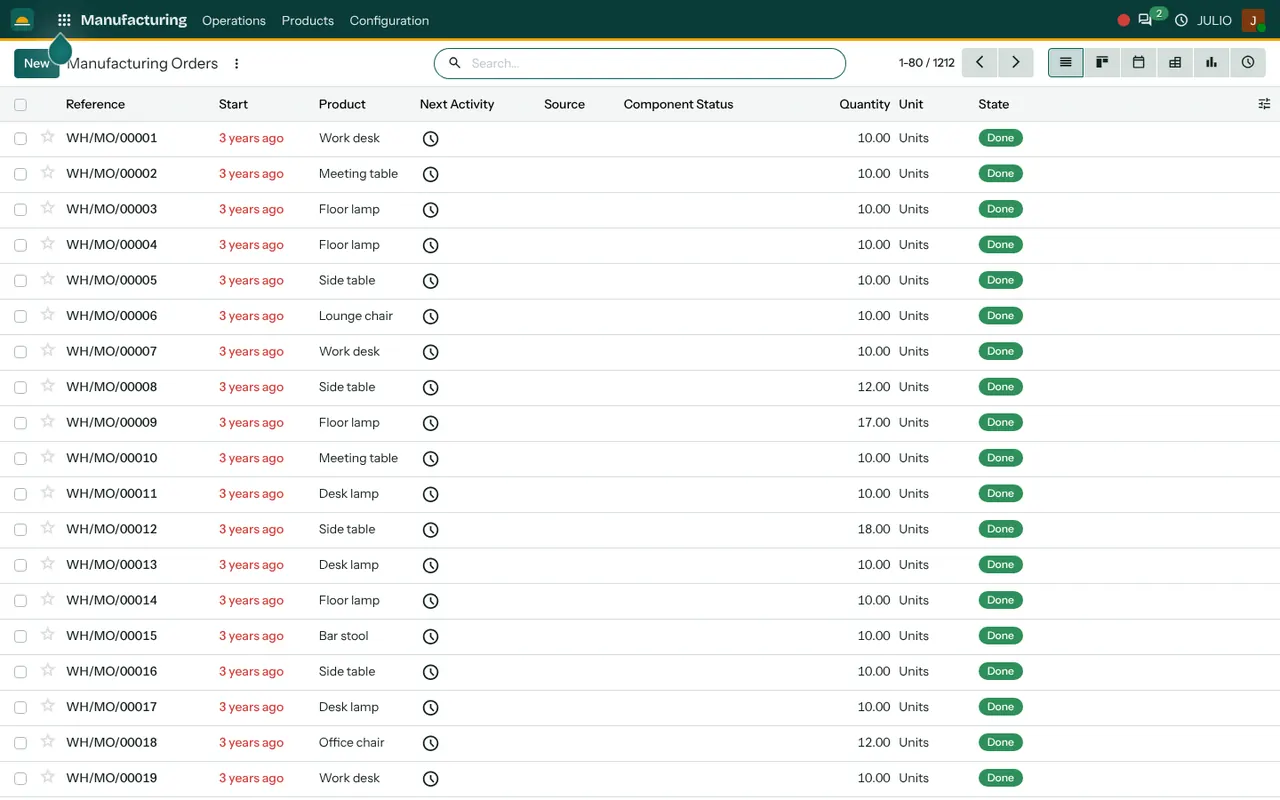
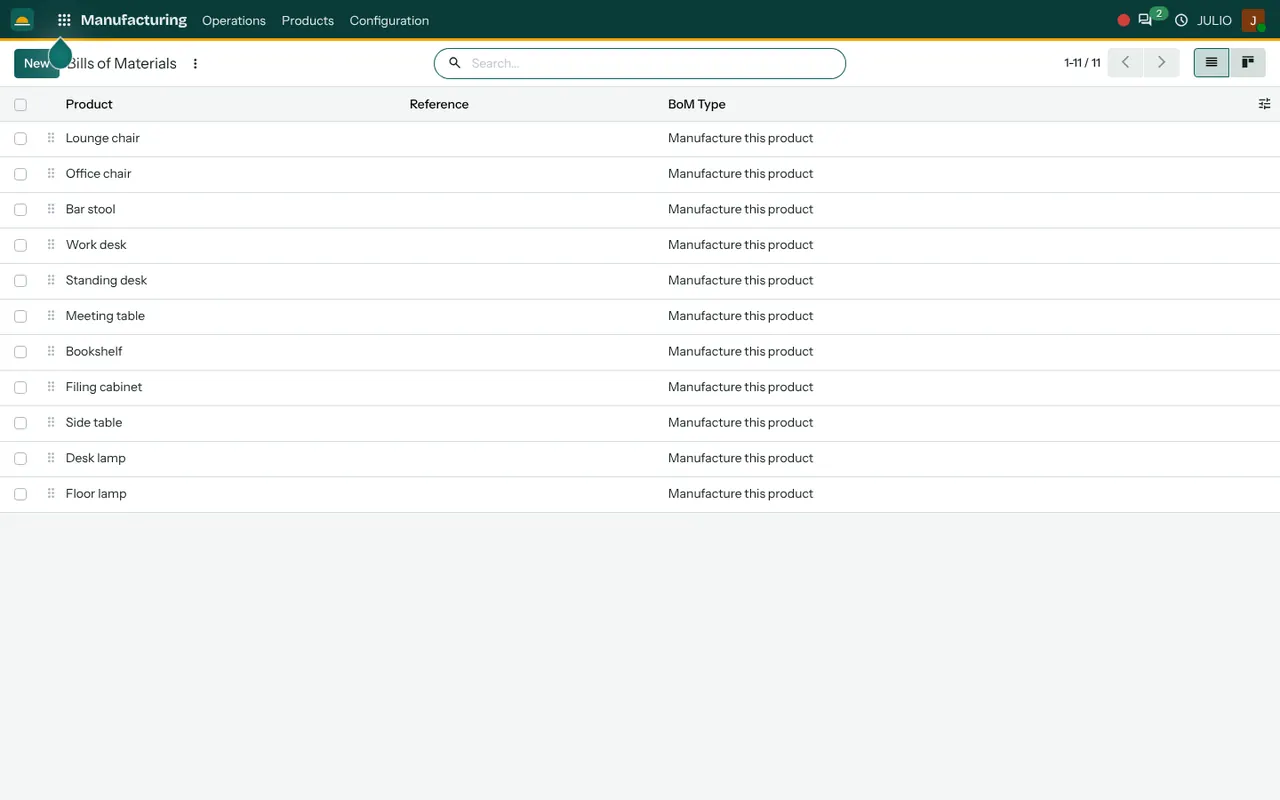
The two screens above show the heart of it: the production orders and the bills of materials behind them.
Bills of materials, one per product
The bills of materials list shows each product and a type reading "Manufacture this product". In the demo there are eleven, from a lounge chair and an office chair to a bookshelf and a floor lamp. Open one and you list the components and the quantity of each needed to make a single unit. Change a component once, and every later order follows.
Production orders with a clear state
Each order has a reference such as WH/MO/00001, a start date, the product, a quantity and a state. The list also has a column called Component Status, which tells you whether the parts are available before you start. A foreman sees a shortage on the list, not halfway through the shift.
Reserving parts, then adding finished goods
Confirming an order reserves the components from stock. When the order is marked done, the components are consumed and the finished product is added. The stock figures in Inventory change as a result, with no one adjusting them by hand.
Planning views for the shop floor
Besides the list, orders can be displayed as a board, a calendar, a pivot table, a graph and a list of activities. The calendar shows which day each batch is planned for, which helps when the manufacturing module for small factories has to share one cutting table between several jobs. The graph shows how much was produced over a period.
Work orders for the steps inside a job
Where a job has stages, such as cutting, stitching and finishing, the module can break an order into work orders, one per step. You switch this on only if you need it, so a simple workshop is not burdened with steps it does not use.
How the manufacturing module for small factories connects
Making things needs buying things, and the manufacturing module for small factories is built on that fact. Components flow in through Purchase, so a shortage on an order can become a supplier order. Finished goods land in Inventory, ready for delivery or for the Point of Sale. A customer order in Sales can start a production order when the product is made to order. Machines that make the goods can be tracked in Maintenance. We built the ERP for LAMBLILY, a garment manufacturer; the story is in our LAMBLILY ERP case study.
A short walk through one batch
Picture a unit that makes office chairs and relies on the manufacturing module for small factories to plan each batch. Each chair has a bill of materials: a steel frame, a foam cushion, upholstery fabric, a fittings kit and a packaging box. The planner raises a production order for ten chairs. The component status shows that fabric is short, so a purchase order goes to the supplier. Once the fabric arrives, the order is confirmed, the parts are reserved and work begins. When the chairs are finished, the order is marked done and ten chairs appear in stock.
| Step | What changes in the system |
|---|---|
| Bill of materials saved | The recipe exists once |
| Order raised | Quantity and start date recorded |
| Order confirmed | Components reserved in stock |
| Order done | Components consumed, product added |
Who starts with the manufacturing module for small factories
These kinds of business commonly start with production alongside stock and purchase. Open a page to see the common starting set.
Before the manufacturing module for small factories goes live
Preparing the recipes is the real work, and it is worth doing carefully. The software only repeats what you tell it, so a vague recipe produces a vague cost, while a precise one gives you a number you can quote against with confidence.
- A recipe for each product. List every component and quantity. Include packaging, which many units forget.
- Wastage. Decide whether the bill should include a normal allowance for off-cuts and rejects.
- Make to stock or to order. Some products are made ahead; others only when a customer asks.
- Steps or no steps. Choose whether you need work orders, or whether one order per batch is enough.
- Component codes. Each raw material needs its own code in stock before a bill can refer to it.
Conclusion
The manufacturing module for small factories is useful because it forces a good habit: every product has a written recipe, and every batch follows it. At DigiGrowvity we set up JULIO ERP for growing businesses, and in our experience setting up ERP projects the bills of materials take longer to gather than the software takes to configure. Once they are in, Purchase, Inventory and the production floor work from one set of figures.
Key Takeaways
- The manufacturing module for small factories records each product's components once in a bill of materials.
- Production orders show a state and whether the parts are available.
- Confirming an order reserves parts; finishing it adds goods to stock.
- Work orders can split a batch into steps when you need them.
- It is included in the ₹10,000 JULIO Local plan.