 DigiGrowvity
Friday night in a restaurant is a test of memory: which table ordered what, what the kitchen has run out of, who is covering the floor. ERP for restaurants moves that memory into a system that everyone reads from the same screen, from the waiter to the owner doing the month-end. JULIO ERP offers a table floor plan, a till, store room stock, supplier ordering and staff records, with no limit on how many devices sign in over your own Wi-Fi.
What ERP for restaurants needs to do
A full-service restaurant has more moving parts than a counter business. ERP for restaurants has to answer these five needs.
| Need | Module that covers it |
|---|---|
| Tables, floors and orders | Restaurant |
| Payment and the day's takings | Point of Sale |
| Store room and ingredients | Inventory |
| Supplier orders | Purchase |
| Waiters, cooks and cleaners | Employees |
- Orders tied to a table. A meal builds over an hour, and the bill must follow the table.
- A fast, calm till. At closing time, every cash and card payment should land in one tally.
- A store room that is not a guess. Rice, oil, paneer and gas run out at the worst moment unless the count is current.
- Buying for a menu. Suppliers deliver daily, and the same dish needs the same things every week.
- A team on shifts. Cooks and waiters come and go, and records of who works where must be kept somewhere.
The common starting set for ERP for restaurants
Most ERP for restaurants begins with the five modules below. It is a common set, and we confirm yours in discovery.
 RestaurantTables, floors and kitchen orders
 Point of SaleFast checkout for shops and counters
 InventoryStock across every warehouse
 PurchaseOrders to suppliers, on time
 EmployeesStaff records in one place
Restaurant, the floor plan that runs the room
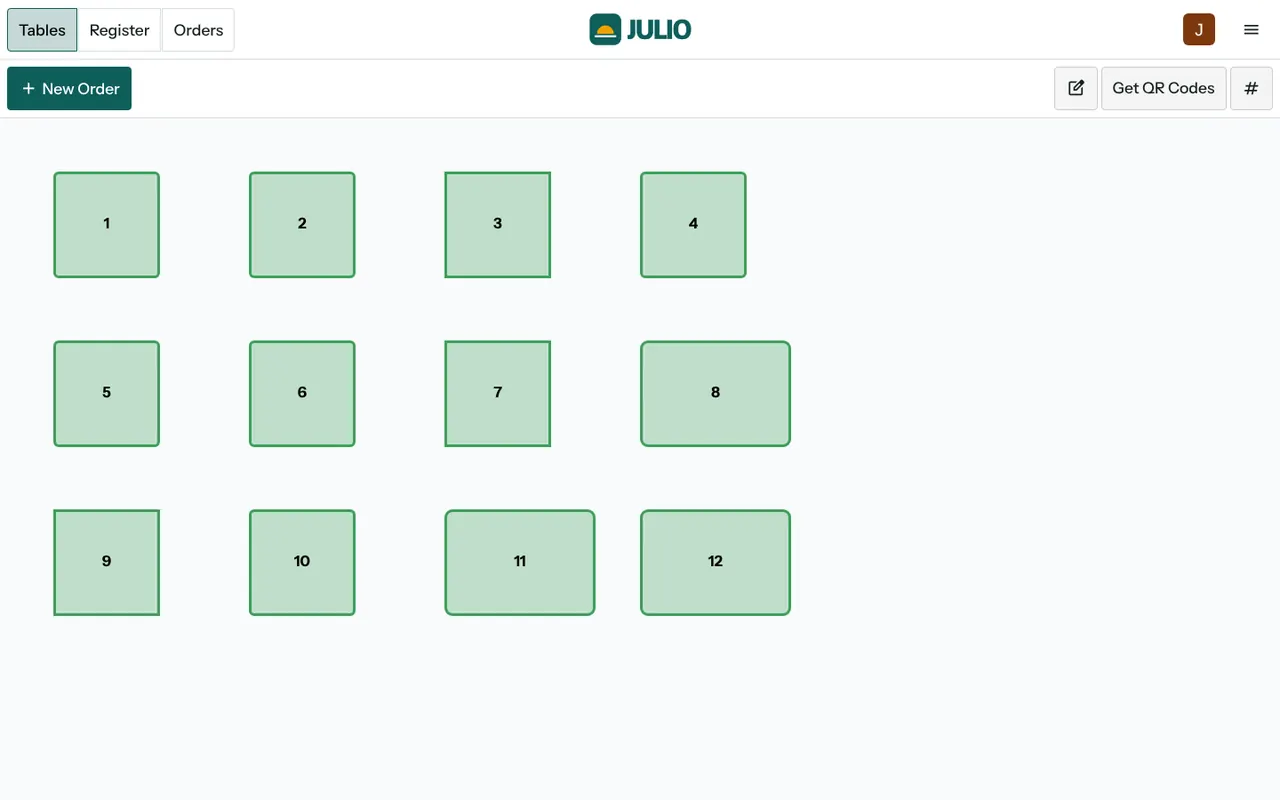
The floor screen shows numbered tables laid out like the room, with tabs for Tables, Register and Orders. A New Order button opens an order, and a Get QR Codes button is there for table codes. Whether guests order from their phones is something we settle in discovery. See the Restaurant module.
Point of Sale for payment
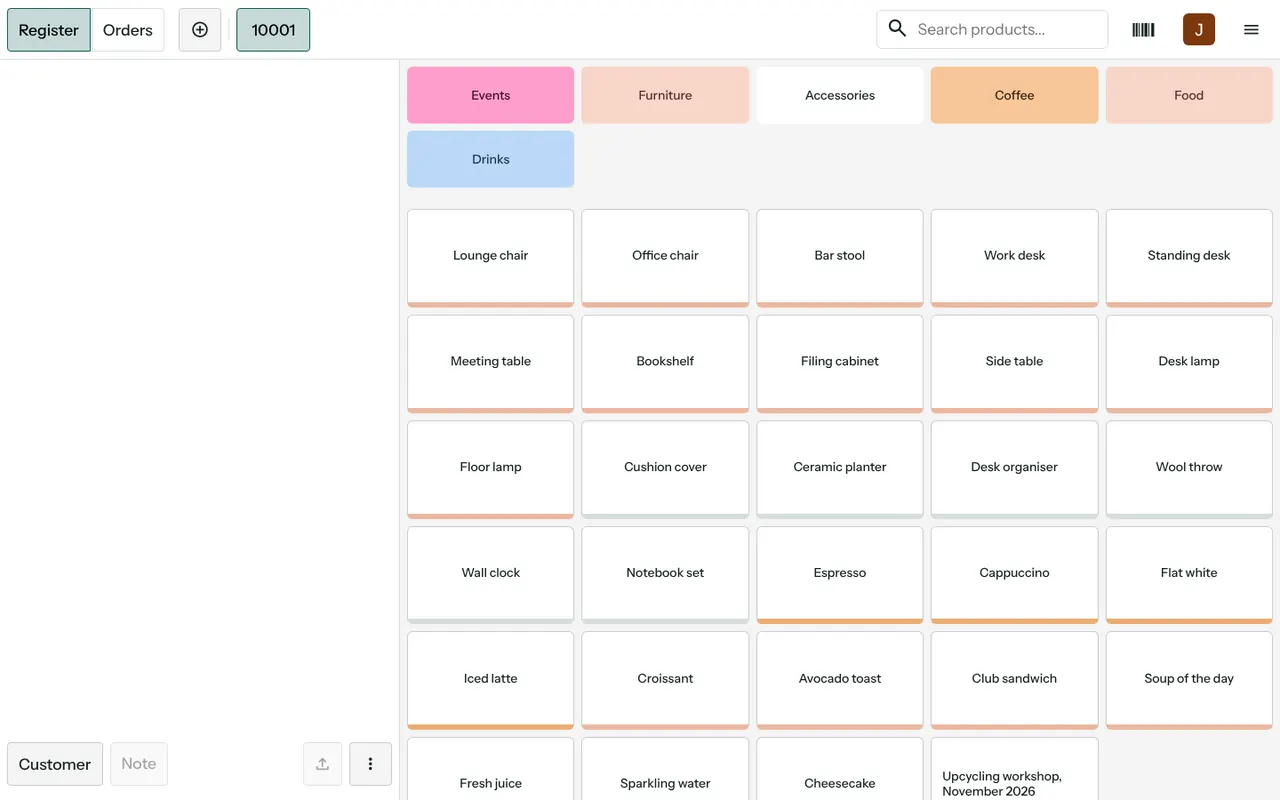
The till is where the table's order becomes a payment, and the sales it records feed the day's figures. A list of orders and an analysis report sit behind it. See the Point of Sale module.
Inventory for the store room
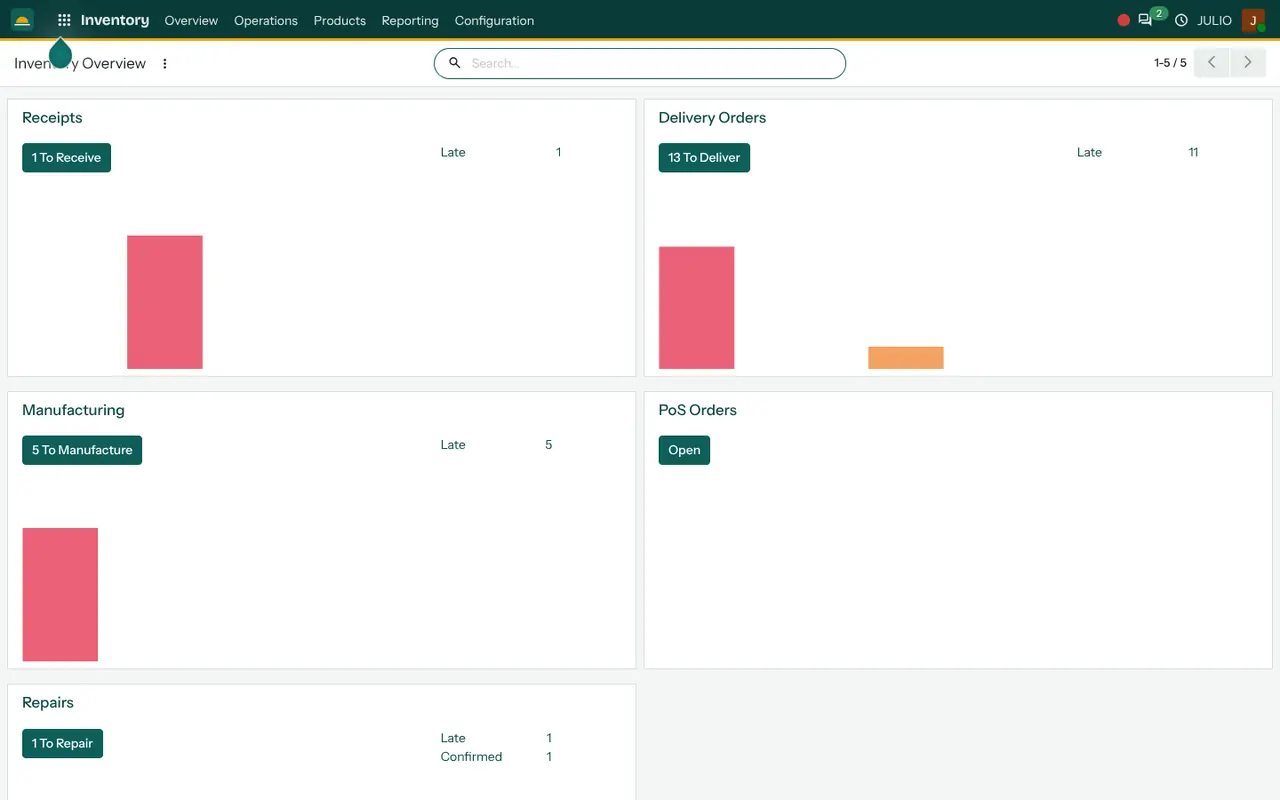
Items are counted by location, such as the kitchen store and the cold room, so a shortage in one place is not hidden by a surplus in another. The overview counts the receipts and deliveries still waiting. See the Inventory module.
Purchase for supplier orders
An order goes to a vegetable vendor or a dairy, is received against the delivery and is matched to the bill. A late supplier shows in the expected arrival column. See the Purchase module.
Employees for the team
Each person has a record, and departments group them into kitchen, floor and office. See the Employees module.
What ERP for restaurants looks like in JULIO
These are real screens from the JULIO demo, with demo data. The business behind the demo is a furniture firm, not a restaurant.
What JULIO does not do for restaurants
A back-office system is not the same as the equipment on the pass. Kitchen display screens, ready-made links to food-delivery apps, an online table-booking page and recipe costing that deducts every ingredient from each dish sold are not in the standard set. Printers for kitchen tickets are hardware that we confirm with you. All of it can be built as custom work, quoted separately.
How a first release of ERP for restaurants could look
A first release of ERP for restaurants should begin with the floor plan and the till, because that is where the day's work happens. Draw the tables as they are in the room and load the menu with prices, so staff see a screen that looks like the dining hall. Run a quiet lunch on it before a busy dinner. Then count the store room and add purchase orders, and finally the staff records.
If dinner service goes badly, the old bill book is still there, and the change is easy to pause. Train the cashier and two waiters first; they teach the rest of the floor faster than any manual does.
One evening service, from seating to closing
Take a forty-seat restaurant on a weekend. Guests are seated at table six, and the waiter opens an order against it. More dishes are added through the evening. At the end, the bill is taken to the till and paid. The manager then glances at the day's order list to compare takings with the count in the drawer. In the morning, the store keeper checks stock and sends a supplier order. Done well, ERP for restaurants takes that routine from three notebooks to one screen, and that is why the owner ends up free to stand on the floor.
Conclusion
ERP for restaurants earns trust when the Friday rush no longer depends on one person's memory. At DigiGrowvity, we set up JULIO ERP for growing businesses, and in our experience of setting up ERP projects, a restaurant does best with the floor plan and the till first, then the store room. We have not published a restaurant project, so this is a common starting set that we confirm with you.
Key Takeaways
- ERP for restaurants ties tables, orders, payment, store room, suppliers and staff together.
- The usual starting set is Restaurant, Point of Sale, Inventory, Purchase and Employees.
- Start with the floor plan and till, and add the back office after.
- Kitchen displays, delivery-app links and online booking are custom work, quoted separately.
- The plan is ₹10,000 once, with unlimited users and 1 year of free support.