 DigiGrowvity
At eight in the morning a warehouse supervisor needs three answers: what arrived overnight, what must leave today, and what is already late. When those answers live in a register, a spreadsheet and somebody's head, the day starts with an argument. ERP for warehouses puts them in one place. JULIO ERP offers stock by location, receipts and deliveries, supplier orders, customer orders, vehicle records and live dashboards, with no limit on users on your own network.
What ERP for warehouses needs to do
A warehouse is judged on accuracy and on dispatch on time. The needs below follow the path of goods through the building.
| Need | Module that covers it |
|---|---|
| Quantity by location and item | Inventory |
| Inbound orders to suppliers | Purchase |
| Outbound orders from customers | Sales |
| Vehicles, drivers and fuel | Fleet |
| A live view of the whole floor | Dashboards |
- Goods in with a record. Every receipt should be checked against the order that expected it, not accepted on trust.
- Stock that is findable. Knowing there are 200 cartons somewhere is not enough. You need to know which location holds them.
- Dispatch that keeps promises. Orders waiting to ship, and those already past their date, should be impossible to overlook.
- Reserved is not available. Stock promised to one order should not be sold again.
- Transport under control. Vehicles, drivers and servicing cost money when they are unplanned.
The common starting set for ERP for warehouses
Warehouses usually begin ERP for warehouses with the five modules below. It is a common starting set, and we confirm yours in discovery, since a storage-only godown and a distribution hub differ.
 InventoryStock across every warehouse
 PurchaseOrders to suppliers, on time
 SalesQuotations, orders and follow-ups
 FleetVehicles, fuel and servicing
 DashboardsLive numbers for the whole business
Inventory, where the building is mapped
In ERP for warehouses, Inventory is the core. Stock is shown by location and product with the counted quantity, the reserved quantity and a replenishment shortcut. Transfers between locations are recorded as documents with a reference and a status, and the overview groups work into receipts and delivery orders with late counts. See the Inventory module.
Purchase for what is coming in
A purchase order tells the dock what to expect. It carries the vendor, the total and an expected arrival date, which turns red once it has passed. That is a ready-made list of late inbound deliveries for ERP for warehouses. See the Purchase module.
Sales for what must go out
Customer orders drive dispatch. The order list shows a count of orders to deliver and orders to invoice, which are the two figures a dispatch supervisor and an accounts clerk each need. See the Sales module.
Fleet for the vehicles that carry it
In ERP for warehouses, vehicles are kept as records with a driver and contracts, shown as a board whose columns are stages such as New Request, To Order and Registered. That gives a simple home for the trucks and vans you own or lease. See the Fleet module.
Dashboards for the supervisor's morning
The operations dashboard shows deliveries to ship, receipts expected, late transfers, open manufacturing, stock value and a chart of goods in and out per month. See the Dashboards module.
What ERP for warehouses looks like
These are real screens of ERP for warehouses from the JULIO demo database. The demo is a furniture and fit-out company with its own warehouse, so the items are chairs, panels and lamps.
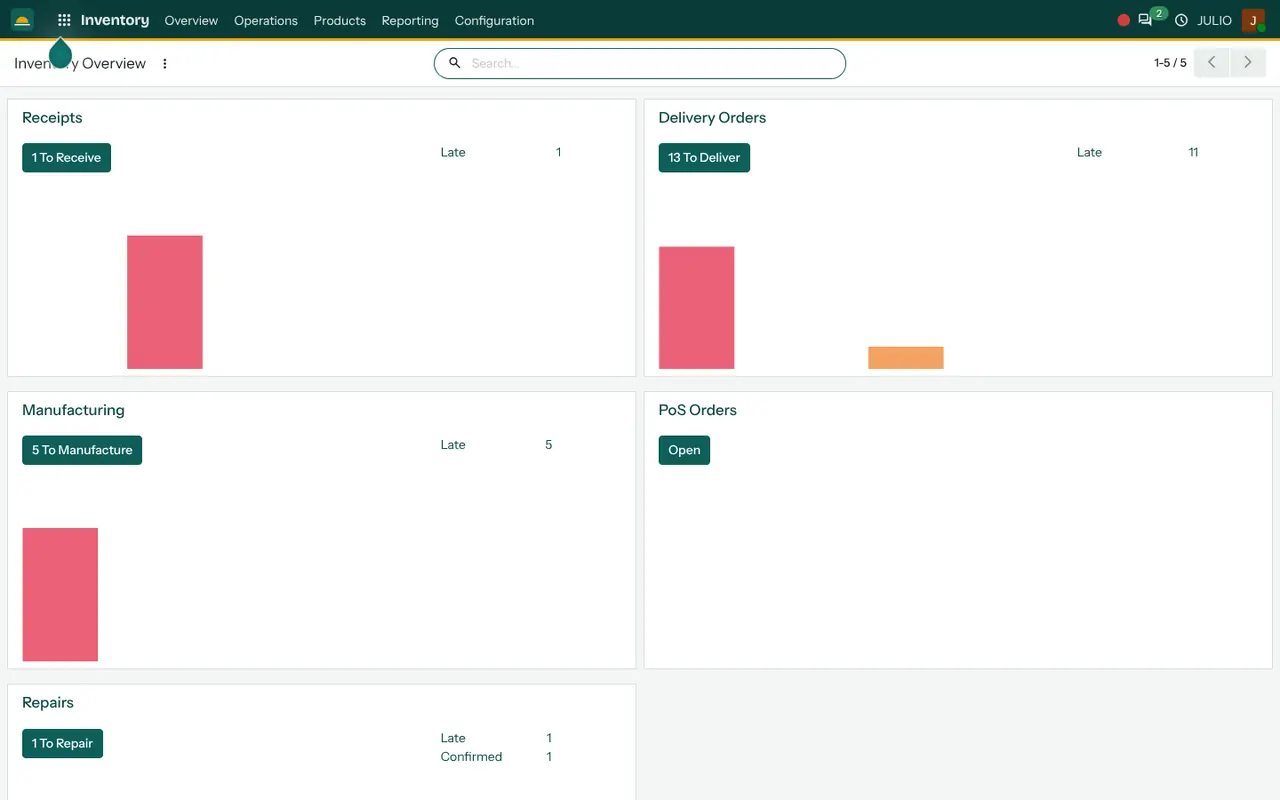
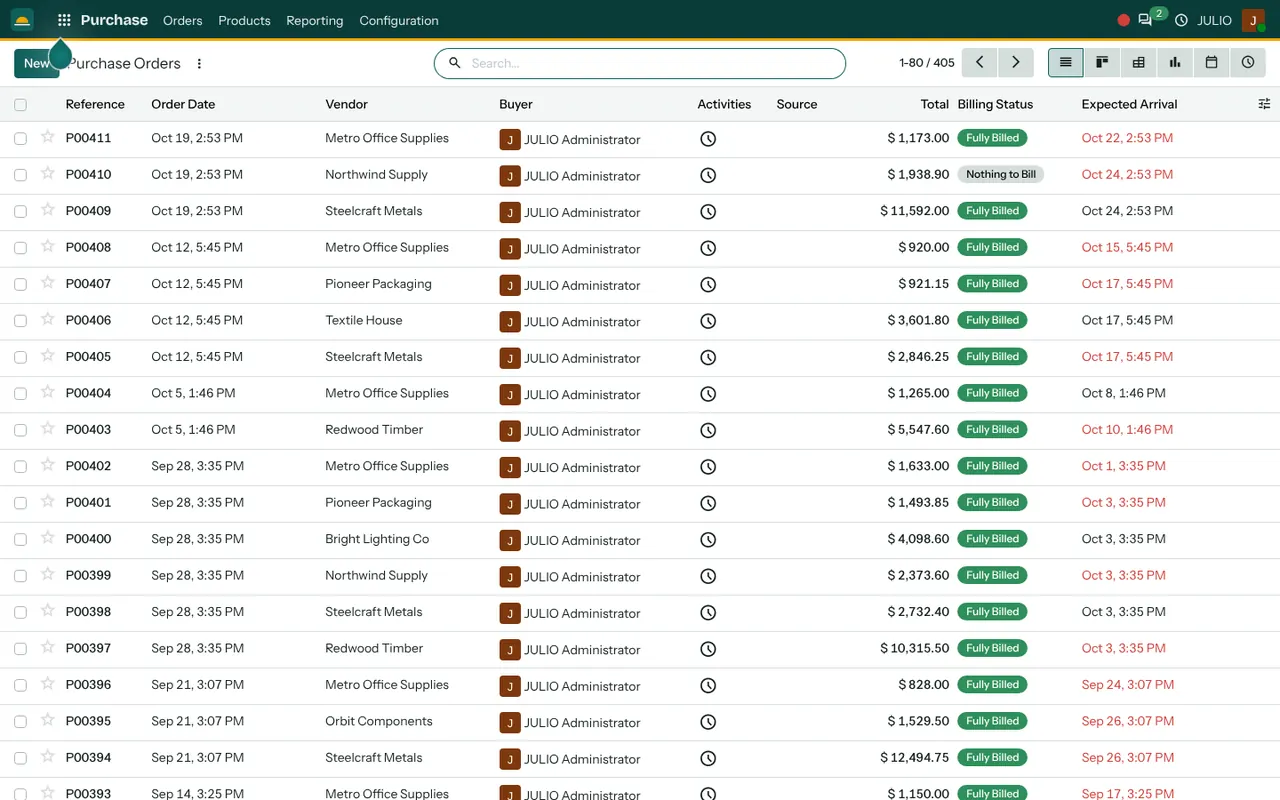
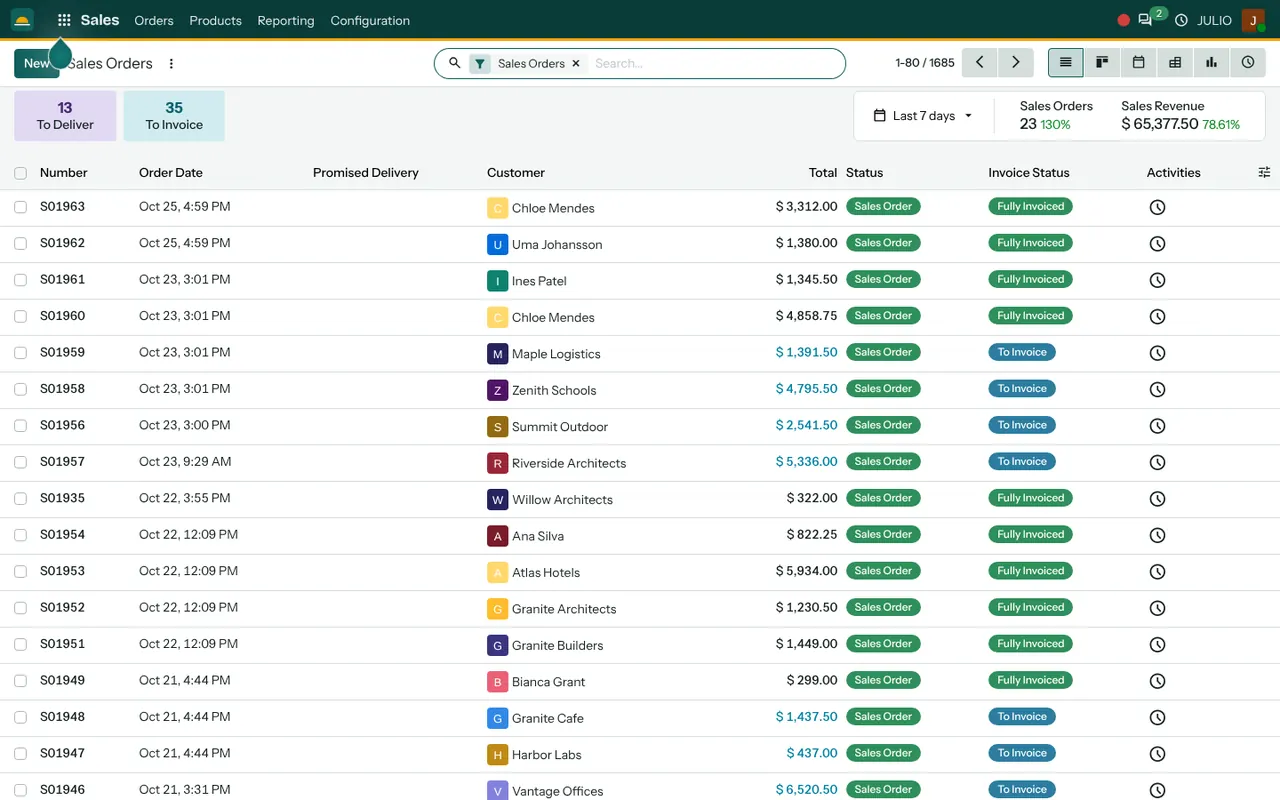
The inventory overview presents tiles for receipts and delivery orders, each with a late count in red. The purchase list shows each order's vendor, total, billing status and arrival date. The sales order list adds the badges To Deliver and To Invoice, and a column showing whether each order has been invoiced.
What JULIO does not do for warehouses
It helps to know where the edges of ERP for warehouses are before a project begins.
- Handheld scanning and put-away guidance. Barcode guns, mobile apps for pickers and directed put-away are custom work, quoted separately.
- Bin-level maps and slotting. Locations can be set up, but rack-by-rack optimisation and pick-path planning are not part of the starting set.
- Transport management. The fleet records vehicles, but route planning, GPS tracking and freight rate engines are custom.
- Customs and e-way bill filing. Filing happens on the government portals, by you or your accountant. Any link to them is custom.
- Automation equipment. Links to conveyors, sorters and robots are not included.
How a first release of ERP for warehouses could look
A first release of ERP for warehouses is a stock count and a location list. Locations are named in the way your team already speaks, whether aisle and rack or simply zone, and opening quantities are counted into them. Purchase orders and receipts follow, so inbound goods are checked against orders. Customer orders and deliveries are added once receipts are reliable. Fleet and the dashboards come last, by which time the numbers behind them are worth watching.
A short training session for each shift is part of the plan. Receiving staff learn to confirm a receipt against its order, dispatch staff learn the delivery list, and supervisors learn to read the late counts. Because each role sees only a few screens, ERP for warehouses stays practical on a busy floor.
Conclusion
ERP for warehouses succeeds when the count is right on day one and stays right afterwards. At DigiGrowvity we set up JULIO ERP for growing businesses, and in our experience of setting up ERP projects, a sensible start is to name the locations the way the floor already thinks about them. Receipts, dispatch and the supervisor's dashboard then build on counts people trust.
Key Takeaways
- ERP for warehouses follows goods from inbound order to receipt, location, dispatch and vehicle.
- The common starting set is Inventory, Purchase, Sales, Fleet and Dashboards.
- Reserved quantity is shown beside counted quantity, so promised stock is not sold twice.
- Handheld scanning, put-away guidance, GPS and automation links are custom work, quoted separately.
- The plan is ₹10,000 once, with unlimited users and 1 year of free support.