 DigiGrowvity
An owner's Monday usually starts with questions that sit in different places. Who owes us money? Which deliveries are late? Are sales up or down against last month? Normally the answers come from three people and two spreadsheets, each slightly out of date. The dashboards module for business owners in JULIO ERP answers them on one screen, using the live records from sales, stock, accounts and people, so nobody has to compile anything first.
What the dashboards module for business owners does
The dashboards module for business owners opens with a greeting and a date, then offers five tabs: Overview, Sales, Operations, Finance and People. A switch in the top right sets the period to 30 days, 90 days or 12 months.
Overview: the whole business in one glance
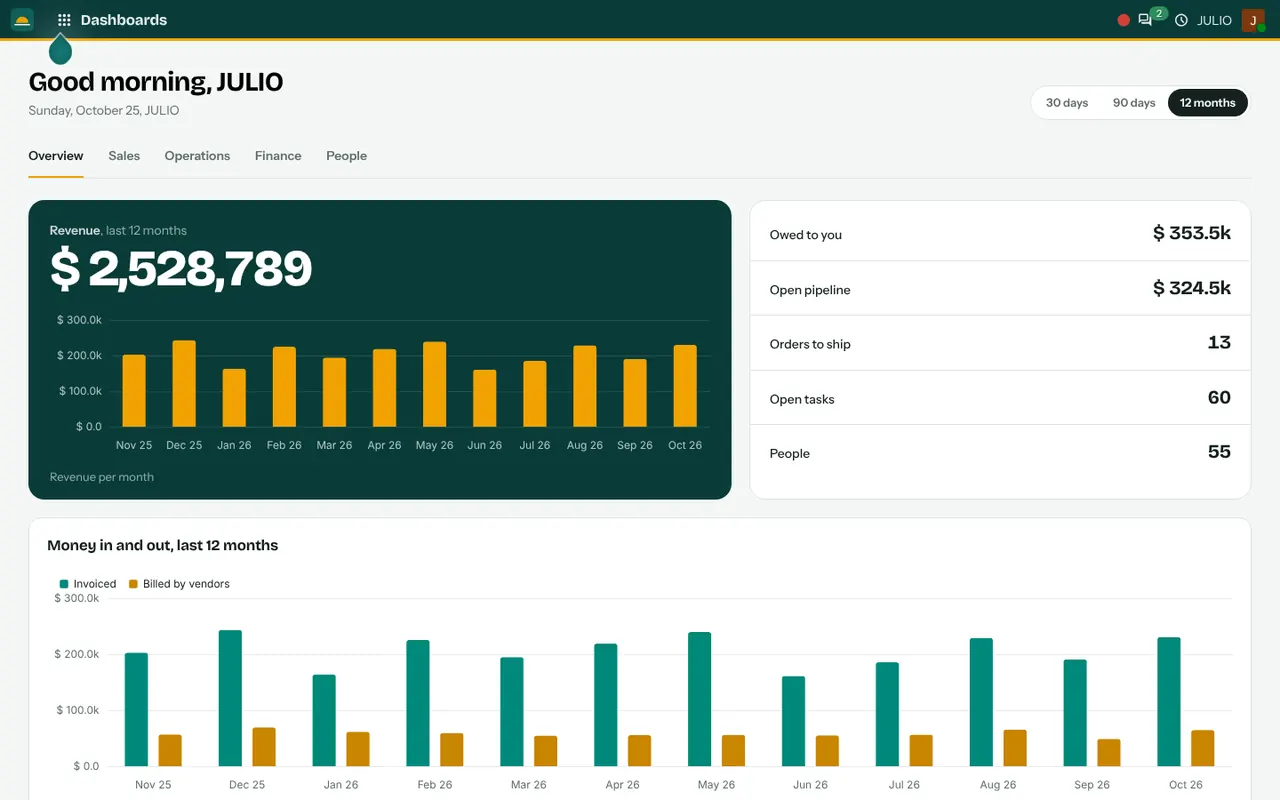
In the dashboards module for business owners, the first tab opens with a large revenue figure for the period and a bar for each month. Beside it sits a short panel of numbers: what is owed to you, the value of the open pipeline, orders to ship, open tasks and the number of people. A second chart sets money invoiced against money billed by vendors, month by month.
Sales: what is moving
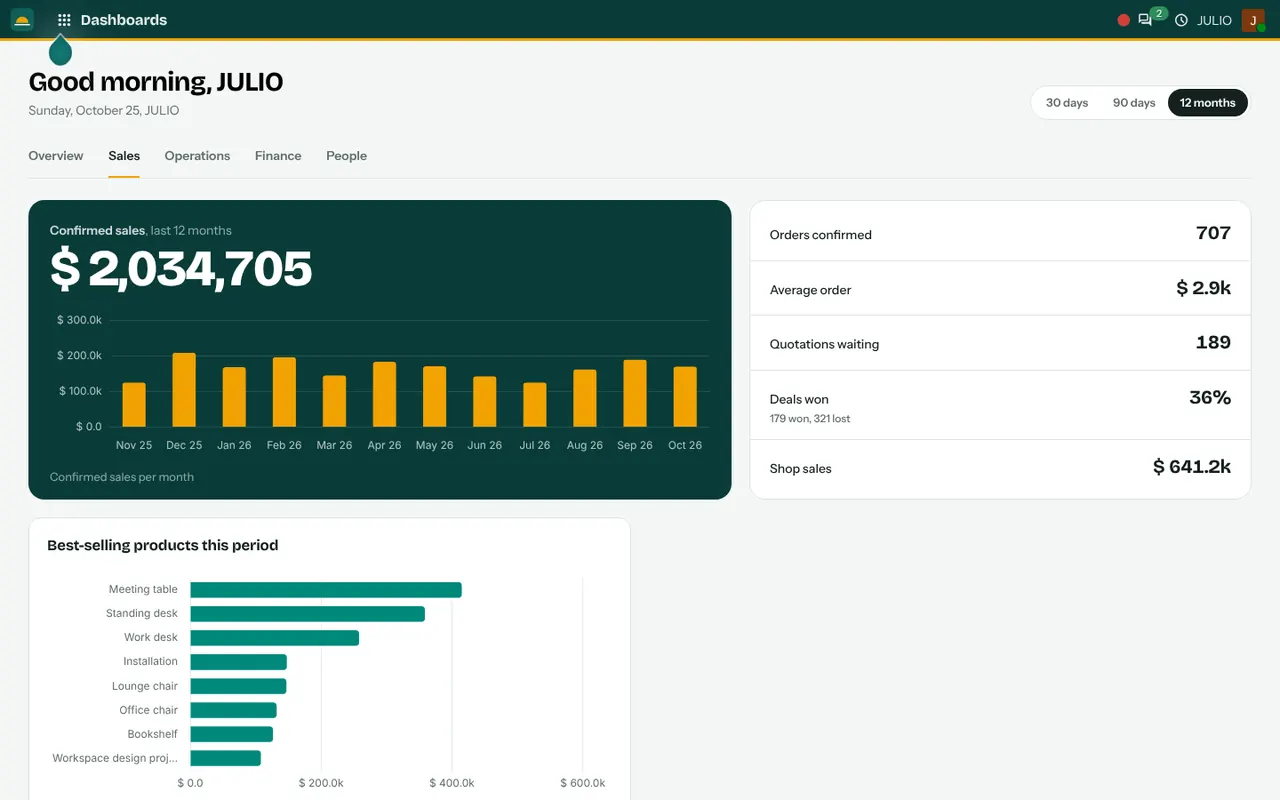
This tab shows confirmed sales, the average order, quotations still waiting, deals won and shop sales. It also lists best-selling products, orders per month and a table of salespeople, so you see who is closing the business.
Operations: what is stuck
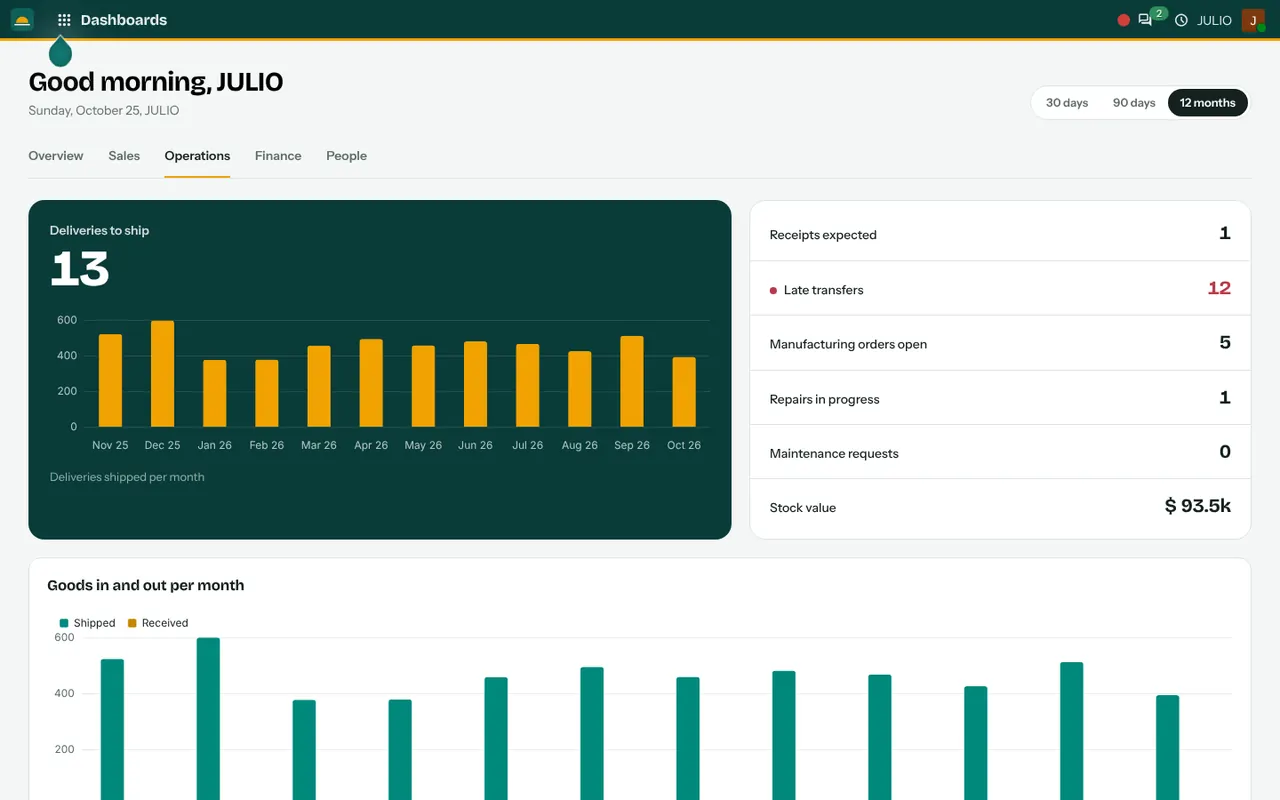
Here the headline is deliveries to ship. The panel counts receipts expected, late transfers, open manufacturing orders, repairs in progress and maintenance requests, plus the value of stock. In the demo screen, late transfers are marked in red, which is the number an operations manager looks at first.
Finance: who owes whom
The finance tab shows invoiced revenue, vendor bills, what you are owed, what is overdue, what you owe and payments received. Unpaid invoices are grouped by age, which tells you whether a collections problem is recent or old.
People: who is in and who is off
The people tab shows headcount, who is checked in now, who is off today, time off and expenses waiting for approval, candidates, people by department and open positions.
How the dashboards module for business owners connects to JULIO
The dashboards module for business owners holds no data of its own. Every figure is read from the module that owns it, so it cannot disagree with the records. Sales numbers come from Sales and CRM, stock and late transfers from Inventory, money owed from Invoicing, and headcount from Employees and Attendances. Because the sources are shared, the pipeline figure on Overview matches the one a salesperson sees on a deal board, and the stock value matches the stock list. If two numbers ever differ, the cause is a record that has not been entered yet, not a second version of the truth.
A short walk through a Monday morning
An owner of a small manufacturer opens the Overview tab of the dashboards module for business owners with her coffee. The owed figure is higher than last week, so she moves to Finance and sees that the unpaid invoices are clustering in the oldest age band. She phones two customers.
On Operations, the late transfers count is higher than usual, so she asks the stores lead why. On People she sees two people off today and approves a pending expense. In ten minutes she has asked four useful questions, and none of them needed a report to be built or a colleague to be interrupted. That is the real gain: the numbers arrive while the question is still fresh, and the follow-up happens the same morning.
What each tab of the dashboards module answers
| Tab | The question it answers |
|---|---|
| Overview | How is the business doing overall? |
| Sales | What is selling and who is selling it? |
| Operations | What is late or stuck? |
| Finance | Who owes us, and whom do we owe? |
| People | Who is here, and what needs approval? |
Who starts with a dashboards module for business owners
Owners who manage through numbers, and not only by walking around, tend to ask for this first. These kinds of business commonly begin with it in their first set. Open a page to see the full list for that business.
Before you use the dashboards module for business owners
The screens are ready on the first day, and no report needs to be built, but a few habits decide whether they are used.
- Which period you read. Thirty days suits an operations manager, while twelve months suits an owner judging the year.
- Who sees which tab. An owner may want all five, a storekeeper only Operations, and finance staff only Finance. Access is agreed during set-up.
- When you look. A fixed weekly slot, such as Monday morning, turns the dashboard into a routine rather than something opened in a crisis.
- How clean the records are. A dashboard repeats what the system knows. If invoices are entered late, the owed figure is late as well.
Conclusion
The dashboards module for business owners is where the other modules prove their worth, because every figure on it is only as good as the records behind it. At DigiGrowvity, we set up JULIO ERP for growing businesses, and in our experience owners trust a dashboard once they have checked a few numbers against what they know. Start with Invoicing and Sales entered daily, and the first morning's figures will already be useful.
Key Takeaways
- The dashboards module for business owners has five tabs covering overview, sales, operations, finance and people.
- A period switch sets 30 days, 90 days or 12 months.
- Late transfers, overdue invoices and money owed are visible without a report.
- Every figure is read live from the module that owns it.
- It is included in the ₹10,000 JULIO Local plan.