 DigiGrowvity
At ten people, everyone knows who does what. At thirty, someone is always asking who manages the workshop, how many people sit in sales, and where the new joiner's details went. An employee module for growing teams answers those questions from one directory. In JULIO ERP, the Employees module holds a record for every person, groups them into departments with managers, and shares that record with attendance, leave, expenses and timesheets.
What the employee module for growing teams does
An employee module for growing teams starts with a simple idea: one person, one record, used by everything else. Nothing is copied from sheet to sheet, which is why a change of manager or title is made once and appears everywhere.
A directory of cards
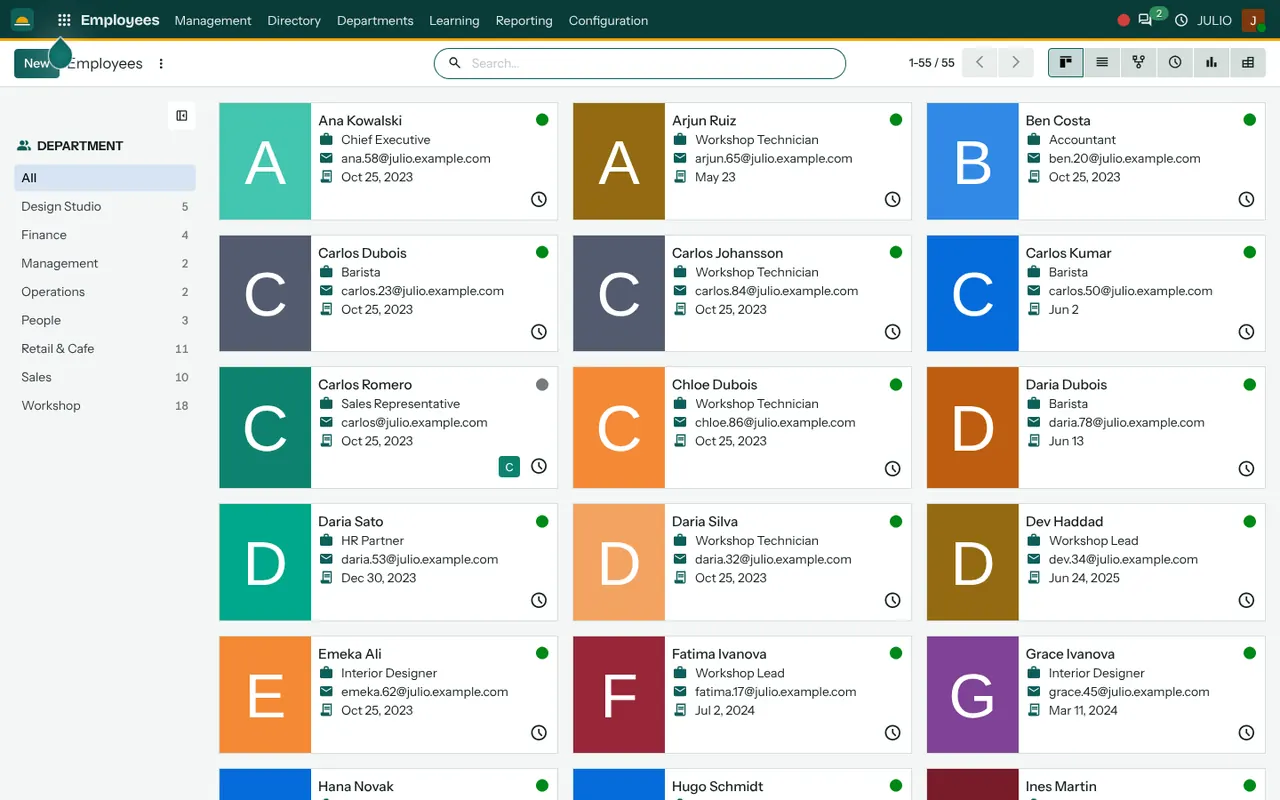
The demo directory shows people as cards, each with a coloured initial, a name, a job title such as Workshop Technician, Barista or Interior Designer, and a work email. A status dot at the corner shows whether the person is present. Because the card is a summary, anyone can find a colleague quickly, and the same data is also available as a list.
Departments on the side
A panel on the left of the directory counts people by department: in the demo it runs from Design Studio and Finance to Retail and Cafe, Sales and Workshop, with the headcount beside each name. Click a department and the cards narrow to that group, which gives a department head a ready-made view of their own team. Total headcount shows at the top, so a manager does not count by hand.
A page of departments with managers
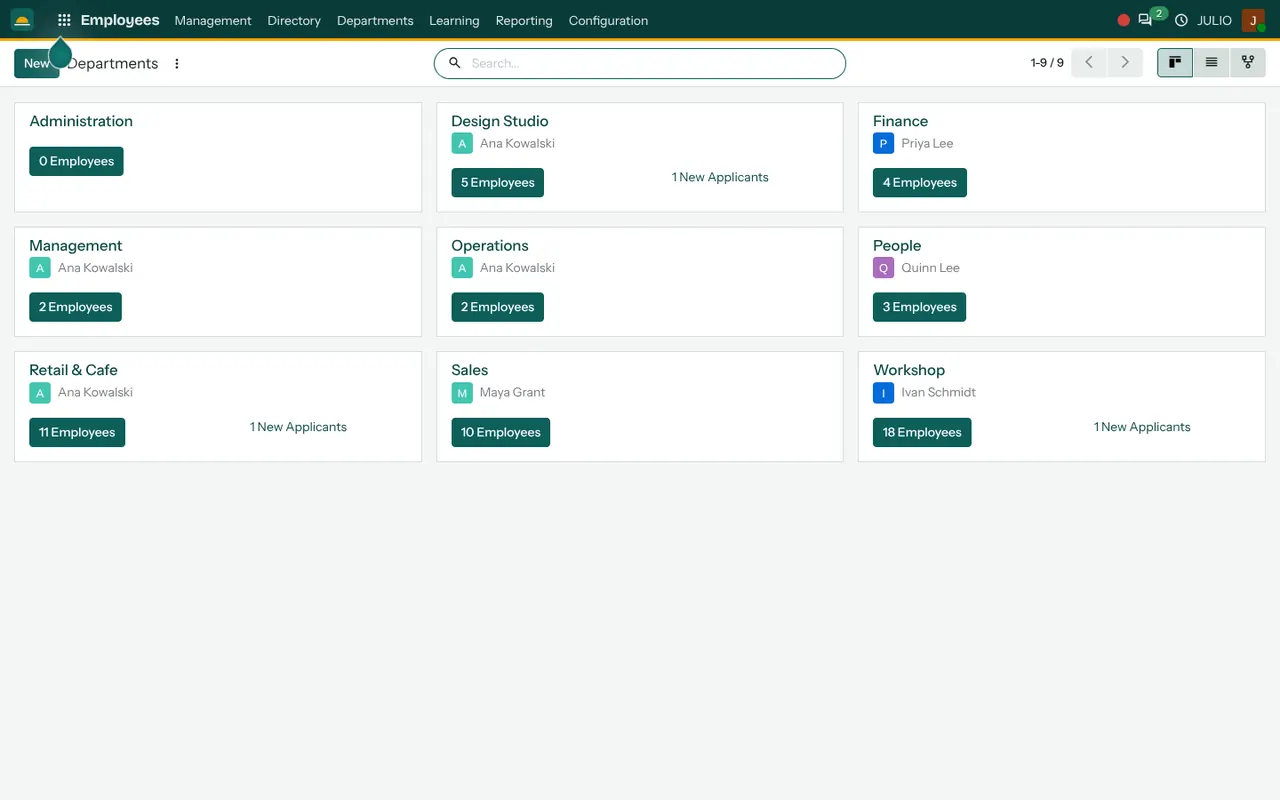
The Departments screen is a card for each unit, with its manager, a button showing the number of employees and, where relevant, a count of new applicants for open roles. In the demo, a department can be viewed as cards, a list or a hierarchy, which helps a founder who needs to see how the units fit together.
Several views of the same people
The directory also offers a list, an org chart, an activity view and a pivot. The org chart draws the reporting lines, which matters once a business has more than one level of management.
A menu built for the whole people side
The top menu reads Management, Directory, Departments, Learning, Reporting and Configuration, which shows how the module extends beyond a list: it is the base for the other people modules.
How the employee module for growing teams connects to JULIO
Nearly every people feature hangs from this record. Attendances records check-ins against each person. Time Off knows whose leave to approve because the manager is stored here. Timesheets and Expenses use the same person, so a claim and a logged hour belong to a real record. Recruitment turns an accepted applicant into an employee without retyping their details.
A short walk through one new joiner
A workshop hires a technician, and the employee module for growing teams carries the new person from offer to first day. After the offer is accepted in Recruitment, the HR person opens the Employees module and creates the record from the applicant. They add the job title, work email, department and manager. From that moment the technician can check in, request leave and submit a claim, because those modules already know who they are. The department card shows one more employee, and the manager's team grows by one on the org chart.
If the technician later moves from the workshop to operations, the department is changed on the same record, and past activity stays attached to the person instead of being lost.
Here is how an employee module for growing teams answers everyday questions.
| Need | Where to look |
|---|---|
| Who is in this department? | Left panel and department card |
| Who reports to whom? | Org chart view |
| How many people do we have? | Directory total |
| Who is present today? | Status dot on the card |
Who starts with an employee module for growing teams
Any business with a payroll to run and a team to schedule needs staff records, and several common starting sets include it from day one.
- Point of sale counters
- Clinics
- Hospitals
- Cafés
- Restaurants
- Hotels and resorts
- Salons and spas
- Gyms and fitness
- Schools and training
Before you switch on an employee module for growing teams
This is the module where tidy data pays back for years, so decide the structure before loading names into the employee module for growing teams. A small amount of care now avoids a messy directory later, when the headcount has doubled.
- Department list. Keep it to the real units that have a manager. You can split them later.
- Job titles. Agree a short, consistent list so reports can group people.
- Manager chain. Name one manager for each person, since leave approvals follow it.
- What you store. Decide which personal details belong in the system, such as contact and emergency numbers, and who may see them.
- Loading existing staff. A spreadsheet of current employees can be imported once the columns are agreed.
- People who leave. Decide how departures are recorded, so former staff drop out of the directory without their history disappearing.
Conclusion
An employee module for growing teams is the quiet foundation under attendance, leave and claims. At DigiGrowvity, in our experience setting up ERP projects, the businesses that spend an afternoon getting departments, titles and managers right find every later people feature easier to switch on. Begin with staff records and Attendances, then add leave and hiring as the team grows.
Key Takeaways
- Every person has one record that the other modules share.
- Departments show headcount, a manager and new applicants.
- The directory can be viewed as cards, a list or an org chart.
- Managers stored here decide who approves leave and claims.
- An employee module for growing teams ends the hunt for who does what.
- It is part of the ₹10,000 JULIO Local plan.