 DigiGrowvity
An agency sells hours, but hours are the easiest thing to lose. They sit in memory, in chat messages and in half-filled sheets, and the invoice at the end of the month is a guess. A timesheet module for agencies fixes that by recording time where the work is planned. In JULIO ERP the Timesheets module logs each entry against an employee, a project and a task, so what you billed can be compared with what was actually spent.
What the timesheet module for agencies does
A timesheet module for agencies has a narrow job, and does it by keeping every entry in the same shape. That sameness is what makes later reports quick to read.
One line per piece of work
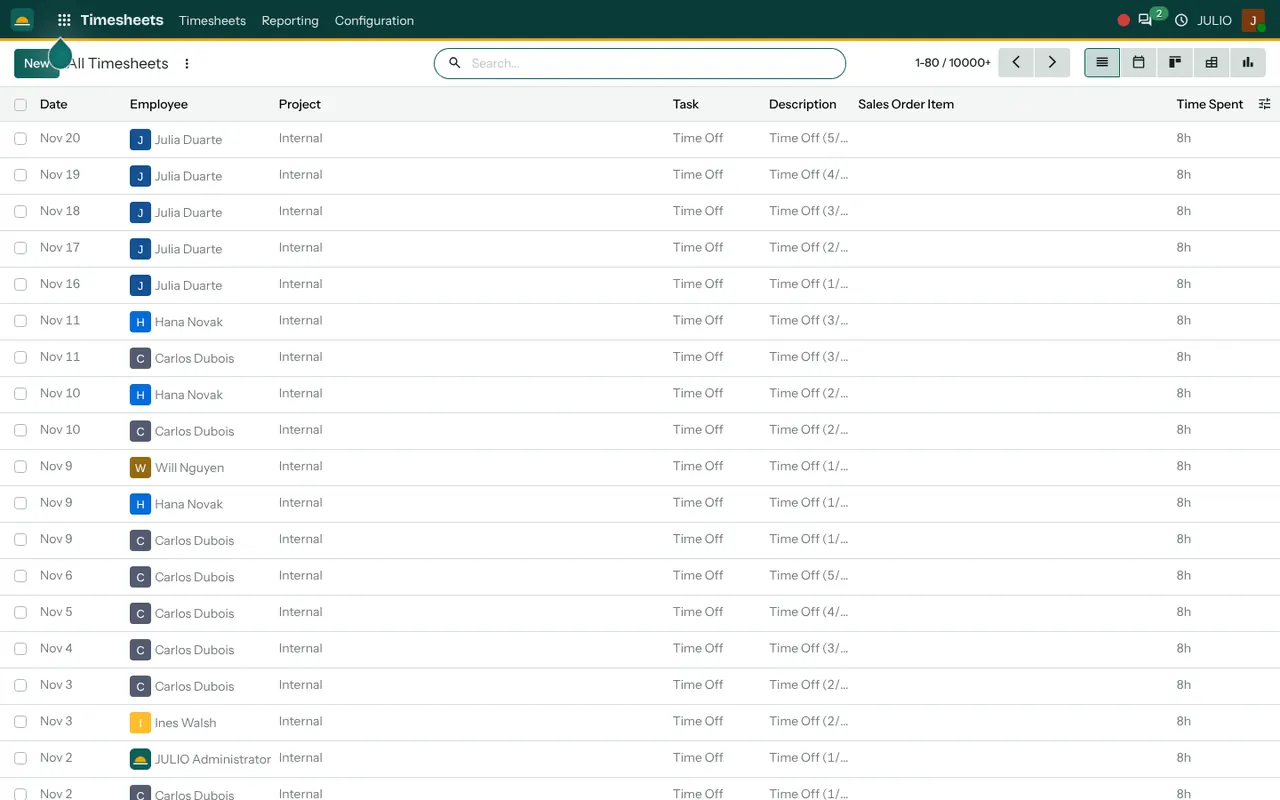
The All Timesheets screen lists Date, Employee, Project, Task, Description, Sales Order Item and Time Spent. A line is one person, on one day, on one task, for a stated number of hours. Because the same structure is used for everybody, a month of entries can be sorted, grouped and added up without cleaning anything first. Missing days are easy to spot, since a gap in the dates shows up in the calendar view.
Hours attached to a project and a task
Every line points to a project and, inside it, a task. The same hours therefore appear in two places: on the timesheet list and on the task as Time Spent in the Project module. Nobody enters the figure twice, and the progress bar on a task moves as the entries arrive.
A link to what you sold
The Sales Order Item column is there so that hours can be tied to a line on a sales order. For an agency that sells a retainer or a block of days, that link is how the invoice and the effort stay comparable. Whether you bill by the hour or at a fixed fee, you can still see the effort behind it.
Time off that records itself
The demo screen shows many entries on an Internal project with a Time Off task, each for 8h, with a description naming the day of the leave. That is the Time Off module writing its approved leave into the timesheet automatically, so a week is not left looking short.
Five ways to look at the same hours
Next to the list sit icons for a calendar, a kanban board, a pivot table and a chart. A timesheet module for agencies is only as useful as its reports, so these views matter. A calendar shows who worked when, while the pivot answers a question such as hours per employee per project in one grid.
How the timesheet module for agencies connects to JULIO
Timesheets sit between three modules. The task and project come from Project, the employee comes from Employees, and the sales order item comes from Sales. Approved leave arrives from Time Off, and the amount you finally bill goes out through Invoicing. If your staff also check in at the door, Attendances records their presence separately from the work they log.
A short walk through one retainer month
Picture a small design agency with a monthly retainer for a hotel group, using the timesheet module for agencies from the first day of the month. The sale lists forty hours. A designer logs two hours on Monday for a social banner, three on Tuesday for a brochure revision, and one hour of client call. By the middle of the month, the project manager opens the pivot, filters by that project and sees how many of the forty hours are gone. If the pace is too fast, the conversation with the client happens before the month ends, not after the invoice.
Use the timesheet module for agencies like this when someone asks a question.
| Question | View to use |
|---|---|
| Who worked on this client? | Pivot by employee |
| How full was last week? | Calendar |
| Which task ate the hours? | List grouped by task |
| Trend over the quarter | Chart |
Who starts with a timesheet module for agencies
Teams that bill their time, or that need to know what a job really cost, begin here. These common starting sets include timesheets.
What to decide before switching on a timesheet module for agencies
Software cannot create the habit of logging time, which is why the early rules matter, but a few choices make the habit stick. Settle them before the timesheet module for agencies is switched on.
- The rhythm. Decide whether people log at the end of each day or each week. Daily is more accurate, weekly is lighter.
- The granularity. Half an hour is enough for most agencies. Five-minute entries create noise.
- Internal work. Create an internal project for meetings, training and admin, so that unbillable time is visible rather than hidden.
- Who corrects mistakes. Name the person who can edit another person's entry, and when.
- What you bill from it. Agree early which sales order items are hourly, which are fixed fee and which are tracked only for cost.
Conclusion
A timesheet module for agencies is a mirror: it shows how the week was really spent. At DigiGrowvity, in our experience setting up ERP projects, the habit forms faster when the first version is small, with one internal project, a short task list and a Friday reminder. Connect it to Project and Sales, and the hours you log become the evidence behind every invoice.
Key Takeaways
- Each entry records employee, project, task, description and time spent.
- Hours appear on the task automatically, so they are entered once.
- A sales order item column links effort to what was sold.
- Approved leave is written into the timesheet as time off.
- A timesheet module for agencies turns guessed invoices into evidence.
- It is part of the ₹10,000 JULIO Local plan.