 DigiGrowvity
Hiring in a small business usually runs on three places at once: a job post on one portal, CVs scattered across email and WhatsApp, and a notebook where the owner jots who was called. When the best candidate asks for an update, nobody can say which stage she reached. Applicant tracking software puts every position and every applicant on one screen. The Recruitment module in JULIO ERP does this, and because it shares the staff list with the rest of the system, a person you hire does not have to be typed in again.
What applicant tracking software should show you
The module starts from the jobs you are trying to fill, not from a pile of CVs. That is why good applicant tracking software feels like a hiring board rather than an inbox.
A board of open job positions
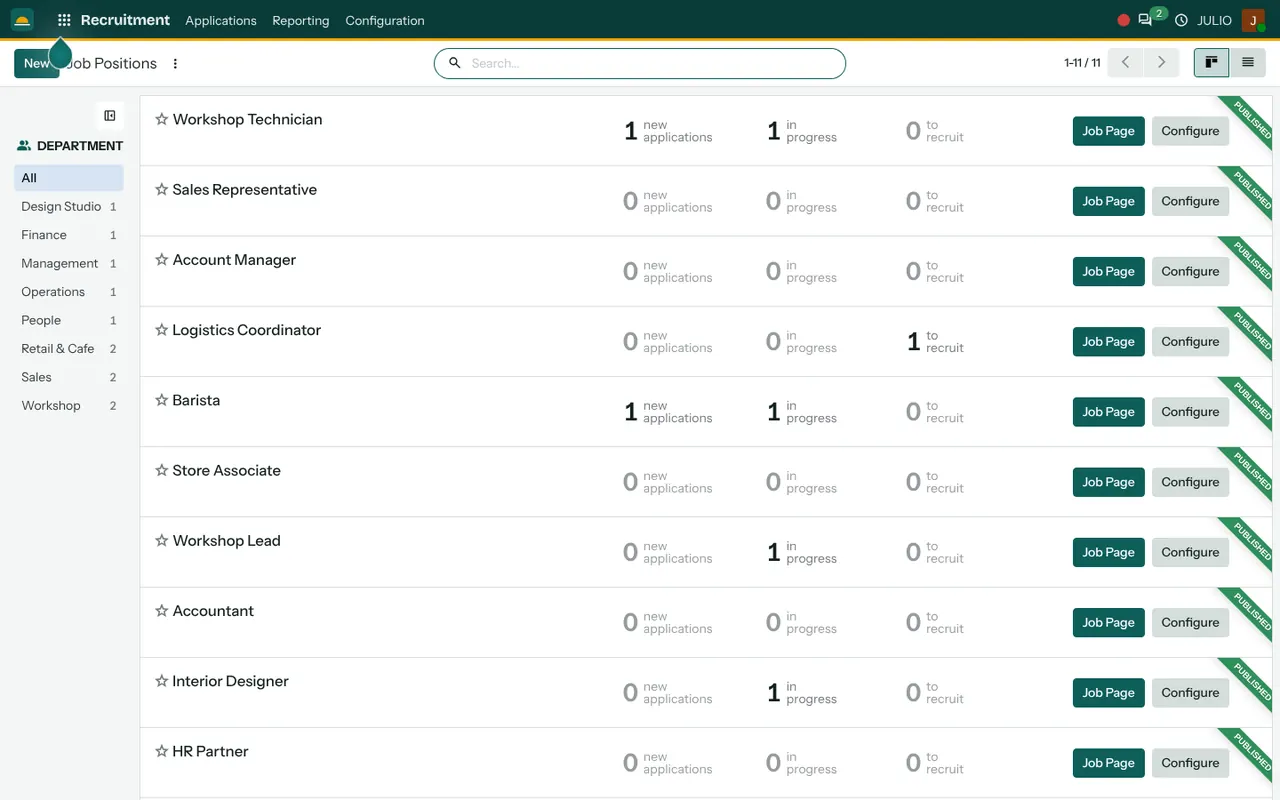
The first screen lists every position as a row: Workshop Technician, Sales Representative, Barista, Accountant and so on in the demo. Each row carries three live counts: new applications, applications in progress, and people ready to recruit. A "Published" ribbon marks jobs that are open on your website, and a Configure button opens the settings of that job. A department list on the left narrows the board to one team.
One list for every applicant
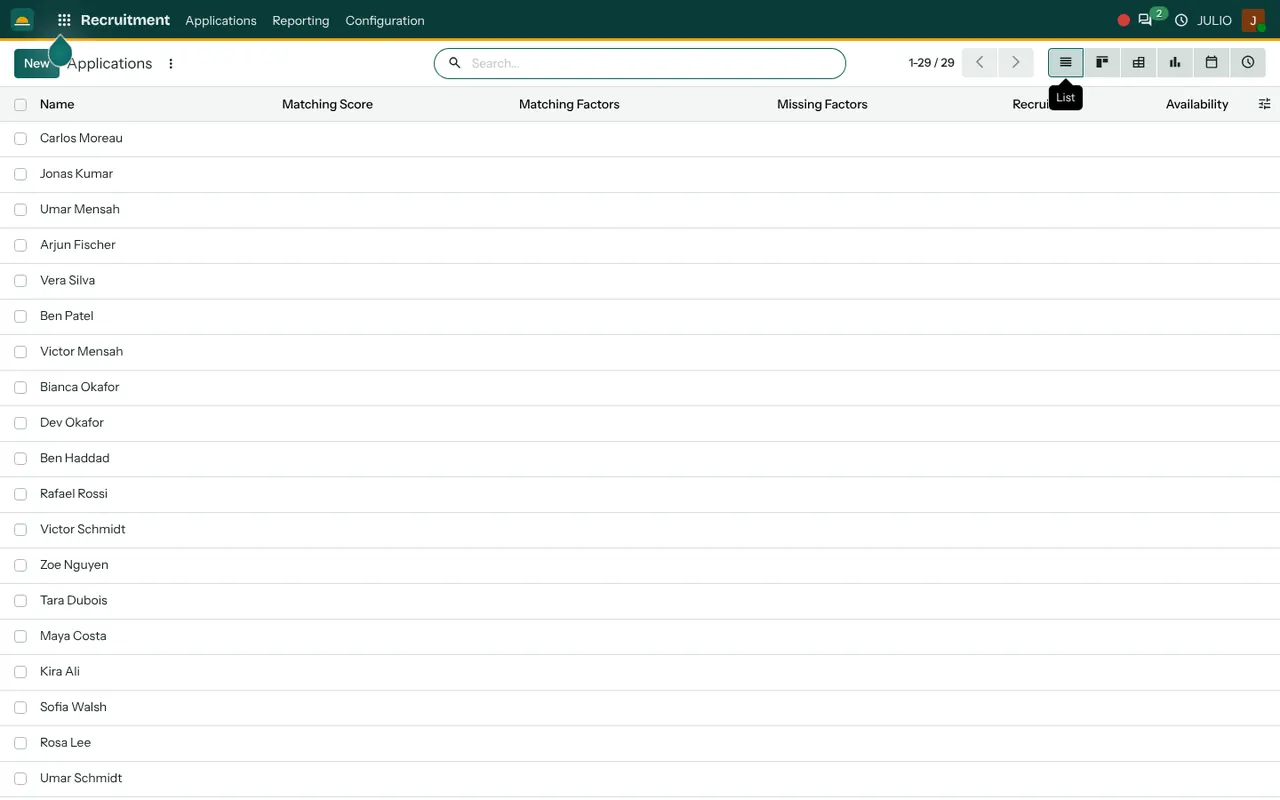
Applications opens a list of everybody who applied, 29 in the demo, with columns for name, matching score, matching factors, missing factors, recruiter and availability. The same records can be flipped to a board by stage, a pivot, a chart, a calendar or an activity view. A recruiter clearing the morning's CVs and a manager reviewing the funnel look at the same data in different shapes.
Stages you can rename
Applicant tracking software works best when the stages mirror reality. Each applicant sits in a stage, for example new, first interview, second interview, offer and hired. You set the stage names for your own process, and dragging an applicant from one column to the next records the move. If your hiring has a practical test for a technician, add a stage called exactly that.
A public job page
The Job Page button opens the position as a page on your site where candidates can apply. It works with the Website module, so the application arrives as a record instead of an email attachment.
Recruiter and follow-up activities
Every applicant can have a recruiter and a dated activity, such as "call on Monday" or "reference check". Overdue activities are easy to spot, which keeps good candidates from going cold.
Where applicant tracking software meets the rest of JULIO
This applicant tracking software is not an island. A hired candidate becomes a staff record in Employees, with their department and manager already known from the job. From there leave is handled in Time Off, working hours in Attendances, and project work in Timesheets. Interview slots can be placed on the Calendar, and the message trail on an applicant lives in Discuss. Hiring counts can also appear in your dashboards.
A short walk through one hire
Here is applicant tracking software in use. Suppose a furniture workshop needs a polisher. The owner opens Job Positions, creates the role under the Workshop department and publishes it. Three people apply through the job page, and their cards appear under new applications. The supervisor books a short practical test for two of them and logs each as an activity.
After the test one applicant moves to the offer stage and the other is refused with a reason. Nobody has to search an inbox to see why one person was chosen. When the offer is accepted, the owner marks the applicant as hired and creates the employee record from the same card, so the new joiner starts with details already filled in.
Applicant tracking software facts at a glance
| Item | What you see |
|---|---|
| Job positions | One row each, with live counts |
| Applicants | List, board, pivot, chart |
| Stages | Named by you |
| Job page | Public page for candidates |
What to decide before using applicant tracking software
The tool is quick to set up. The hiring habits behind it take more thought.
- Your stages. Write the real steps from first call to joining, and keep them to six or fewer.
- Who owns each job. One recruiter per position, so every applicant has someone chasing them.
- A reason for refusal. Pick a short list, such as experience, salary expectation or no show, so you can learn from the pattern.
- Old CVs. Decide whether the spreadsheets and email attachments you already hold should be loaded in as a first batch.
- Privacy. Applicant details are personal data. Agree who may open them and how long you keep a refused person's CV.
Who starts with applicant tracking software
Businesses that hire often, and want applicant tracking software without a separate subscription, such as workshops, cafes and shops, tend to put recruitment beside employees and attendance.
Conclusion
Applicant tracking software earns its place by removing guesswork: which job is open, who applied, who was called and what happens next. At DigiGrowvity, in our experience setting up ERP projects, small teams get most value when they keep stages few and keep one person responsible for each position. In JULIO ERP the hiring board hands over to Employees the moment someone joins, so the first day starts with a record rather than a blank form.
Key Takeaways
- Every job position shows new, in-progress and ready-to-recruit counts at a glance.
- Applicants can be viewed as a list, a stage board, a pivot or a chart.
- Stages, recruiters and activities follow your own hiring process.
- A public job page brings applications into the system without email attachments.
- It is included in the ₹10,000 JULIO Local plan.