 DigiGrowvity
In many small firms, leave is run from a notebook, a WhatsApp message and the owner's memory. Someone asks for Friday off, nobody knows how many days they have left, and two people in the same team turn out to be away together. Leave management software fixes this by giving every request a record, an approver and a balance. The Time Off module in JULIO ERP is leave management software that does exactly this, using the same staff list as the rest of your system.
What leave management software must do
The module is organised around the person asking and the person approving.
A personal year calendar for every employee
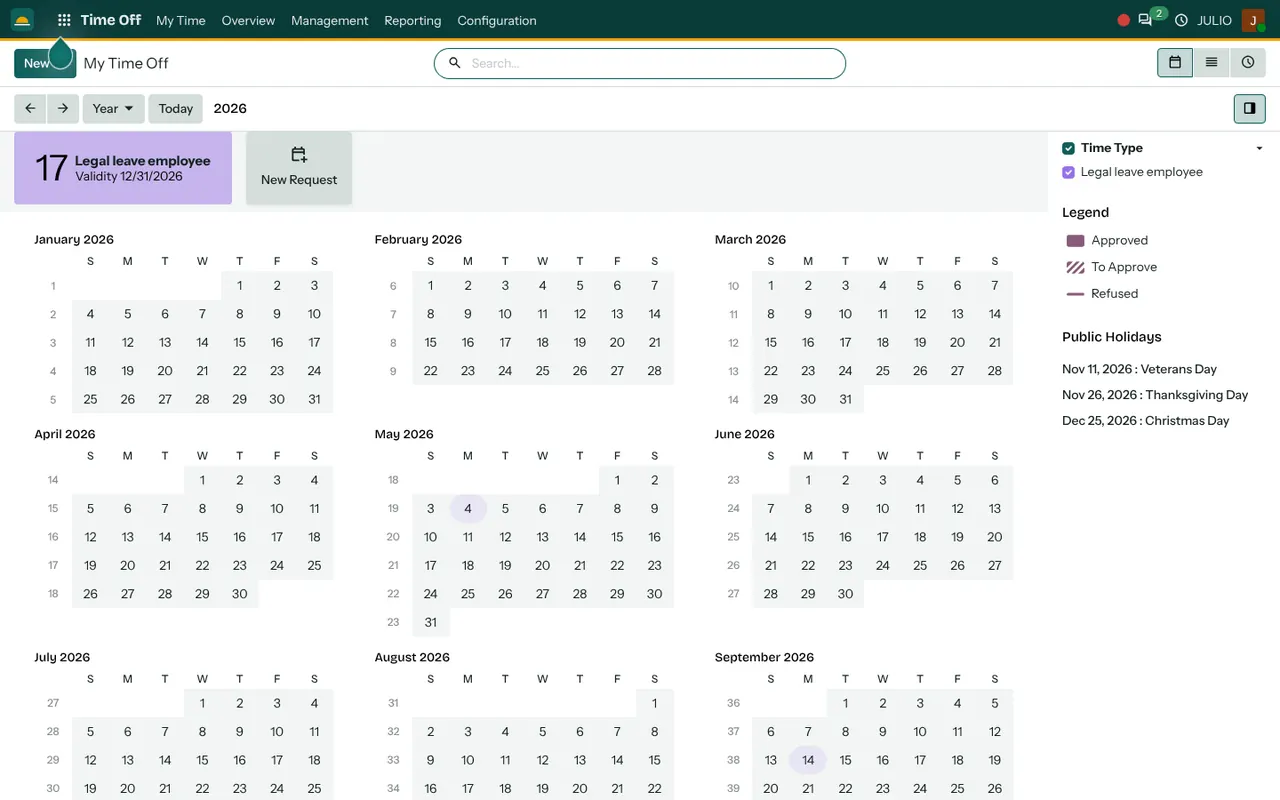
In this leave management software, the "My Time Off" screen shows the whole year as twelve small months. Approved days are filled in, days waiting for a decision are hatched, and refused days are struck through. Beside it sits the employee's balance as a coloured card: in the demo it reads 17 days of one leave type, with its validity date. A "New Request" button starts a request from that same screen, so nobody needs to ask HR how many days remain.
Requests that go to the right approver
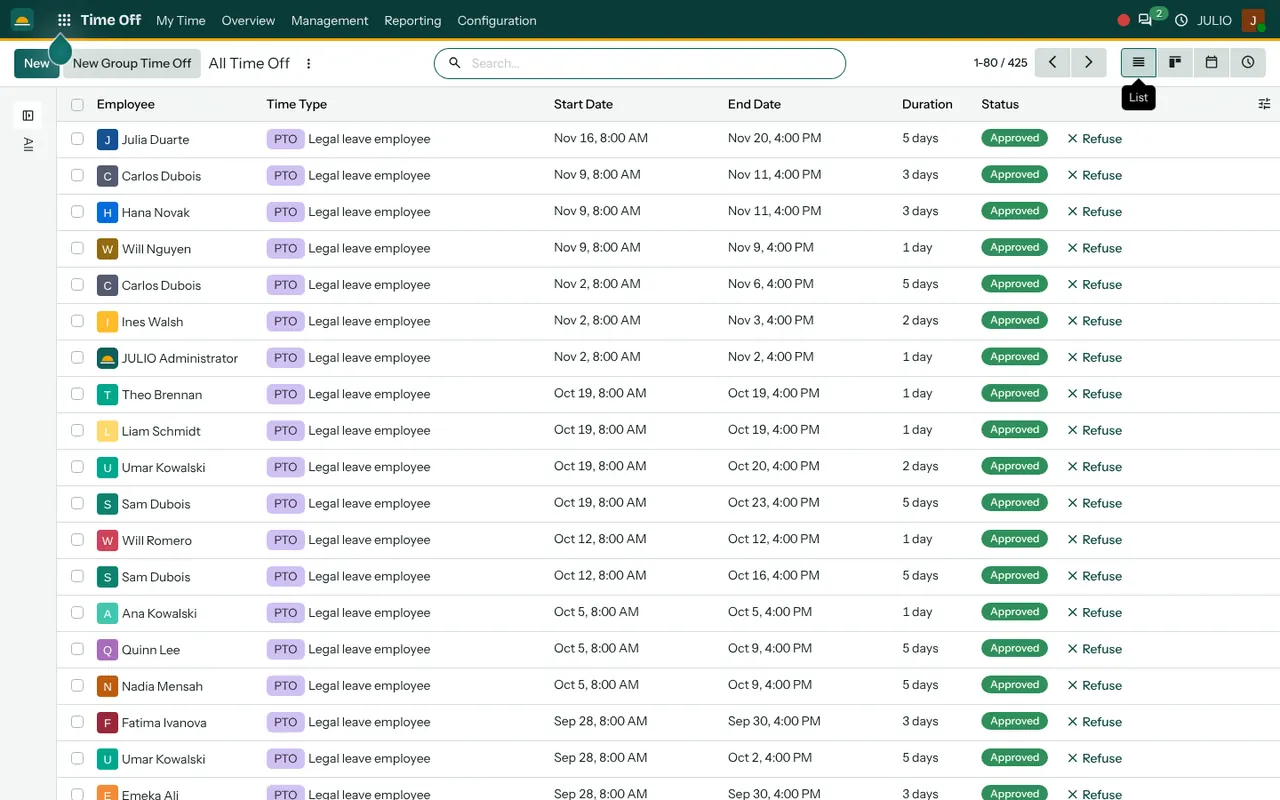
An employee picks a leave type, a start and an end, and sends it. The request waits as "To Approve" until someone decides. For each leave type you can choose who approves: the reporting manager, an HR officer, or both. Approved and refused states are clear, and the Refuse button sits right on each row of the manager's list.
The all-time-off list for managers and HR
Under Management, one list shows every request in the company with employee, leave type, dates, duration and status. The demo database holds 425 records, and the same data can be viewed as a list, a board, a calendar or a timeline. Filtering by department or by month answers "who is away next week?" in seconds.
Leave types and balances you define yourself
Good leave management software bends to your policy, not the other way round. The demo uses a single legal leave type, but you create your own: casual leave, sick leave, earned leave, compensatory off, unpaid leave. Each type has its own allocation and validity, and an unpaid type simply records the absence without touching a balance. Balances that grow through the year can be set up as well, so a new joiner does not need a spreadsheet to know what is due.
Public holidays on the calendar
Holidays are listed beside the year view, so an employee planning a long weekend sees them immediately. You enter your own list, such as Pongal, Diwali or state-specific days, once a year.
How leave management software links up
Time Off reads its people from Employees, so a new joiner can request leave the day their record exists, and the approver comes from their manager field. Worked hours live in Attendances, which means absence and presence sit side by side. Planned absences can be viewed against the Calendar when you schedule a site visit, and staff and managers can discuss a request in the Discuss thread attached to it. Headline numbers feed your dashboards.
A short walk through one request
This is how leave management software behaves on an ordinary Tuesday.
Take a workshop supervisor who wants three days around a family function. She opens her year view, checks the balance card and presses New Request. She picks casual leave, chooses the dates and sends. Her manager sees the request in the list as "To Approve", checks the all-time-off calendar, notices that one other supervisor is already away on one of those days, and still approves because the line is covered. The days turn solid on her calendar, the balance drops by three, and nobody wrote anything in a register. If she changes her mind, she cancels from the same screen and the days return to her balance.
Before leave management software goes live
| Rule | Typical choice |
|---|---|
| Leave types | Casual, sick, earned, unpaid |
| Approver | Reporting manager, HR, or both |
| Half days | Allowed or not |
| Year start | April or January |
Software only follows rules that someone has written down. A short list before you switch on leave management software saves arguments later, and it takes an afternoon.
- Count what you give. List every leave type and how many days each person gets in a year.
- Fix the leave year. Indian firms often run April to March, others January to December. Pick one.
- Decide the approver. One name per person, so requests never sit unseen.
- Write the carry-forward rule. Say clearly what happens to unused days at year end.
- Collect the holiday list. Gather the dates for the coming year before staff start planning.
Who starts with leave management software
Businesses with shift staff, clinics and teams that cannot all be away at once tend to start here along with employee records. Open a page to see the full starting set for that business, because leave is rarely the only module they switch on.
Conclusion
Good leave management software does not need to be complicated. It needs a clear request, a named approver and a balance everyone can see. At DigiGrowvity, in our experience setting up ERP projects, leave is one of the first modules that staff actually enjoy, because it ends the guesswork about how many days are left. In JULIO ERP it shares Employees and Attendances with the rest of the system, so nothing is entered twice. For an owner who wants leave management software without a separate subscription, that matters.
Key Takeaways
- Each employee sees a year calendar and a live balance, and requests from there.
- Requests wait for approval and show as approved, to approve or refused.
- Managers and HR see every request in one list, calendar or board.
- Leave types, balances and public holidays are yours to define.
- It is included in the ₹10,000 JULIO Local plan.