 DigiGrowvity
The register at the gate, the WhatsApp message saying "reached", the supervisor's notebook: most small businesses already track attendance, just in four places that never agree. An attendance module for small business replaces them with one record per person per day. In JULIO ERP, the Attendances module logs check-in, check-out and break time, works out the hours, and gives a manager a status to validate before the numbers are used for anything else.
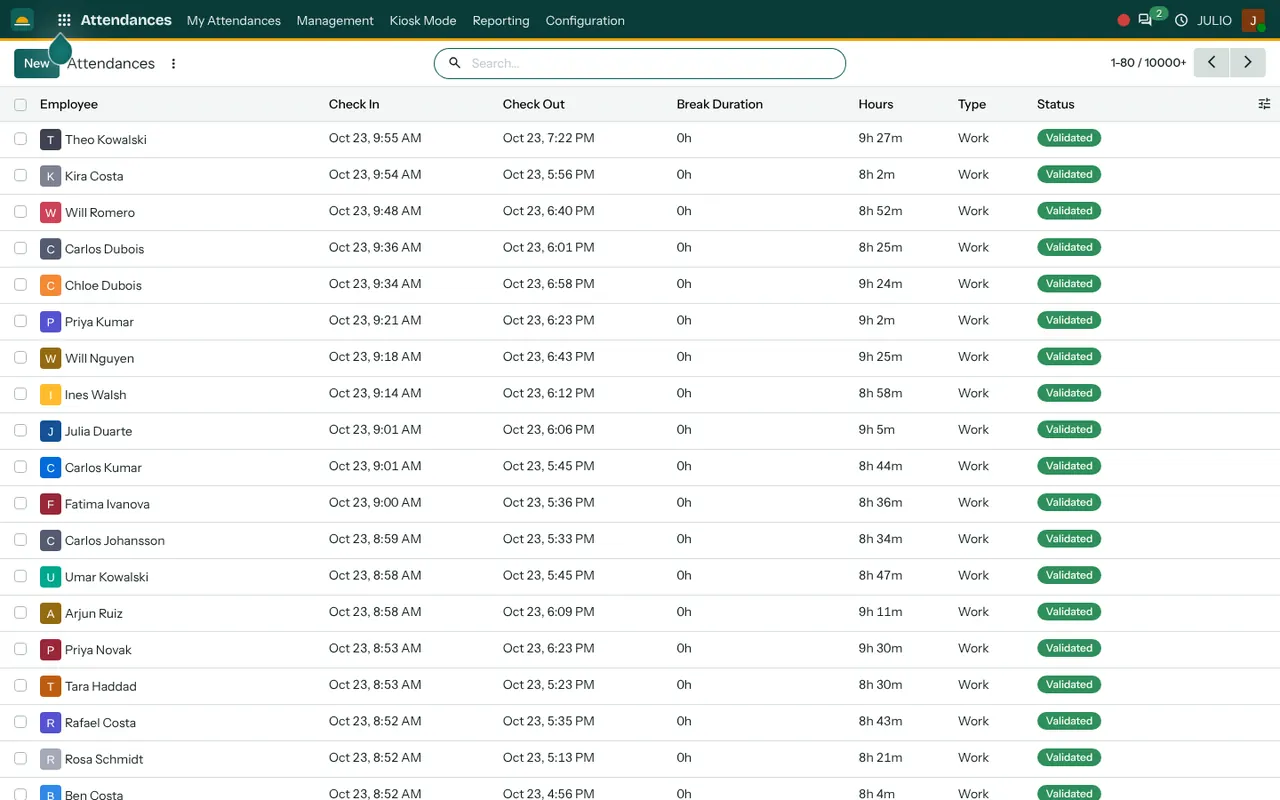
What the attendance module for small business does
An attendance module for small business records presence, and nothing more complicated than that, which is its strength. Simple records are the ones people actually keep up.
A row for every working day
The demo screen lists Employee, Check In, Check Out, Break Duration, Hours, Type and Status. A line reads like a day in plain terms: someone checked in at 9:01 AM, out at 6:06 PM, and the hours column shows the total, for example 9h 5m. Type is Work, and Status is Validated once a manager has approved the line. Hundreds of such lines sit in the list, sorted newest first, and the search bar narrows them to one person or one day.
Check-in from the person's own menu
The top menu starts with My Attendances, which is where an individual checks in and out. It takes one click, and the time is stamped by the system rather than typed, so nobody has to remember to write it down.
A kiosk for a shared tablet
A Kiosk Mode entry in the menu turns a screen into a check-in point, which suits a workshop or shop floor where people do not sit at a computer. A tablet near the door can serve everyone who walks in, so the record is created at the moment of arrival.
Breaks and hours counted for you
A column for Break Duration sits beside the hours, so the figure you see is the time actually worked rather than the time between two clicks. The totals update as soon as a check-out is recorded.
Validation by a manager
A Management menu gives the person in charge a view of everyone's attendance. Lines can be reviewed and marked Validated, which turns a loose record into one you can rely on. It also exposes the odd line, such as a missing check-out or a very long day, so mistakes are caught while people still remember what happened.
How the attendance module for small business connects to JULIO
Attendance needs to know who people are, and that comes from Employees. It sits next to Time Off, so a day of approved leave is not mistaken for an absence. Where staff also log work against jobs, Timesheets records what they did while Attendances records that they were there, and the two can be compared. A Project manager can then see presence and effort side by side. The Dashboards module can show who is checked in at the moment.
A short walk through one shift
At a small workshop using the attendance module for small business, the first person arrives at 8:50 and taps the tablet by the door. The check-in is stamped. At one o'clock two people take their lunch, which is recorded as a break. By 6 PM everyone has checked out. The next morning the supervisor opens Management, scans yesterday's lines, notices one missing check-out, corrects it, and validates the rest. The month-end hours are now ready for whoever prepares salaries. Because every line carries a name and a time, a question months later, such as who opened the shop on a particular day, can be answered in seconds.
An attendance module for small business keeps these four fields side by side.
| Field | What it tells you |
|---|---|
| Check In and Check Out | When the person arrived and left |
| Break Duration | Time that should not count as work |
| Hours | Time actually worked |
| Status | Whether a manager has validated the line |
Who starts with an attendance module for small business
Businesses with a fixed team on site, such as hospitals and hotels, tend to include attendance early. These common starting sets do, and we confirm yours in discovery.
Before you switch on an attendance module for small business
Attendance touches people's pay and trust, so the rules should be clear before the attendance module for small business records its first check-in. Write them down and share them with the team.
- How people check in. Choose a personal login, a shared kiosk or both, based on whether your staff work at desks.
- Working hours and lateness. Write down the shift times and what counts as late, so lines can be judged consistently.
- Missed check-outs. Decide who corrects them and how quickly, because forgotten check-outs are the most common error.
- Who validates. Choose one person per team to validate lines each week.
- Privacy. Tell your staff what is recorded and who can see it.
- Overtime. Decide how hours beyond the normal day are treated, because the Hours column will show them plainly and people will ask.
Conclusion
An attendance module for small business should feel invisible: a tap in the morning, a tap in the evening, and a clean record at month-end. At DigiGrowvity, in our experience setting up ERP projects, the businesses that do best agree the shift rules first and start with one team before extending to everyone. Keep Employees and check-ins together, and add Time Off so leave never looks like absence.
Key Takeaways
- Each line records check-in, check-out, break time and hours worked.
- People check in from their own menu or a shared kiosk screen.
- Managers validate lines so the record can be trusted.
- Attendance and leave are kept consistent through Time Off.
- An attendance module for small business replaces the gate register and the notebook.
- It is part of the ₹10,000 JULIO Local plan.