 DigiGrowvity
Two people turn up at the same customer on the same afternoon, or nobody does, because the visit was written in one diary and the other person's phone. The calendar module for small business in JULIO ERP puts site visits, team meetings and approved leave on a single shared calendar. Because it sits inside the ERP, an appointment is not just a time slot: it carries the people involved and the customer it concerns.
What the calendar module for small business does
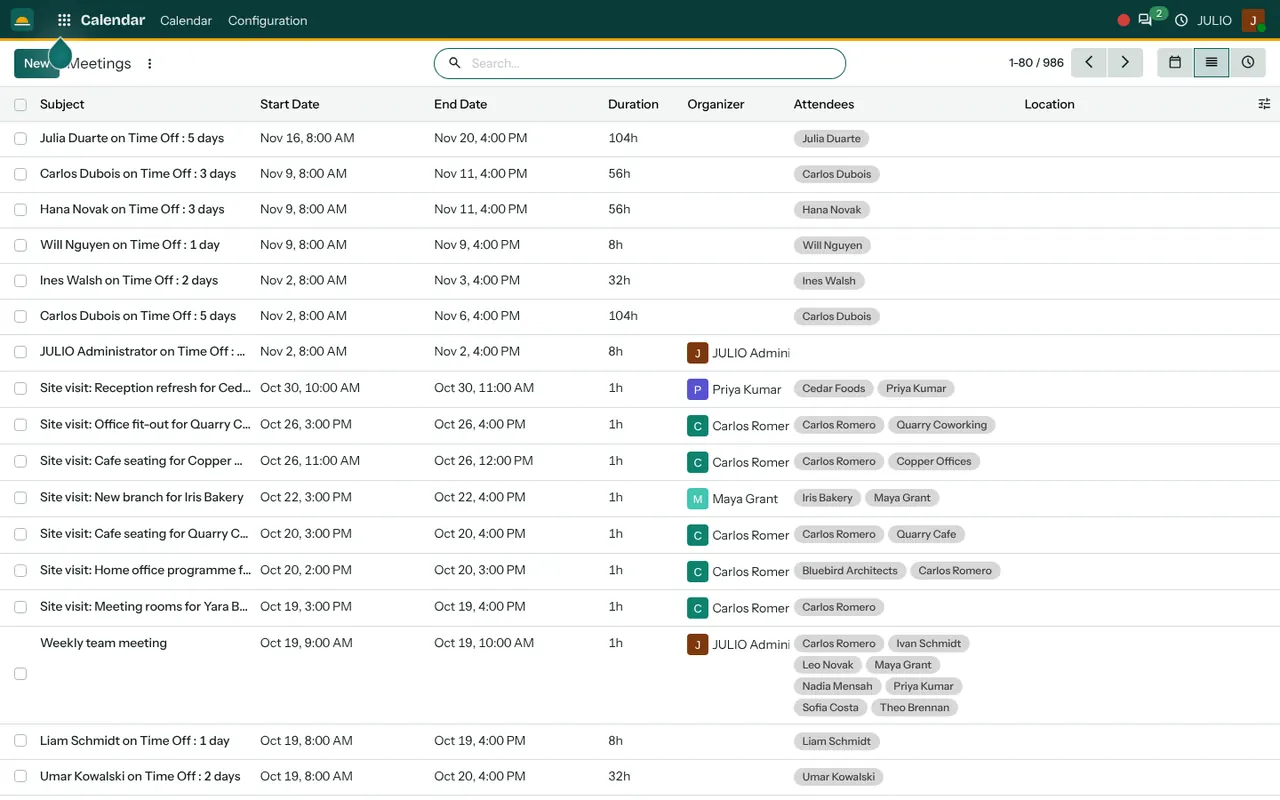
The calendar module for small business is shown in the demo screen as the Meetings list, which is the same data as the calendar in a table form.
Three ways to look at the same appointments
In the calendar module for small business, icons at the top right switch between a calendar grid, a list and an activity view. The grid suits the weekly planner, the list suits a person who wants to sort by date, and the activity view shows follow-ups that are due. In the demo, the list holds nearly a thousand entries, and a search box narrows them by name.
Columns that describe the appointment
Each row carries a subject, a start and end date, a duration, an organiser, the attendees and a location. A one-hour site visit for a cafe fit-out shows two attendees: the salesperson and the customer. A weekly team meeting shows the whole team as chips beside it. You see who is expected without opening anything.
Customer names right in the subject
Site visits in the demo read "Site visit: Office fit-out for" followed by the customer. The customer is attached as an attendee, so the appointment belongs to that customer record and can be found from it later.
Leave shows up automatically
Entries such as "Carlos Dubois on Time Off: 3 days" appear in the same list, with the dates and duration. Approved leave is placed on the calendar for you, so a manager planning a visit sees at once who is away.
Search by customer, person or place
Because every entry has a subject, attendees and a location, one search box finds all appointments with a given customer or at a given site. A manager preparing for a review can type a customer's name and see every visit and meeting held with them, in date order, before walking into the room.
Invitations to the people involved
Adding someone as an attendee invites them, and the appointment appears in their own view. The organiser column tells everyone who to ask if a time must change. For a business with a field team, that single column ends a lot of calls of the kind that begin, "Who booked this visit?"
How the calendar module for small business connects to JULIO
The calendar draws from several places at once. Approved leave comes from Time Off, and the attendees are people from Contacts and Employees. A visit booked from a deal in CRM shows up on the right people's calendars, and the Meetings area in Discuss is where a team can hold a call when nobody can travel.
A short walk through booking a site visit
With the calendar module for small business, a salesperson at a fit-out company gets a call from a bakery that wants a new branch measured. She opens her calendar, creates a one-hour visit called "Site visit: New branch for the bakery", adds the customer as an attendee and sets 3 PM on Thursday. She checks that the colleague she wants to bring is not on leave that day, because the leave entry is visible on the same list. Both receive the invitation. After the visit she moves to the deal and sends a quotation.
Views in the calendar module for small business
| View | Best used for |
|---|---|
| Calendar grid | Planning the week ahead |
| List | Searching and sorting by date |
| Activity | Follow-ups that are due |
Who starts with a calendar module for small business
Any business that works by appointment, whether customers visit or you visit them, depends on a calendar. These kinds of business commonly begin with it in their first set. Open a page to see the full list.
Before you use the calendar module for small business
A shared calendar helps only when everyone agrees what goes on it. These four points take about an hour to settle and save weeks of confusion.
- What is worth an entry. Site visits, customer meetings and team meetings, yes; personal errands, no. Decide this early so the calendar stays readable.
- Naming of subjects. A pattern such as "Site visit: place for customer" makes the list searchable by anyone.
- Who may change an appointment. Usually the organiser, so a time is not moved by accident.
- How leave is recorded. Because leave flows from Time Off, staff must apply for it in the system for it to appear. A leave told over the phone will not show.
Conclusion
A calendar module for small business is a small feature that removes a daily source of friction. At DigiGrowvity, we set up JULIO ERP for growing businesses, and in our experience the calendar is one of the first screens a team opens each morning, because it answers the question "where do I need to be?" Link it to CRM, Time Off and Contacts and the answer is always current.
Key Takeaways
- The calendar module for small business keeps one shared calendar for meetings, site visits and approved leave.
- Each entry shows organiser, attendees, duration and location.
- It can be viewed as a grid, a list or a list of due activities.
- Customers are attached to appointments, so history can be found from them.
- It is included in the ₹10,000 JULIO Local plan.