 DigiGrowvity
Ask a small business where its internal decisions live and the honest answer is a WhatsApp group with sixty unread messages. "The van leaves at ten" sits between a joke and a photo of lunch, and the new joiner was never added. The discuss module for team chat in JULIO ERP replaces that group with channels that have a name and a purpose, so the message about stock counts stays with the stock team and everyone can find it later.
What the discuss module for team chat does
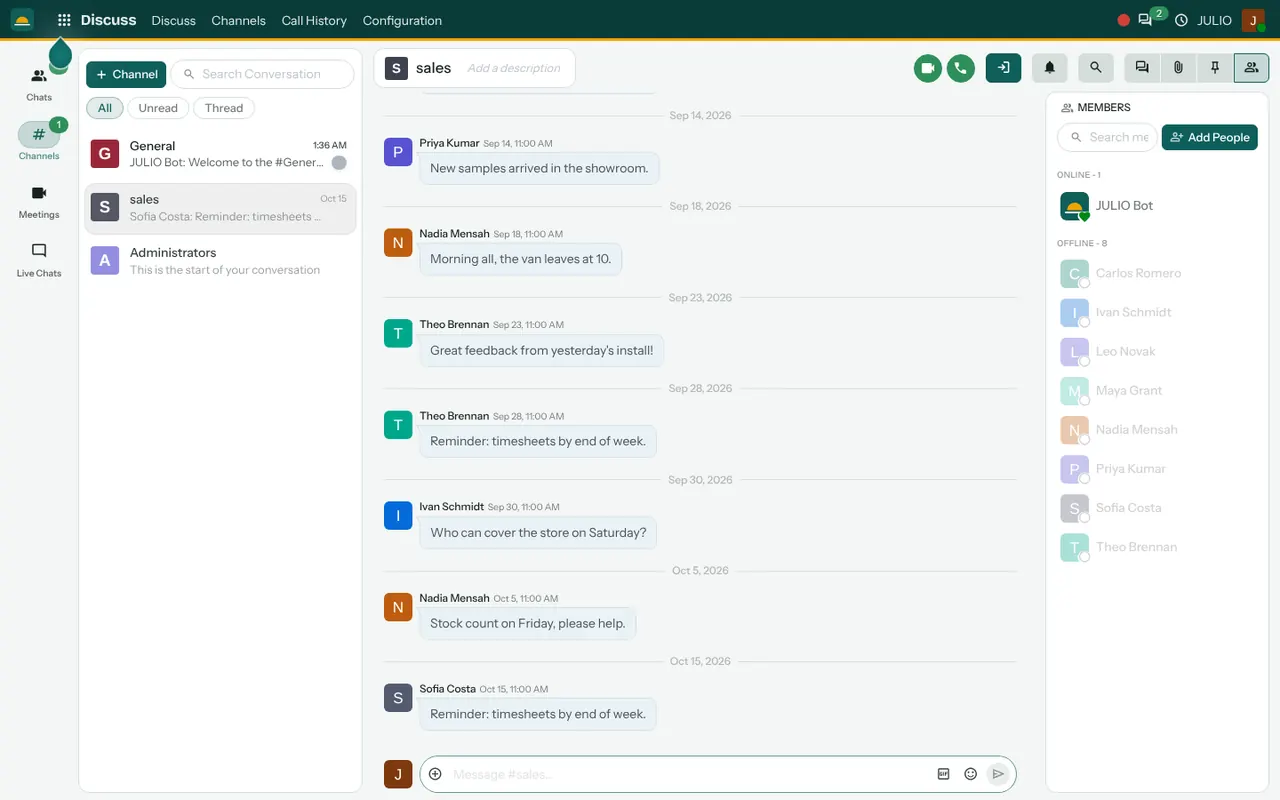
The discuss module for team chat splits its screen into three parts: a list of conversations on the left, the messages in the middle and the people on the right.
Channels with a clear purpose
A channel is a named room such as General or Sales. The demo screen shows a sales channel where staff post short working notes: new samples arrived in the showroom, the van leaves at ten, who can cover the store on Saturday. Because each channel has one subject, a person can mute the ones that do not concern them without missing the ones that do.
Direct chats and threads
In the discuss module for team chat, a Chats area sits next to channels for one-to-one talk. A filter above the list switches between All, Unread and Thread, so a busy morning can be cleared by looking only at what you have not read. A reply can be attached to a single message as a thread, which keeps a long answer from burying the channel.
Members, online or not
The right-hand panel lists everyone in the channel and shows who is online and who is offline, with a button to add people. A manager can tell at a glance whether the person she is about to message is at their desk.
Calls and files from the same window
The channel toolbar has buttons for a video call and a phone call, along with search, pinned messages and attachments. The message box accepts files, emoji and GIFs. A photo of a damaged carton can be dropped straight into the channel where the warehouse team will see it.
A bot for system messages
A General channel greets new users with a message from the JULIO Bot. The same bot style is used for notices that the system itself generates.
How the discuss module for team chat connects to JULIO
Chat in JULIO is not a stand-alone tool. The speech bubble at the top of every screen open the same messaging, so a person working in Sales or Inventory can reply to a colleague without leaving the page. People in the channel are the staff held in Employees. The Meetings and Live Chats items in the left menu connect to Calendar and to Live Chat, where website visitors write to you.
A short walk through one busy Friday
Imagine a retail shop using the discuss module for team chat, with a stock count planned for Friday. The manager opens the Stores channel and posts the plan. Two staff members reply that they can stay late, and one asks who is covering the till. The manager pins the final plan so it stays at the top. On Friday morning a supervisor drops a photo of a mislabelled shelf into the same channel. By evening the count is done, and the whole thread, including the photo, can still be found by searching for the word "count".
The discuss module for team chat against a phone group
| Question | A phone group | Channels in JULIO |
|---|---|---|
| Who is in it | Whoever was added | Members listed on screen |
| Finding old plans | Scrolling | Search and pinned messages |
| New joiner | Misses history | Added to the right channels |
| Where data lives | Many phones | Your own network |
Who starts with a discuss module for team chat
Almost every business can use it, but it matters most where people work across several places. These kinds of business commonly begin with it alongside their first modules. Open a page to see the full list for that business.
What to decide before using the discuss module for team chat
A chat tool, including the discuss module for team chat, becomes noise unless a few habits are agreed on the first day.
- Which channels exist. Start with three or four, such as General, Sales and Stores, and add more only when a topic keeps coming up.
- Which channel is for what. Write one sentence for each in its description, so a message about a delivery does not land in the sales room.
- What stays out of chat. A price change or discount should still be recorded on the quotation or order, with chat used only to discuss it.
- Who is allowed in. Staff are added to the channels that match their work, and private channels are kept for sensitive topics such as pay.
Conclusion
The discuss module for team chat is the least glamorous part of an ERP and one of the most used. At DigiGrowvity, we set up JULIO ERP for growing businesses, and in our experience the teams that move their daily talk into a few well-named channels also record their work better in the other modules, because the conversation and the record sit one click apart. Get Employees set up first, add the channels, and retire the old group once everyone is in.
Key Takeaways
- The discuss module for team chat offers channels, direct chats and threads keep each subject in its own place.
- A members panel shows who is online, with a button to add people.
- Video calls, phone calls, pinned messages, files and GIFs are in the same window.
- Chat is available from every screen, next to sales, stock and accounts.
- It is included in the ₹10,000 JULIO Local plan.