 DigiGrowvity
When a job has five people, three suppliers and a customer asking for an update, the plan usually lives in several heads. A project module for service teams puts that plan on a screen. In JULIO ERP, the Project module shows each job as a card, each task by its stage, and the hours used against the hours planned. Because it sits in the same system as sales and timesheets, the job starts from an order and ends in an invoice.
What the project module for service teams does
A project module for service teams has two levels to manage: the job as a whole, and the tasks inside it. JULIO shows both without making you open a report.
A board of jobs, one card each
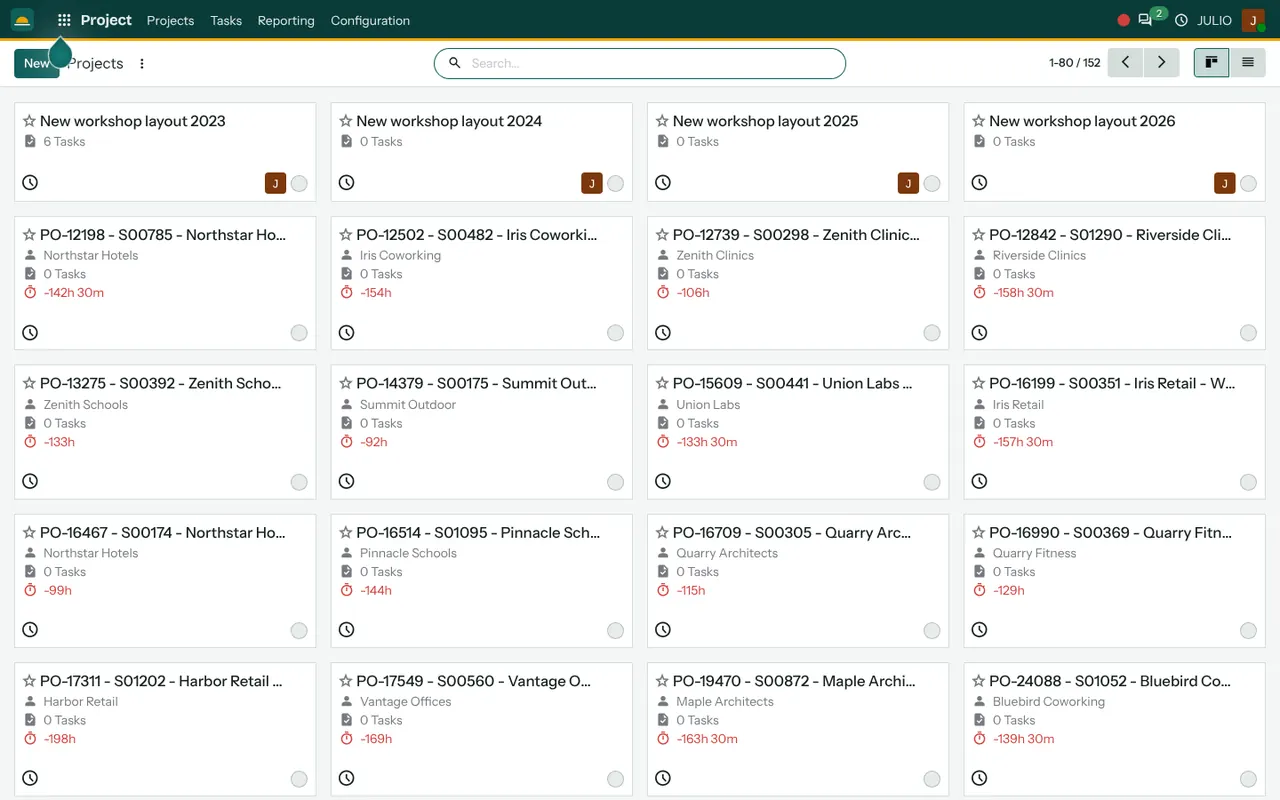
The Projects screen shows cards in a grid. Each has a star to mark it as a favourite, a title, the customer, the number of tasks and a figure for remaining hours. In the demo, the red figures with a minus sign show projects where more hours have been used than were planned, which is how an overrun announces itself. A list view is one click away for people who prefer rows. A manager can sort the cards by remaining hours to see which job needs attention first, and a quiet card with no tasks stands out just as clearly.
Jobs that start from an order
Many demo project names begin with a purchase reference and a sales order number, followed by the customer. That pattern shows a project created from a confirmed sale. Nobody types the customer or the scope again, and the project stays linked to the order that pays for it.
Tasks with owner, progress and stage
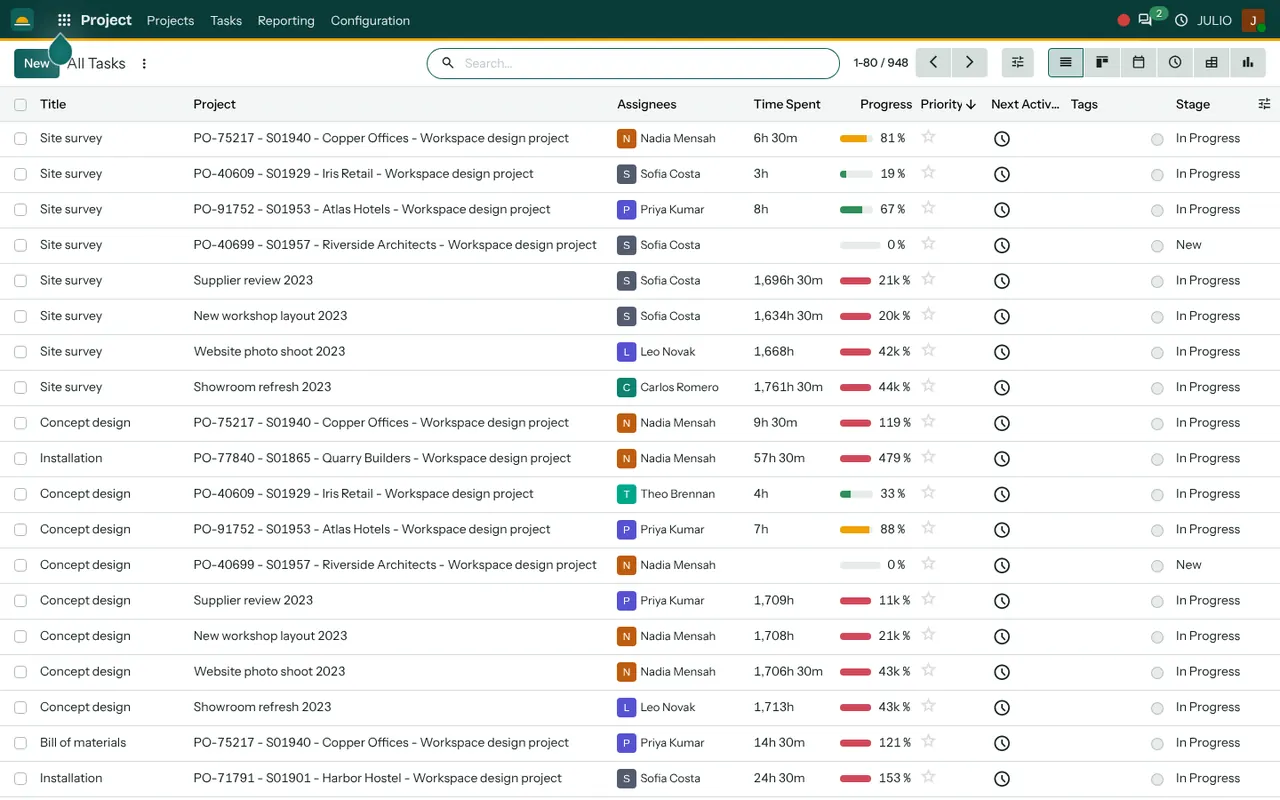
The All Tasks list shows the Title, the Project, the Assignees, Time Spent, a Progress bar, a Priority star, the Next Activity and the Stage. In the demo, stages include New and In Progress, and task titles such as Site survey, Concept design, Bill of materials and Installation describe the steps of one job. The progress bar turns amber or red as the hours used approach or pass the allowance.
Many ways to look at the same tasks
The same tasks can be shown as a list, a kanban board by stage, a calendar by deadline, an activity view, a pivot and a chart. A manager checks the calendar for deadlines, while a team lead drags cards across the board.
Stages you define yourself
The stage names are yours. A design studio might use Brief, Concept and Review, while an installer might use Survey, Fabrication and Handover. Each project can have its own set.
How the project module for service teams connects to JULIO
The Sales module creates the job, so the order and the project never drift apart. Staff log their hours in Timesheets, and those hours appear on the task as Time Spent. Materials needed for a job are ordered through Purchase. The people come from Employees, and the finished work is billed through Invoicing. A site visit can sit on the Calendar, which keeps the field team and the office looking at the same dates.
A short walk through one fit-out job
Imagine an interior contractor who wins a workspace design order and runs it through the project module for service teams. The sale is confirmed, and a project appears with the customer's name. The project manager adds tasks: Site survey, Concept design, Bill of materials and Installation. Each is assigned to a person and given a stage. The surveyor logs hours against the first task, and the Progress bar fills.
The designer picks up the next task only when the survey stage is complete, so the order of work stays visible to everyone. When Installation passes its allowance, the figure goes red, and the manager sees it on the project card before the customer asks.
This table shows where the project module for service teams answers a manager's questions.
| Item | Where you see it |
|---|---|
| Overall job health | Project card, remaining hours |
| Who is doing what | Task list, Assignees column |
| Late or stuck work | Task calendar and stage board |
| Hours used so far | Time Spent and Progress |
Who starts with a project module for service teams
Businesses that sell work rather than goods are the natural starting point, and some add it once a job grows past a single person. Each of these starting sets includes it.
What to decide before switching on a project module for service teams
The module is flexible, which is exactly why a few early choices matter. Make them before the project module for service teams is switched on.
- What counts as a project. One customer order, one site or one phase? Pick a unit and keep to it.
- A standard task list. If every job has the same five steps, make them a template so nobody builds the list again.
- Stage names. Choose a short, honest list that the team already uses in speech.
- Planned hours. Decide who sets the allowance, because the red figures only help if the plan was realistic.
- Who sees what. Customers and suppliers should not see internal notes, so agree the access rules.
Conclusion
A project module for service teams earns its keep on the day something goes wrong, because the overrun and the late task are already on the screen. At DigiGrowvity, in our experience setting up ERP projects, the best results come when a business starts with one real job type, builds the stages around it and connects it to sales and hours. Sales feeds it, Timesheets measure it, and Invoicing closes it.
Key Takeaways
- Each job is a card showing customer, task count and remaining hours.
- Tasks carry an assignee, a stage, a progress bar and a priority.
- Hours used beyond the plan show in red.
- Projects can start from a confirmed sales order.
- A project module for service teams shows overruns before the customer asks.
- It is included in the ₹10,000 JULIO Local plan.