 DigiGrowvity
A delivery van is a small business in miniature: it has a driver, a registration, an insurance date, a service interval and a monthly cost. When these live on separate scraps of paper, something lapses, usually on the day the van is needed. The fleet module for small business in JULIO ERP gathers each vehicle into one record and shows the whole fleet on a board, so you can see what is registered, what is waiting and who is driving what.
What the fleet module for small business keeps
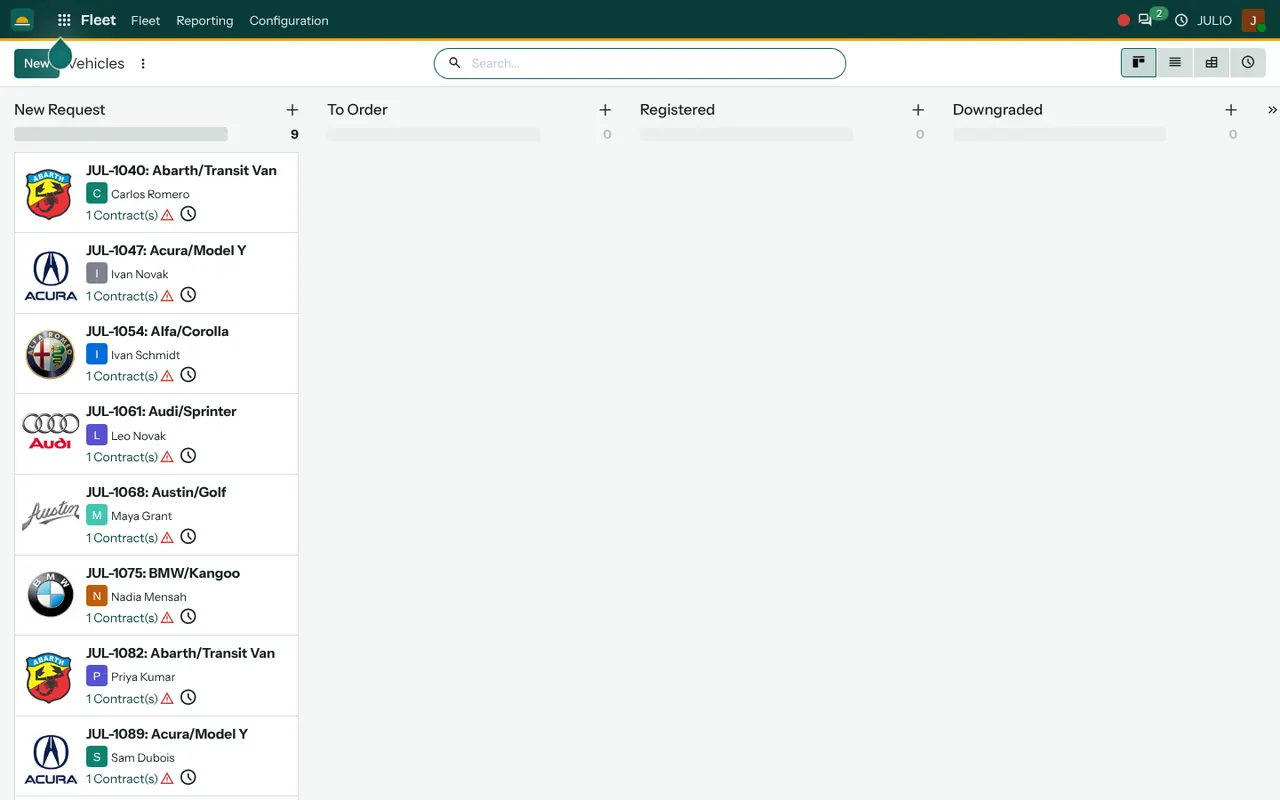
The screen above is the vehicle board from the demo, and a good fleet module for small business starts there. Here is how each piece helps a business that runs a handful of vehicles.
A board of vehicles by stage
Vehicles sit in columns by stage: New Request, To Order, Registered and Downgraded, with a double arrow that scrolls to more. The count at the top of each column shows how many vehicles are in it, nine in New Request on the demo screen. You move a vehicle from one column to the next as it progresses, from a request for a new vehicle to one that is registered on the road.
A card for each vehicle
Each card shows a code and the make and model, such as JUL-1040 for a transit van, the name of the driver and a note of how many contracts it has. A small warning icon beside the contract count signals that something needs attention. The brand logo makes a long list quick to scan.
Drivers on the vehicle record
The driver is a person on the card, taken from your contacts. When a driver leaves or changes, you update the card and the history shows who had the vehicle and when.
Contracts and renewals
In the fleet module for small business a vehicle can carry contracts, such as leasing, insurance or a service plan, each with a start and an expiry. The module watches the dates, so a lapsing contract is flagged on the card instead of being discovered at a roadside check.
Services, fuel and odometer logs
Beyond the board, the module records services done, fuel bought and odometer readings against each vehicle. Over a few months you can see what each van truly costs per kilometre, which is the number that decides whether to repair or replace it.
Other views of the fleet
The same vehicles can be shown as a list, a pivot table or a list of activities, so a manager can switch from the board to a spreadsheet-like view when comparing costs.
How the fleet module for small business connects
A vehicle is rarely alone in a business. Delivery vans move goods between Inventory locations and out to customers from Sales orders. A driver is an employee, so the fleet module for small business draws names from Employees. Fuel and toll bills can be claimed through Expenses, and a vehicle that breaks down is a case for Repairs or Maintenance. The distribution page in our industry list shows where fleets commonly appear.
A short walk through adding a new van
A trader who relies on the fleet module for small business decides to buy a second delivery van. The manager adds a card in the New Request column, naming the make, the model and the intended driver. After approval the card moves to To Order, and when the van arrives it is registered and moved to Registered. The insurance and finance contracts are attached, each with an end date. Later, every service and fuel fill is logged. At year end the owner opens the card and reads the running cost of that one van.
| Stage | What it means |
|---|---|
| New Request | A vehicle is proposed or being considered |
| To Order | Approved and being purchased |
| Registered | On the road with a driver |
| Downgraded | Reduced use or being retired |
Who starts with the fleet module for small business
Businesses that deliver, collect or send crews to sites commonly add vehicles early. Open a page to see the common starting set for that business.
Before the fleet module for small business goes live
Keep the first version small, and add detail only when someone needs it. The fleet module for small business rewards a tidy start: a short list of vehicles with correct dates is worth more than a long list with gaps.
- Which vehicles to include. Start with the ones that earn money. Add personal-use cars later if you want to.
- Stages. The default board suits most; rename a column if your approval path differs.
- Driver records. Each driver should already exist as a contact before you assign them.
- Contract dates. Gather registration, insurance and finance papers, and enter expiry dates carefully.
- Who logs fuel and services. Choose whether drivers report, or an office assistant enters them weekly.
Conclusion
The fleet module for small business is about preventing the avoidable: a lapsed policy, an unrecorded service, a van with no clear driver. At DigiGrowvity we set up JULIO ERP for growing businesses, and in our experience setting up ERP projects the vehicle list is often assembled from a drawer of papers, which is exactly why putting it on one board helps. Connect it to Employees and Expenses and the costs follow the vehicle.
Key Takeaways
- The fleet module for small business shows every vehicle as a card on a board, with a driver and its contracts.
- Columns show the stage from request to registered.
- Contracts carry dates, so renewals are flagged early.
- Services, fuel and odometer readings give a true cost per vehicle.
- It is included in the ₹10,000 JULIO Local plan.