 DigiGrowvity
A customer drops off a chair with a broken leg, and three weeks later phones to ask where it is. In most workshops the honest answer is a search through a notebook. Repair order software for workshops replaces the notebook with a list: one line per item, with the customer, the date and a status. In JULIO ERP the Repairs module gives you that list, and it links to stock so that the parts used on a job are not forgotten.
What repair order software for workshops records
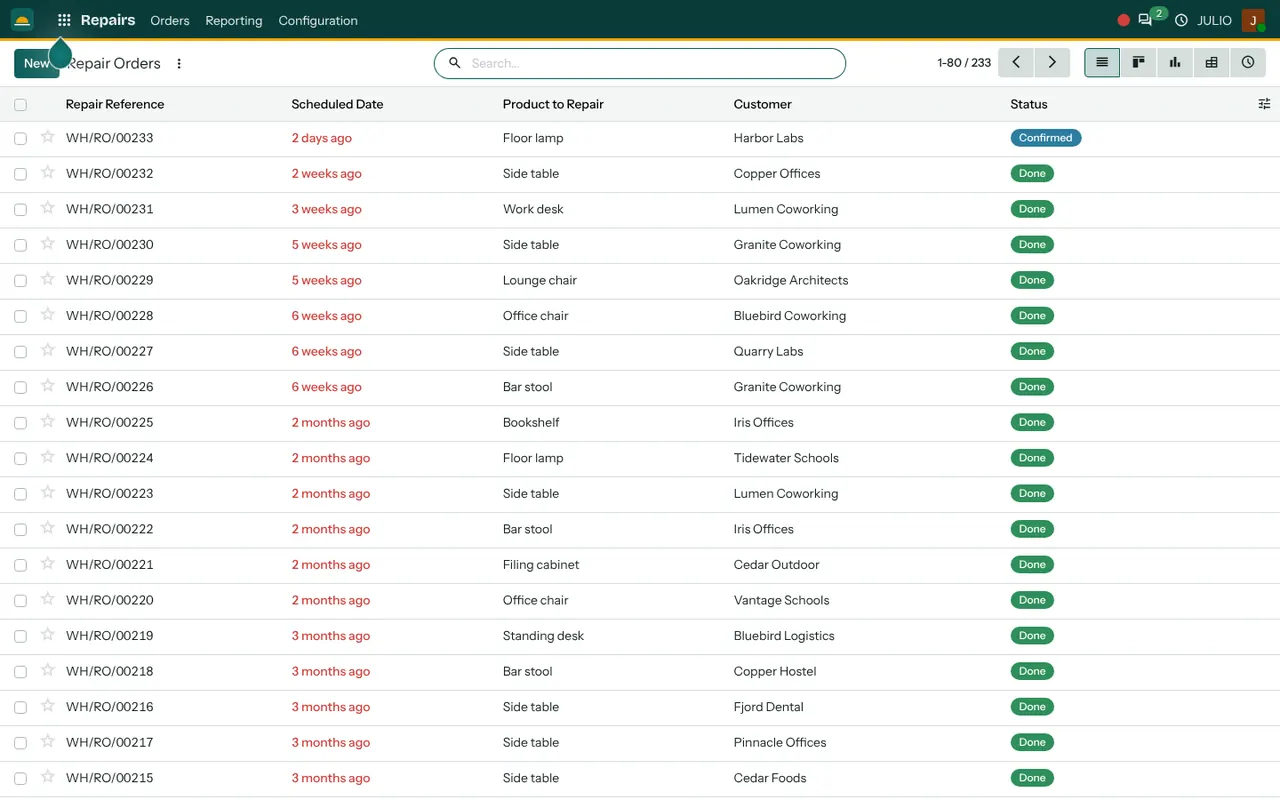
The screen above is the repair orders list. It is plain on purpose, because a workshop counter needs to find a job in seconds.
One row per job
In repair order software for workshops the unit of work is the job. Each repair has a reference in the pattern WH/RO/00233, a scheduled date, the product to repair, the customer and a status. The demo list holds more than two hundred jobs, from floor lamps and side tables to office chairs and bar stools, each tied to a named customer. Searching by customer pulls up every item that person ever brought in.
Status you can read at a glance
A green badge reads Done and a blue one reads Confirmed. A confirmed job is accepted and waiting; a done job is finished. A counter assistant can answer "is it ready?" in the time it takes to look up the name.
Dates that tell you what is overdue
The scheduled date is shown in relative terms, such as "2 days ago" or "6 weeks ago", and appears in red once it has passed. A job still sitting at Confirmed with a red date is an unhappy customer in waiting.
Parts and fees on the job
A repair order can list the spare parts used and any labour charged. Parts are taken from stock, so the stock figure drops when the job is finished, and what you charge matches what you used.
A board, a graph and a pivot
The same repairs can be shown as a board by status, a bar graph of jobs per period, a pivot table by customer or product, and a list of scheduled activities. An owner can see which product comes back most often, which is useful feedback for the people who make it.
How repair order software for workshops joins the rest
Repair order software for workshops needs more than a list, because a repair uses parts, so the stock side lives in Inventory, which even has its own Repairs card on the overview with a count of jobs to repair and late ones. The customer is a shared record in Contacts, so a person who bought from you can also bring something back without being typed twice. When the job is complete, the charge goes to Invoicing. A warranty or after-sales promise made at the time of sale in Sales can be matched to the repair that follows. Workshops with their own machines can also use Maintenance.
A short walk through one chair repair
Imagine a furniture business that services what it sells and keeps repair order software for workshops at the front desk. A client brings a lounge chair with a broken frame. The assistant creates a repair order for the lounge chair, adds the customer and sets a date. The status is Confirmed. The carpenter picks up the order, notes the replacement frame as a part, and finishes the work. Marking the order Done takes the frame out of stock. The invoice is raised for the labour and the part, and the order remains in the customer's history for the next visit.
| Stage | Visible on the list |
|---|---|
| Item received | New order with customer and product |
| Accepted | Status shows Confirmed |
| Work finished | Status shows Done |
| Billed | Linked invoice in accounts |
Who starts with repair order software for workshops
Garages, service centres and makers who repair their own products commonly begin here. Open a page to see the common starting set for that business.
Before you use repair order software for workshops
Repair order software for workshops is quick to learn. Agreeing your rules takes longer, and it is better to do it before the first job is entered.
- What counts as a job. Decide whether a ten-minute adjustment is a repair order or simply a free favour. Recording both is more honest.
- Parts you stock. Common spares need their own products and codes, or the stock will never fall when they are used.
- How you charge. Choose between a flat fee, time and parts, or free under warranty.
- Customer records. Make sure each customer has one entry with a working phone number, so you can call when the job is ready.
- Overdue limit. Set the number of days after which a Confirmed job must be reviewed.
Conclusion
Repair order software for workshops makes a promise to the customer visible to everyone on your team. At DigiGrowvity we set up JULIO ERP for growing businesses, and in our experience setting up ERP projects the repair list is the part that front-desk staff pick up fastest, because it replaces something they already do on paper. Linked to Inventory and Invoicing, the job also updates stock and the bill.
Key Takeaways
- Repair order software for workshops gives each job a reference, a customer, a product and a status.
- Dates that have passed show in red, so late jobs stand out.
- Spare parts used on a job leave stock when the job is done.
- Every customer has a history of items they have brought in.
- It is included in the ₹10,000 JULIO Local plan.