 DigiGrowvity
A text message is read within minutes, which is why shops, salons and gyms still lean on it for festival offers, appointment reminders and last-day sales. What goes wrong is the process around it: somebody pastes numbers into a website, the same people get texted twice, and nobody records what was sent. SMS marketing software inside your ERP fixes the process. The SMS Marketing module in JULIO ERP texts the contacts you already keep, and logs every campaign beside your other business records.
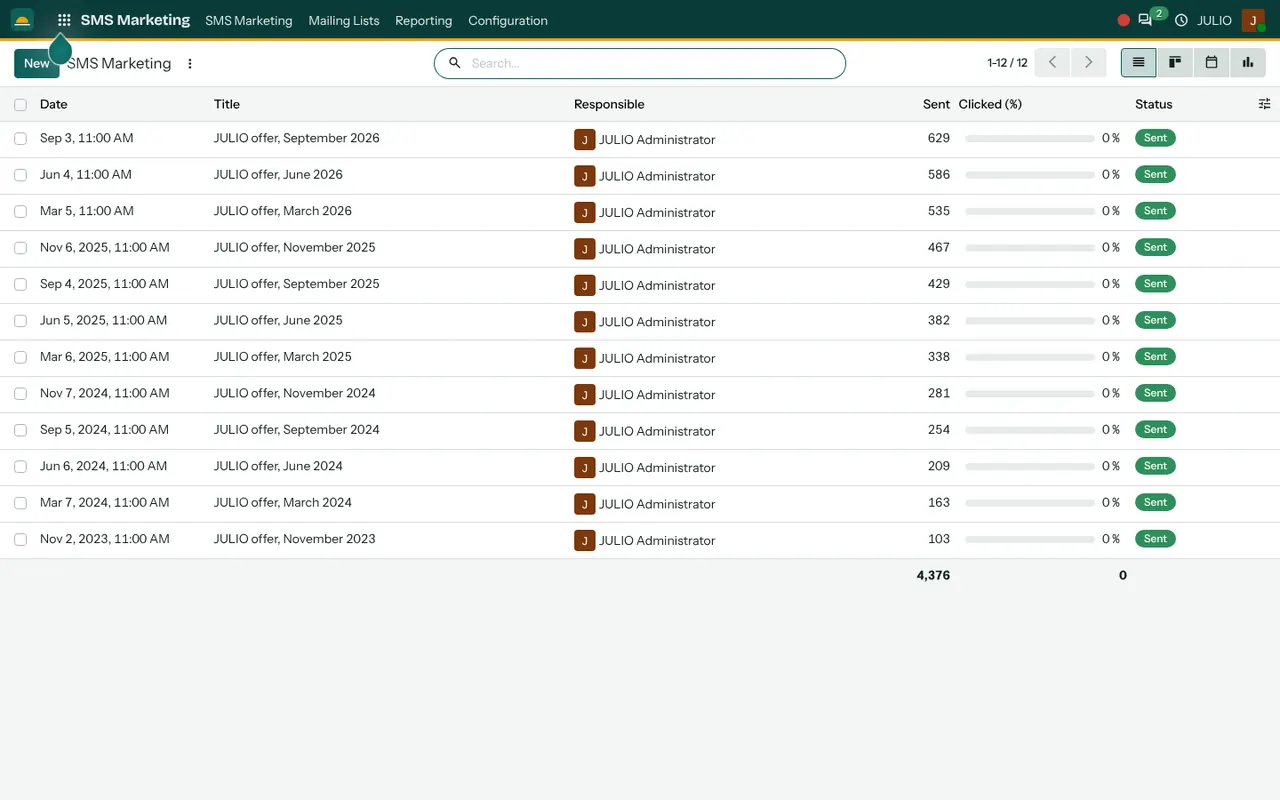
What sms marketing software looks like on screen
This sms marketing software keeps its menu short. The top menu of the module has four entries: SMS Marketing, Mailing Lists, Reporting and Configuration. Most of the work happens in the first.
A log of every text campaign
The first thing sms marketing software should do is remember. The main list shows one row per campaign: date, title, responsible person, how many messages were sent, a clicked percentage and a status. The demo holds twelve campaigns with titles such as "JULIO offer, September 2026", and a footer line adds up the total sent, which is 4,376 in the demo. You can see your whole texting history in a glance, and you can flip the list to a board, a calendar or a chart.
Short messages, written once
In this sms marketing software a campaign is a title, a message and an audience. Because an SMS has a small character limit, the screen keeps the writing short. If the text carries a link, the clicked percentage shows how many people followed it. Do not expect high numbers: a text is a nudge, and the real answer arrives as a visit, a call or an order.
The same lists as email
Mailing Lists is shared with Email Marketing. A list card shows its total contacts, and separately how many have an email and how many have a phone number. One list can therefore serve both channels, and a contact who opted out is recorded against the list.
Scheduling a send
A campaign can be saved as a draft, sent now or timed for later, and the calendar view helps you spread messages across the month. Late-night texts annoy people and drive opt-outs, so schedule offers for the hours when customers are likely to read them.
Reporting by campaign
Under Reporting you compare campaigns over time. That is useful to see whether the Diwali text brought more footfall than the summer one. Keep a habit of writing one line next to each campaign about what happened in the shop afterwards, because the software counts messages but only you see the footfall. After a few months those notes become your own guide to the best days, wording and offers.
How sms marketing software joins the rest
Your sms marketing software needs good numbers. Phone numbers come from Contacts, where customers are created once for selling, invoicing and messaging. A shop using the Point of Sale can capture a number at the till and have it join a list. Salons and gyms often combine texts with the Calendar for reminders, and CRM lets you follow up the people who replied. Totals can appear on your dashboards.
A short walk through one offer
Take a salon that wants to fill quiet Tuesday afternoons. The manager opens SMS Marketing, creates a campaign called "Tuesday glow offer" and writes one short line with a discount and a closing date. She picks the list of customers who visited in the past year, schedules the text for 11 in the morning and saves it. When it goes out, the row moves to Sent and the count appears. That is sms marketing software doing its small job. The following Tuesday the front desk simply counts how many mentioned the message, because a text that does not change footfall is not worth repeating.
Facts to keep in view
| Part | What it records |
|---|---|
| Campaign | Title, date, owner |
| Audience | A mailing list |
| Sent | Number of messages sent |
| Clicked | Link follow-through, if any |
What to decide before sms marketing software goes live
Why plan first? Because a text cannot be recalled once sent. A few decisions come before the first text, and they apply to any sms marketing software.
- The gateway. Messages travel through an SMS gateway. Their charge is paid to that provider, not within the ₹10,000 plan. We confirm the gateway in discovery.
- Registration. Indian rules for commercial texts require the sender name and message templates to be registered through your provider. Check this with them before planning a campaign.
- Consent. Text only people who agreed to hear from you, and record those who ask to stop.
- Timing. Decide the hours and the days, and keep late evenings and early mornings free of texts.
- One message, one action. A single clear ask makes the result easy to read.
Who starts with sms marketing software
Salons and gyms are the common starting points for sms marketing software, because they depend on repeat visits and reminders.
Conclusion
Good sms marketing software is boring in the right way: a short message, a clean list and a log that tells you what went out. At DigiGrowvity, in our experience setting up ERP projects, small businesses do best when they text rarely and plainly, and when the list comes from real customers. In JULIO ERP the numbers sit in Contacts and the lists are shared with Email Marketing, so one record serves both.
Key Takeaways
- Each campaign is logged with its date, owner, sent count and status.
- Mailing lists are shared with email, so one list serves two channels.
- Message charges go to your SMS provider, not to the plan.
- Indian sender and template registration must be done through the provider.
- The module is included in the ₹10,000 JULIO Local plan.