 DigiGrowvity
Most small businesses already own the most valuable marketing asset there is: a list of people who bought from them. The trouble is that the list sits in the accounts file, while the newsletter goes out from a separate tool that needs the names copied across every month. Email marketing software that lives inside your ERP removes that copying. The Email Marketing module in JULIO ERP builds a mailing from the contacts you already hold and reports back on every send.
What email marketing software has to get right
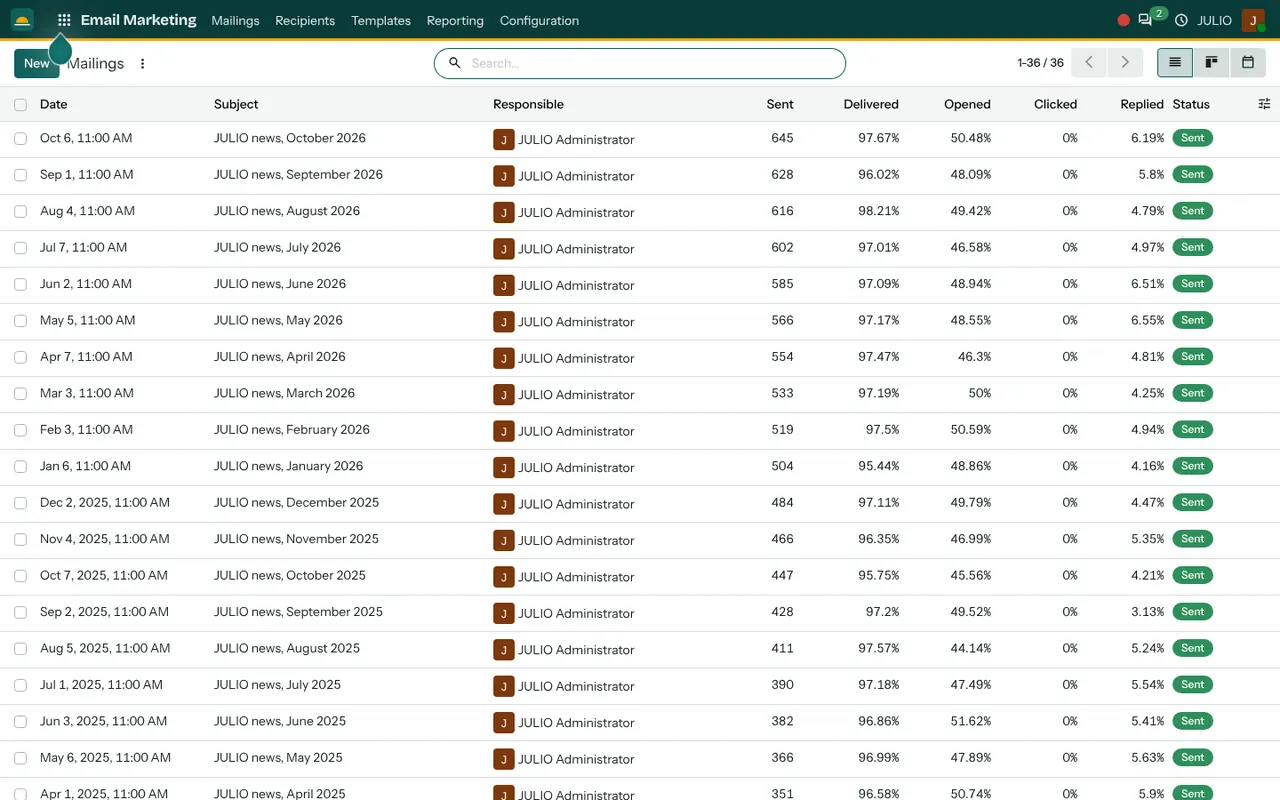
This email marketing software is a mailing room with four doors: mailings, recipients, templates and reporting, which are the menus along the top of the demo screen.
A log of every mailing you have sent
A useful piece of email marketing software remembers what you sent. The Mailings list shows one row per campaign with its date, subject, responsible person, how many were sent, and the percentages delivered, opened, clicked and replied. A status chip tells you whether a mailing is a draft, scheduled or sent. The demo holds 36 monthly newsletters, which shows how the list grows into a record of everything you have said to customers. The same data can be switched to a board or a calendar.
Mailing lists you can keep separate
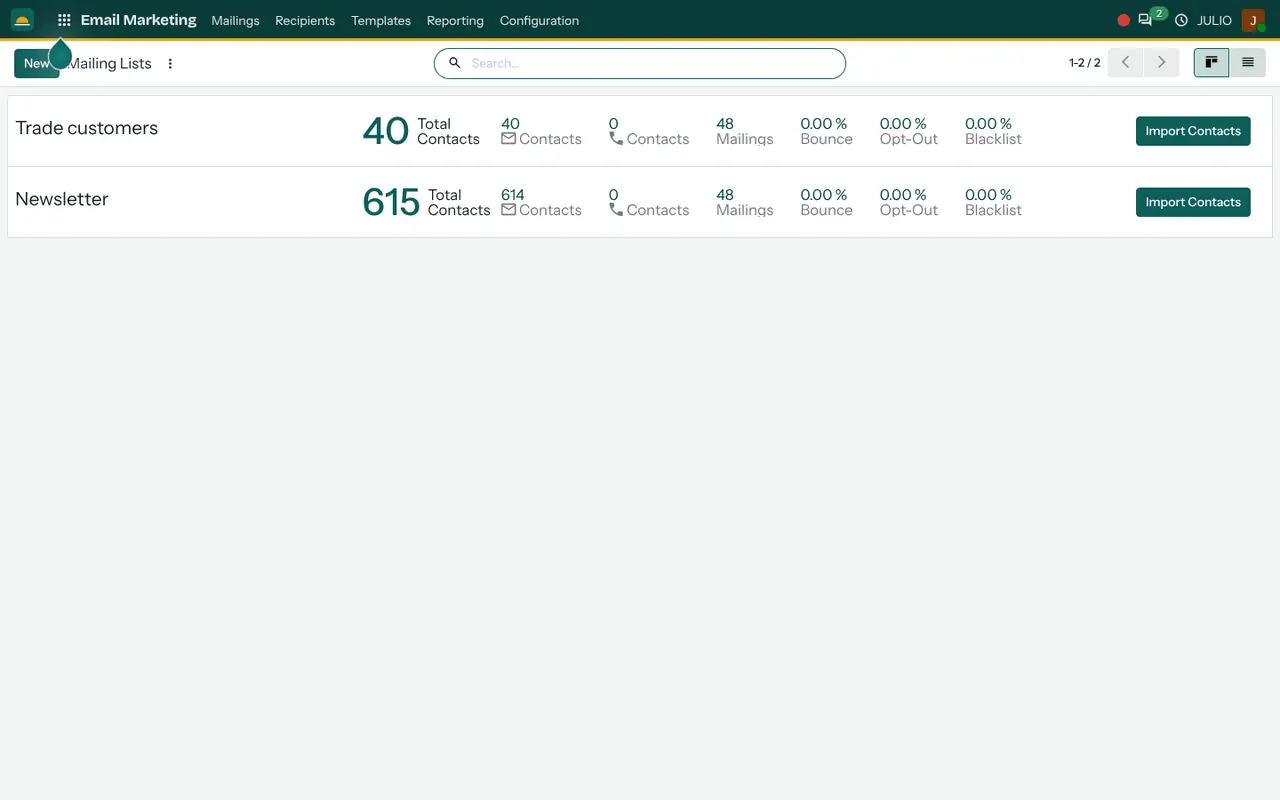
The Mailing Lists screen shows each list as a card with its total contacts, its email and phone counts, how many mailings it has received, and its bounce, opt-out and blacklist rates. The demo has two lists, one for newsletter readers and one for trade customers, each with an Import Contacts button. Keeping them apart means a price update for dealers never reaches retail shoppers by mistake.
Reusable templates
Under Templates you design a layout once, with your logo and colours, and reuse it for every issue. Staff who are not designers can write the text and leave the frame alone. This matters when three people take turns to send the monthly note.
Opt-out that actually works
A recipient who unsubscribes is recorded against the list, and the blacklist keeps an address from being mailed again. Respecting a "stop" is good manners and matters under India's consent and data protection rules, so the module keeps the record for you.
Reporting after the send
Once a mailing goes out, the email marketing software lets you open its figures and see delivery, opens and replies over time. Treat opens as a rough guide rather than a precise count, and look at replies and orders, which are what you actually want. A mailing that earns two quotation requests has done its job, whatever its open figure says.
How email marketing software connects to JULIO
In JULIO the recipients are your Contacts, so a new customer created at the till or in an invoice can join a list without being retyped. Shops can pair it with the E-commerce module for offers to online buyers, and with CRM to follow up enquiries that arrived but did not buy. For urgent or short messages there is the SMS Marketing module, which uses the same lists. Results can be shown in your dashboards.
A short walk through one newsletter
Here is how email marketing software fits into a normal first week of the month. A furniture shop owner opens Mailings and starts from last month's issue. She keeps the template, replaces the offer text with the festival range, and chooses the Newsletter list as the audience. She sends a test to her own address, schedules the mailing for 11 in the morning and goes back to work. By afternoon the row shows how many were delivered and a handful of replies, and one reply is a quotation request that she moves straight into the CRM.
Next month she copies the same mailing, changes the offer and sends again. The log keeps every earlier issue, so she never has to remember what she promised in March.
Email marketing software at a glance
| Part | What it gives you |
|---|---|
| Mailings | Subject, date, sent, delivered, opened, replied |
| Lists | Separate audiences with opt-out counts |
| Templates | One look, reused each issue |
| Reporting | Figures per mailing |
What to decide before using email marketing software
Sending is easy. Before you turn email marketing software on, settle what to send and to whom, because that is the real work.
- Your lists. Split customers by what they need to hear, such as retail, trade or past enquiries.
- Permission. Send only to people who have agreed to hear from you, and say how they can stop.
- The sending address. Decide which of your own mailboxes the mails go out from, and keep a real reply address.
- A rhythm. One good message a month beats five rushed ones. Pick a day and keep it.
- One goal per mailing. Ask for one action, such as a visit, a reply or an order, so you can tell if it worked.
Who starts with email marketing software
Online sellers and travel businesses are the common starting points for email marketing software, since they keep customer lists and send regular offers.
Conclusion
Email marketing software is useful when it is close to your customer data, not when it is the fanciest. At DigiGrowvity, in our experience setting up ERP projects, the businesses that keep a steady monthly mailing are the ones that start with a clean list and a plain template. In JULIO ERP the lists come from Contacts and the replies lead to CRM and Sales, so a newsletter is part of the sales flow rather than a separate chore.
Key Takeaways
- Every mailing is logged with sent, delivered, opened and replied figures.
- Separate mailing lists stop trade and retail messages from mixing.
- Templates keep the look steady while anyone can write the text.
- Opt-outs and the blacklist are recorded against each list.
- It is included in the ₹10,000 JULIO Local plan.