 DigiGrowvity
A dine-in service has a different rhythm from a shop counter. Four people sit down, order in stages, change their minds, and ask for the bill in different ways. Restaurant software for small business has to follow a table through all of that without losing the order. The Restaurant module in JULIO ERP adds a drawn floor plan to the point of sale, so each table carries its own open order from the first starter to the final payment.
What restaurant software for small business does for a table
This restaurant software for small business is an extension of the till, tuned for the way a dining room works.
A floor plan you draw yourself
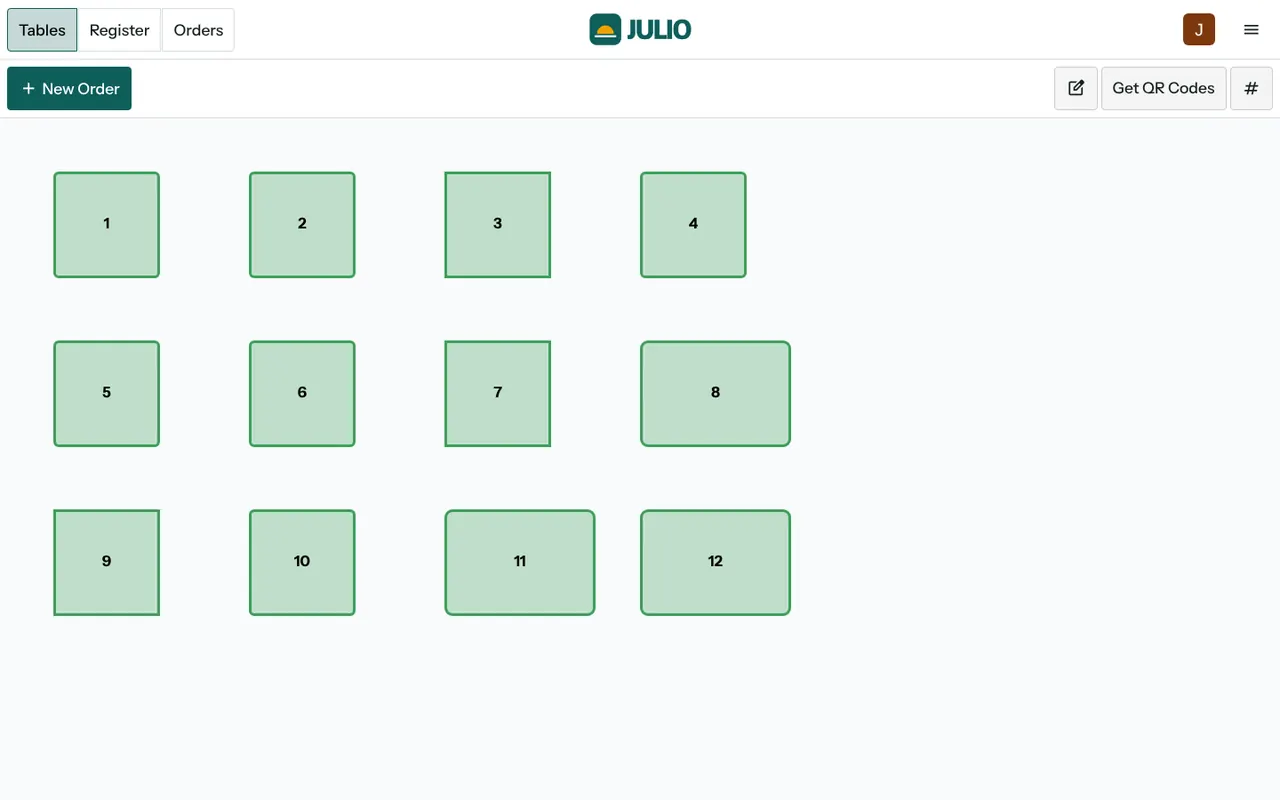
The demo screen shows twelve numbered tables laid out in rows on a plain floor. Most are square, while a few are wider, the way a long table for six would be. A pencil button puts the floor in edit mode, where you can move tables, change their shape and add more. In the demo every table is shown in green because none has an open order, so a glance at the screen tells the waiter which tables are free.
Orders that stay with the table
Tapping a table opens its order. The waiter adds items as the guests choose them, and the order stays open as the meal grows. Nothing is rung up until the table is ready to pay. A New Order button also lets staff start an order that is not tied to a table, which suits takeaway.
Orders sent to the kitchen
Restaurant software for small business has to handle kitchen orders as well as tables, and this one does. Items added to a table's order can be sent forward so the kitchen knows what to cook. How you want that to appear in your own kitchen, on a printed slip or on a screen, is a decision we settle with you in discovery.
QR codes for tables
In this restaurant software for small business, a Get QR Codes button sits in the top bar of the floor screen. It produces a code for each table, which you can print and place on the table. Whether you use those codes for guests to view the menu or to order themselves is a choice you make with us when we set the module up.
Bills that settle at the till
The floor plan has Tables, Register and Orders tabs side by side. When a table is done, the waiter switches to the register, takes payment and the order becomes a normal numbered sale. The usual restaurant moves, such as splitting a bill or moving guests to another table, are part of the standard behaviour.
How restaurant software for small business joins JULIO
The restaurant software for small business builds on Point of Sale, so it shares the same products, categories, receipts and sessions. A dish is a product, and if it is made from ingredients, those ingredients live in Inventory. Supplier deliveries of milk, vegetables or meat are recorded in Purchase. Waiters and cooks come from Employees, and their shifts can be recorded in Attendances. Takings appear in the Dashboards.
A short walk through restaurant software for small business
Here is the restaurant software for small business in use on a Sunday afternoon in a small family restaurant. Table seven is a group of five. The waiter taps table seven and adds two starters and the first round of drinks. Ten minutes later the mains are added to the same open order. Meanwhile table three leaves, so that table goes back to free and the host seats the next group. When table seven asks for the bill, the waiter moves to the register, splits it between two payers and closes it. The sale is numbered, posted and counted in the day's total.
How the dining room maps to the system
| In the room | In the system |
|---|---|
| A table | A numbered table on the floor plan |
| A running order | An open order on that table |
| Takeaway | A new order with no table |
| Paying | The register tab and a numbered sale |
Who starts with restaurant software for small business
Restaurants and cafés commonly begin with restaurant software for small business, usually next to the till and stock. Open a page to see the full starting set for that business.
What to decide before you switch on the dining room
Settle these points on paper before anyone touches the floor plan of your restaurant software for small business.
-
Your layout. Walk the room and count the tables as they really stand. Add upstairs, a terrace or a private room as separate floors.
-
Dish list and prices. Decide names that a waiter can say fast and a kitchen can read without confusion.
-
Kitchen route. Choose whether orders go to a printer, a screen or are called out. A kitchen display is not something we promise until we have confirmed it with you.
-
Who can discount or void. Agree who may cancel an item or give a discount, because those are the points where leakage hides.
-
Table QR codes. Decide whether guests will scan at all, or whether the codes are only a future option.
Conclusion
Restaurant software for small business should feel like an extra pair of hands for the waiter, not a screen that slows service. At DigiGrowvity, we set up JULIO ERP for growing businesses, and in our experience ERP projects work best when the floor plan is drawn first and tested with one real shift. Since the dining room sits on the same Point of Sale and Inventory, every plate sold also updates the stock room.
Key Takeaways
- Restaurant software for small business ties each open order to a table.
- The floor plan in restaurant software for small business is drawn by you and can be edited as the room changes.
- Takeaway orders can be started without a table.
- Table QR codes are available, and their use is agreed with you.
- It is included in the ₹10,000 JULIO Local plan.