 DigiGrowvity
The usual online shop is a separate world. Prices are typed into one admin screen, stock is counted in another, and someone copies each web order into the billing software by hand. Online store software for small business should end that copying. The E-commerce module in JULIO ERP is a shop front built on the same catalogue, stock and customers as the rest of the system, so a web order is just another sales order.
What the online store software for small business shows
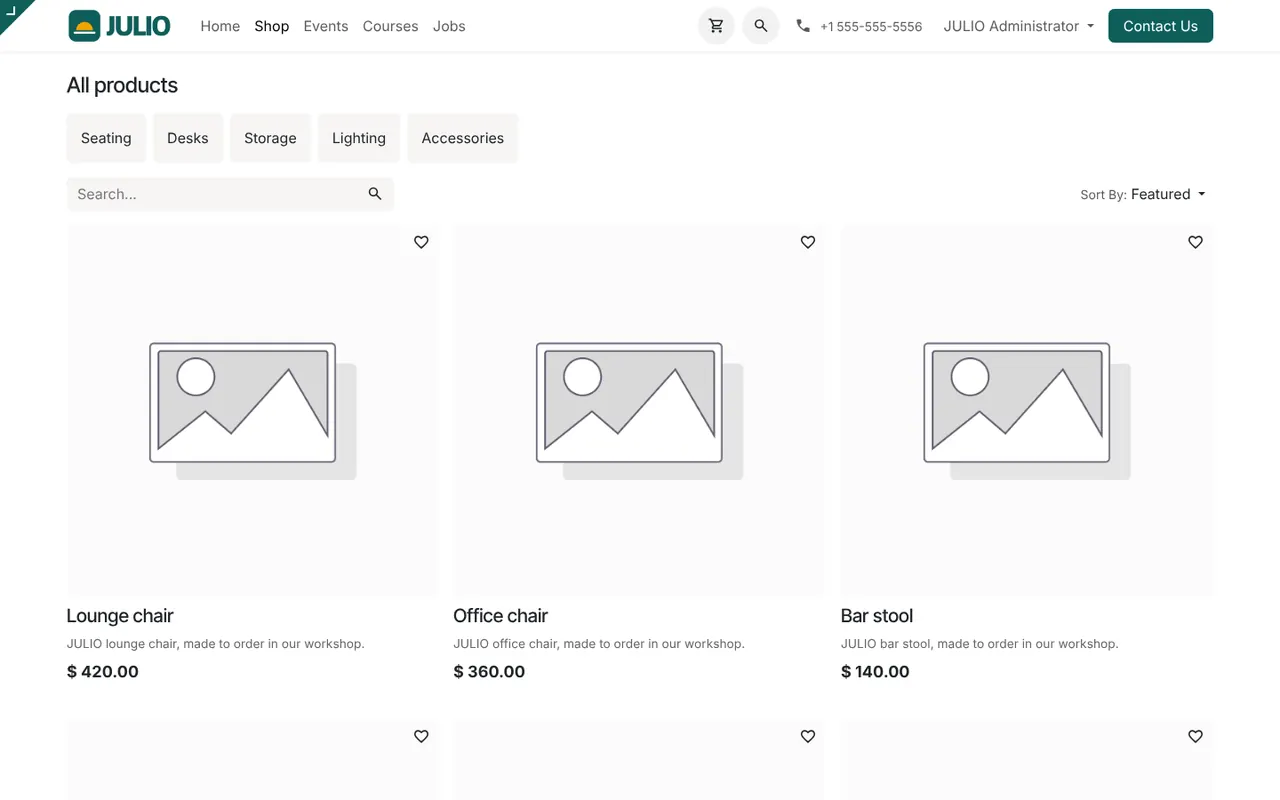
The demo screen is the public shop page of the online store software for small business, the one a visitor would land on. It is plain by design, and it shows the pieces that matter.
A shop page with categories and search
The page is titled All products and offers category buttons across the top. In the demo they are Seating, Desks, Storage, Lighting and Accessories. Beneath them are a search box and a Sort By menu set to Featured. A shopper can narrow down by category, search by name or change the order of the results.
Product cards that read from your catalogue
Each card carries a product name, a short description and a price. These are not typed again for the web: they come from the same product records your team quotes from in Sales. Change a price once and the shop shows the new price. The demo cards show a grey picture placeholder, because the demo products have no photographs loaded.
A cart, a wishlist and a header that behaves like a shop
The header carries a cart icon, a search icon and a Contact Us button. A small heart on every card lets a shopper save a product. This is the familiar shape of an online store, so visitors do not need to be taught how to use it.
Selling from live stock
The module's blurb says it sells online from live stock, and that is the point. Because the shop reads the same Inventory as your warehouse, what the web shows can follow what you actually hold. You decide how to handle an item that has run out, for example hiding it or taking pre-orders.
Orders that arrive as ordinary orders
A web order lands in the sales order list like any other. From there it follows the normal path to a delivery and an invoice, with no second system to reconcile.
How online store software for small business joins JULIO
The online store software for small business is one face of a larger system. It sits on the Website module, which supplies the header, the footer and the pages around it. Orders flow to Sales, then to Inventory for packing and to Invoicing for the bill. Buyers who register become records in Contacts, and you can reach them later through Email Marketing. Shoppers with questions can be answered through Live Chat.
Our own experience with online store software for small business
We have run this pattern ourselves. LAMBLILY, a garment business we built an ERP for, has its own online store, and the store's orders are brought into the ERP every hour by a read-only sync. The shop and the ERP stay separate, and the ERP always has an up-to-date picture of what sold. You can read about it on the LAMBLILY ERP page. The built-in shop described here is the other route: the web store lives inside the ERP from the start.
A short walk through one web order
With the online store software for small business, a shopper opens the shop, taps Lighting and searches for a lamp. They add it to the cart, enter their address and pay. The order appears in the sales order list marked To Deliver. A packer sees the delivery in Inventory, packs the lamp and validates it, which lowers the stock figure. The order then shows as To Invoice until the bill is raised. At no step does anyone retype the item or the customer.
What the online store software for small business needs from you
| Item | Why it matters |
|---|---|
| Product photographs | The demo shows placeholders until you upload yours |
| Short descriptions | Shoppers read two lines, not a page |
| Categories | Five or six clear buttons beat twenty |
| Delivery and payment options | Settled with you in discovery |
Who starts with online store software for small business
Online sellers and shops that want a web presence commonly begin with online store software for small business. Open a page to see the full starting set for that business.
What to decide before switching on the web shop
-
Which products go online. Not every item suits the web, and your online store software for small business works best with a first batch. Pick items you can photograph well.
-
How shoppers pay and how goods travel. Payment methods and delivery partners are agreed with you in discovery, since they depend on your city and your courier.
-
Where the shop is reached from. The Local plan serves your own network. Showing the shop to the public needs a public address, which we talk through with you. A domain is optional, about ₹1,500 a year.
-
Out of stock behaviour. Decide whether to hide, show or take pre-orders.
-
Who packs and who answers. Name the people for orders and for shopper questions.
Conclusion
Online store software for small business is worth most when it is honest about stock and invisible in the back office. At DigiGrowvity, we set up JULIO ERP for growing businesses, and in our experience ERP projects for online sellers go well when one small category is put live first and the orders are followed all the way to the invoice. Because the shop shares Sales, Inventory and Invoicing, that single trial order tells you whether the whole chain holds.
Key Takeaways
- Online store software for small business should read prices and stock from one catalogue.
- The shop has categories, search, sorting, a cart and a wishlist heart.
- Web orders arrive as ordinary sales orders.
- Photographs, payment and delivery for your online store software for small business are settled in discovery.
- It is included in the ₹10,000 JULIO Local plan.