 DigiGrowvity
A visitor reads your prices page for two minutes, has one question, and leaves. Whether that visitor becomes a customer often depends on whether someone answered within the minute. The live chat module for small business in JULIO ERP puts a chat window on your website and gathers every conversation in a record your team can search later. The answer happens on the spot, and the history stays behind.
What the live chat module for small business shows
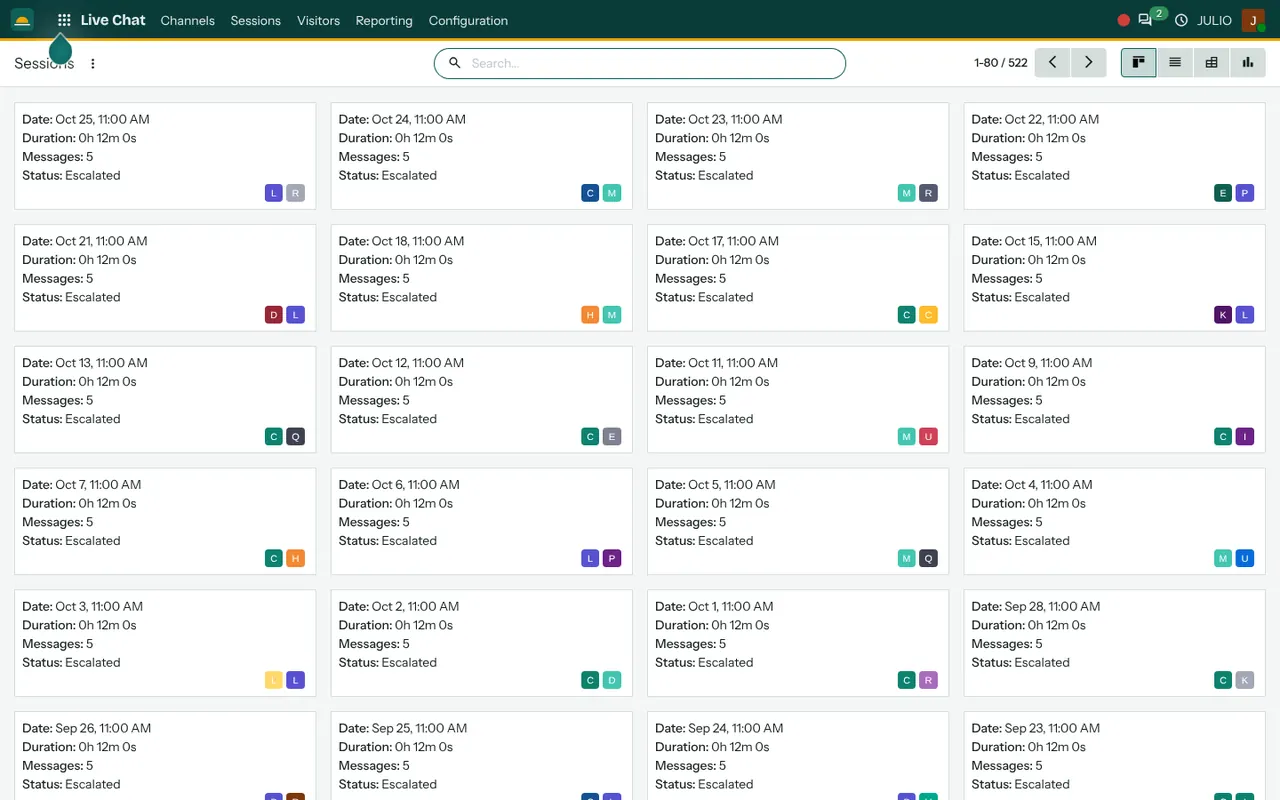
The demo screen of the live chat module for small business is the Sessions list, drawn as a board of cards. Four menus run along the top: Channels, Sessions, Visitors and Reporting, with Configuration after them.
Sessions as cards you can scan
Every card is one conversation. It carries the date and time, the duration, the number of messages and a status. In the demo the cards each show about twelve minutes, five messages and a status of Escalated, and two small coloured avatars at the bottom show who took part. The same sessions can be switched to a list, a pivot table or a chart, which is how you move from reading one chat to counting many.
Channels for different parts of the business
In the live chat module for small business, a channel is one chat setup, with its own team of operators and its own look on the site. You could keep one channel for sales questions and another for support, so the right people receive the right chats. We help you decide how many you need. Most small firms start with one.
Operators who answer from inside the ERP
Operators are ordinary users who are set to take chats. When a visitor writes, the operator receives it in the same system they already use for their daily work. Canned responses, which are saved replies, save typing on questions that come up every day, such as delivery times or opening hours.
Visitors you can see
The Visitors menu lists the people who have been on your site. For a small shop or a services firm, it shows how many people the website actually brings and which of them chose to talk.
From a chat to a lead
An operator can create a CRM lead from within a conversation. The visitor's question, the contact details they gave and the full chat transcript go with it, so the salesperson who follows up does not start cold.
How the live chat module for small business joins JULIO
The live chat module for small business belongs to the Website module, since the chat window appears on your public pages. Chats that turn into enquiries move to CRM, and from there into Sales. Operators message each other and share notes in Discuss, and a shopper's question about an order can be answered by someone who can open the order in the E-commerce module.
A short walk through the live chat module for small business
Imagine the live chat module for small business in a small clothing shop with an online catalogue. A visitor looks at a jacket page and types, asking whether it comes in a larger size. The shop assistant, who is logged in as an operator, sees the chat and replies using a saved answer about size charts. The visitor asks about delivery to another city, and the assistant answers that too. The visitor leaves an email address and asks for a call. The assistant creates a lead from the chat, and the session is stored with its date, duration and message count for later review.
The four chat menus in one table
| Menu | What it is for |
|---|---|
| Channels | Set up a chat window and its operators |
| Sessions | Read and count past conversations |
| Visitors | See who has been on the site |
| Reporting | Measure chat activity over time |
Who starts with a live chat module for small business
A live chat module for small business tends to be added after the shop and the website. It is less often the first module a business switches on. Open a page to see the full starting set for that business, and note that this module is usually added next.
What to decide before switching on live chat
Chat is a promise to answer, so settle the practical points of your live chat module for small business first.
- Who is on duty. A chat window with nobody behind it is worse than none. Decide who answers and during which hours.
- What the window says out of hours. Write the message visitors see when no operator is available.
- Channels. Decide whether sales and support questions need separate channels.
- Saved replies. List the five questions you answer every day and write good answers in advance.
- Where chats lead. Agree who follows up when a chat becomes a lead, and how quickly.
Conclusion
A live chat module for small business only works when it is staffed, quick and connected to the rest of your records. At DigiGrowvity, we set up JULIO ERP for growing businesses, and in our experience ERP projects see the best results when chat starts small: one channel, set hours and a short list of saved answers. With Website, CRM and Discuss behind it, every conversation has somewhere useful to go.
Key Takeaways
- The live chat module for small business answers visitors on your website in real time.
- Every session is kept with its date, duration, message count and status.
- Channels let different teams handle different kinds of questions.
- A chat can be turned into a CRM lead.
- It is included in the ₹10,000 JULIO Local plan.