 DigiGrowvity
A workshop is easy to announce and surprisingly hard to run. Names arrive by message, a few people cancel, two walk in unannounced, and the next morning nobody can say how many actually came. Event registration software replaces that muddle with one record per event and one line per person. The Events module in JULIO ERP does this on the same customer list you already use for selling, so the people who attend are the people you can follow up.
What event registration software tracks
This event registration software has four menus: Events, Registration Desk, Reporting and Configuration. The first two carry most of the daily work.
One row per event
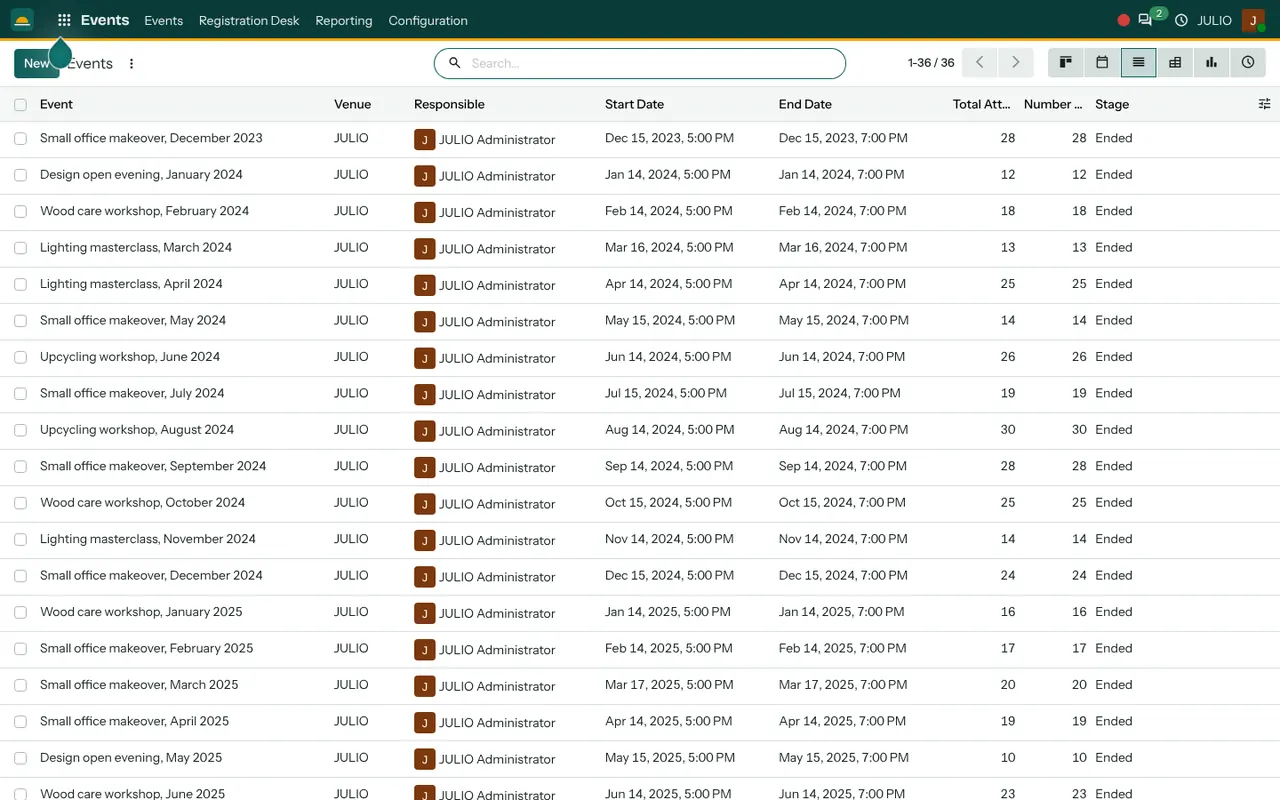
Good event registration software starts with a clean calendar of what is planned. The Events screen lists each event with its name, venue, responsible person, start and end time, total attendees and stage. The demo shows 36 sessions with names such as Wood care workshop, Lighting masterclass and Small office makeover, each running from 5 to 7 in the evening, and each marked Ended once it is over. Switch the same data to a board by stage, a calendar, a pivot or a chart to see the year at a glance.
Registrations with a clear status
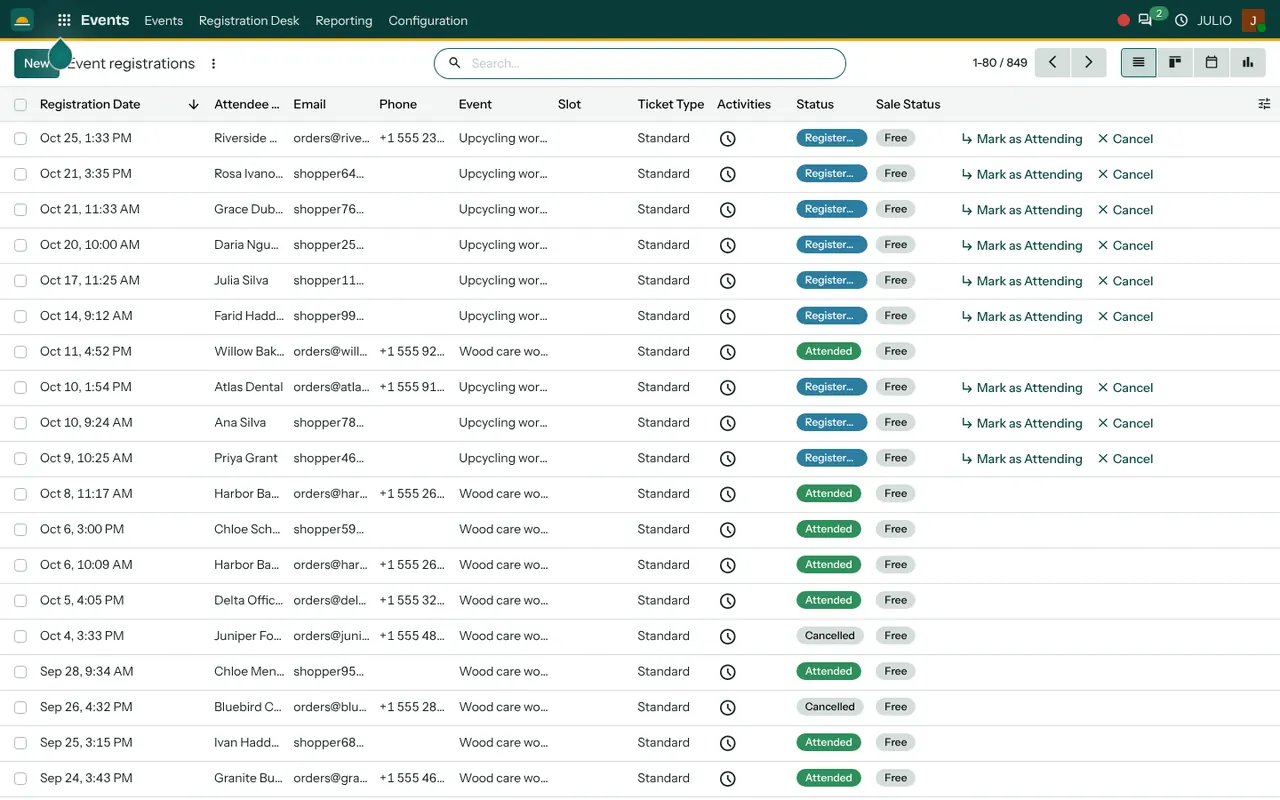
The heart of event registration software is the person-level record. Every person who signs up becomes a registration: date, attendee, email, phone, the event, the ticket type and a status. The status is Registered, Attended or Cancelled, and two buttons on each row, Mark as Attending and Cancel, change it. The demo holds 849 registrations, filterable by event, so a cancelled seat is released and counted properly.
Ticket types and free or paid seats
Each event can carry more than one ticket type. The demo uses a single Standard ticket, shown as free. Where you charge, the sale status column links the seat to the order, so you can tell which registrations have been paid for.
A registration desk for the day
The Registration Desk menu is for the person at the door. They find an attendee by name, tick them as present and move on. No printed lists, and no argument about who came, because the status is on the record.
Counts you can trust afterwards
Why does this matter? Because event registration software is only worth having if the numbers afterwards are right. Total attendees and the attended number sit beside each event, so comparing a Lighting masterclass with an Upcycling workshop takes seconds. Over a year you learn which topics fill the room and which need a different day. A topic that always fills in two days may deserve a second session, while one that struggles may only need a better time slot or a clearer title.
How event registration software connects to JULIO
In JULIO, attendees are Contacts, so a person who came to a workshop already exists when you later quote them. Public registration pages come from the Website module, paid tickets flow through Sales and Invoicing, and invitations can go out through Email Marketing. After the event, a feedback form from Surveys closes the loop. Schools may also pair it with eLearning.
A short walk through one open evening
Here is event registration software on a real evening. Imagine a design studio hosting a lighting masterclass. The organiser creates the event, sets the date, the venue and a ticket limit, and publishes the registration page. People sign up over two weeks, and the list shows who is registered and how many seats remain. Two cancel, and their rows turn to Cancelled. On the evening, a colleague at the desk marks each arrival as attended. The next day the studio opens the event and reads the attendee count.
Then it sends a thank-you message with a feedback form, and drops the three most interested people into the CRM as leads. Nothing is retyped, because every attendee was already a contact when they registered.
Event registration software in a nutshell
| Part | What it holds |
|---|---|
| Event | Venue, dates, owner, stage |
| Registration | Person, ticket, status |
| Desk | Check-in on the day |
| Count | Registered and attended |
What to decide before event registration software starts
Planning the first event with event registration software is simple if these points are agreed in advance.
- A seat limit. Know the room's capacity, so the registration page stops at a sensible number.
- Free or paid. Decide whether a ticket costs anything, and who may waive it.
- What you need from attendees. A name, an email and a phone number are enough for most workshops. Ask for nothing you will not use. Every extra question lowers the number of people who finish signing up.
- A cancellation habit. Say how late a person may withdraw, so a seat can be released in time.
- The follow-up. Decide who writes to attendees afterwards, and what they are asked to do next.
Who starts with event registration software
Schools and training providers are the common starting point for event registration software, since classes, demos and parent evenings all follow the same pattern.
Conclusion
Event registration software does not make a workshop better, but it stops the paperwork from spoiling it. At DigiGrowvity, in our experience setting up ERP projects, small organisers value two things above all: knowing who is coming before the day, and knowing who came after it. In JULIO ERP the attendee list comes from Contacts, tickets can run through Sales, and the feedback form comes from Surveys, so the whole event stays in one system.
Key Takeaways
- Each event shows its venue, dates, owner and attendance in one list.
- A registration carries a status of Registered, Attended or Cancelled.
- The desk menu lets a colleague check people in on the day.
- Ticket types allow free and paid seats, linked to the order.
- It is included in the ₹10,000 JULIO Local plan.