 DigiGrowvity
Customers will tell you what is wrong if you ask them simply and at the right moment. The usual problem is the asking: a Google form here, a paper slip there, and a handful of answers that nobody reads. Survey software gives every question set one home, one link and one results page. The Surveys module in JULIO ERP does that, and because it sits beside your customers, staff and events, the feedback arrives next to the records it is about.
What survey software shows in the demo
The module has three menus: Surveys, Participants and Questions & Answers. The first opens a board of cards, one per survey.
A card for each survey
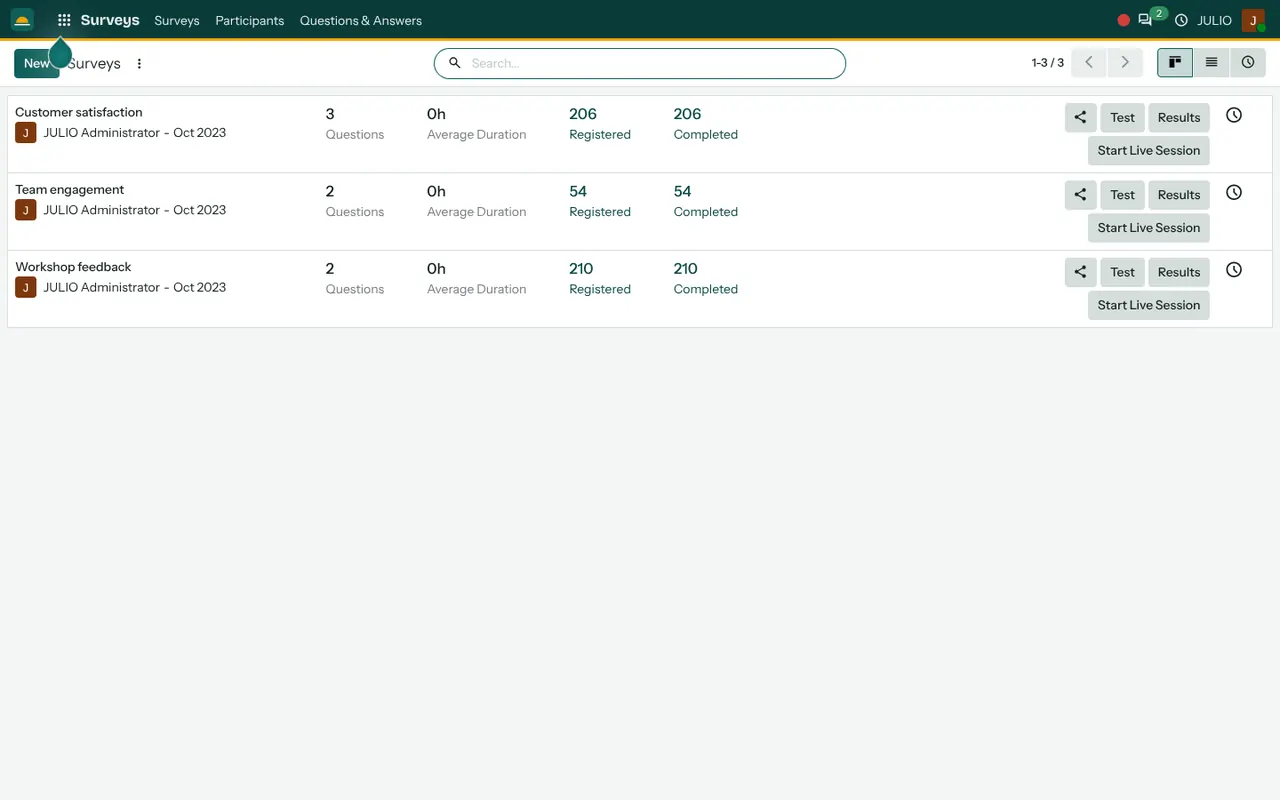
Every card names the survey and its owner, then shows the number of questions, the average time taken, how many people were registered and how many completed. The demo has three: Customer satisfaction with three questions, Team engagement with two, and Workshop feedback with two. Keeping surveys short is a design choice. A form of three questions gets finished, while a form of thirty gets abandoned. If you need more detail, run a second short survey a month later instead of one long one.
Share, test, results
The buttons are where survey software saves the most time. Four buttons sit on each card. Share gives you the link to send by email, text or on a poster. Test lets you fill the form yourself before anyone else sees it. Results opens the answers as charts and tables. Start Live Session runs the survey in a room, where people answer on their phones and the results update on screen.
Question types for different jobs
Good survey software offers more than a rating box. A question can be a single choice, multiple choice, a text box, a number or a date, among others. A feedback form needs a rating and a comment. A staff pulse needs a few choices. A product quiz needs correct answers and a score. You choose the type for each. Mixing a rating with one open comment usually gives you both a number to track and a reason behind it.
Participants and their answers
The Participants menu lists everyone who started a survey, whether they finished, and what they said. For a named invitation you can tell who answered and who did not, and for an open link you may let answers stay anonymous.
Quizzes with scoring
When a survey is built as a quiz, correct answers carry points, and a pass mark can be set. This makes the same survey software useful for short product knowledge checks on a new sales team.
How survey software connects to JULIO
Feedback is most useful when it is linked to its source. A workshop run with Events can end with a feedback survey sent to its attendees. A customer satisfaction form can be mailed through Email Marketing or posted on your Website. A staff questionnaire reaches people from the Employees list, and a course can close with a quiz from eLearning. The headline figures can also appear on your dashboards.
A short walk through one feedback round
Here is survey software on an ordinary week. A furniture workshop wants to know how its Saturday class went. The organiser opens Surveys, copies the Workshop feedback survey, and trims it to two questions: a rating out of five and a free comment. She presses Test to try it herself, then Share to copy the link. The link goes out to the attendee list that evening. By Monday the card shows how many registered and how many completed, and the Results page shows the ratings. One comment mentions that the room was cold, and the organiser changes the venue for the next batch.
The same survey software can carry a quarterly staff pulse of just two questions, how the work week felt and what one thing should change. Over a year the answers show a pattern that a single conversation would miss.
Survey software on one page
| Part | What it gives you |
|---|---|
| Survey card | Questions, registered, completed |
| Share | A link to send |
| Results | Charts and answers |
| Live session | Answers on phones, in the room |
What to decide before using survey software
The tool takes minutes to learn. With any survey software, the questions take care, and the plan matters more than the settings.
- One purpose per survey. Decide whether you want to measure satisfaction, collect ideas or test knowledge, and not all three.
- Few questions. Two or three is enough for most feedback, and every extra question costs you completions.
- Named or anonymous. Staff questionnaires often work better when people can answer without being identified.
- Who sees the results. Agree who reads the answers, and what you will do about them.
- What you promise. If you ask for complaints, make sure someone replies.
Who starts with survey software
Schools and training providers commonly start with survey software, because classes and courses end naturally with a quiz or a feedback form.
Conclusion
Survey software is worth using when it turns a vague feeling into a few numbers and a few honest comments. At DigiGrowvity, in our experience setting up ERP projects, the businesses that get the most from it ask very little, very regularly, and act on what they read. In JULIO ERP the surveys sit alongside Events, Employees and Email Marketing, so the right people are easy to reach.
Key Takeaways
- Each survey is a card showing its questions, registered and completed counts.
- Share, Test, Results and Start Live Session are one click away.
- Question types cover ratings, choices, comments and scored quizzes.
- Participants can be named or anonymous, depending on the survey.
- It is included in the ₹10,000 JULIO Local plan.