 DigiGrowvity
Most small businesses already train people, just not in a way that leaves a record. A senior hand shows the new joiner how a machine is cleaned, a customer is greeted or a quotation is checked, and a month later nobody can say who was shown what. The elearning module for staff training in JULIO ERP gives that knowledge a home: short courses with steps, invited learners and a count of who has finished, kept inside the same system as your employees and customers.
What the elearning module for staff training does
The elearning module for staff training is a course library with a score sheet attached. Each course is a small card, and the card tells you how the training is going.
Course cards that report as they go
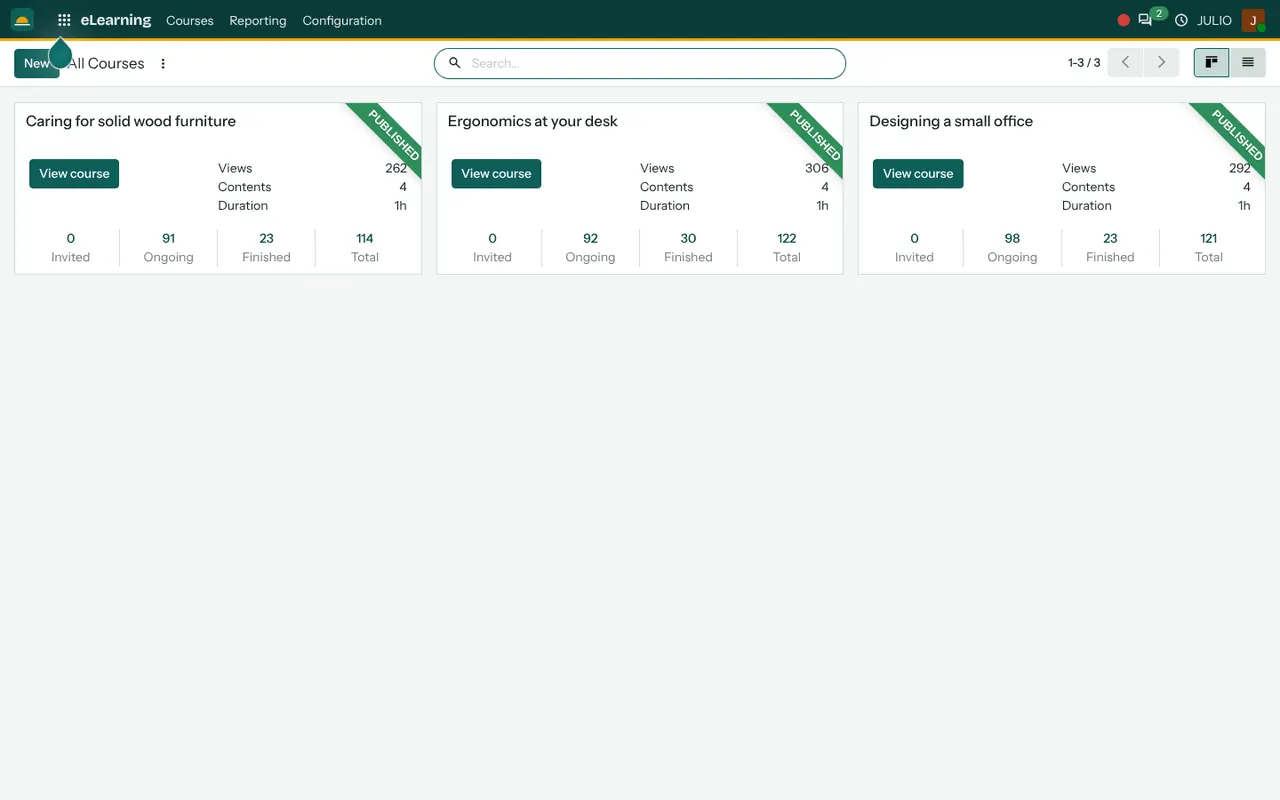
On the back-office screen each course appears as a card marked Published, with its views, number of contents and total duration. Along the bottom sit four counts: Invited, Ongoing, Finished and Total. In the demo screen, a one-hour course with four contents shows ninety-odd learners ongoing and a couple of dozen finished. You read the state of the training in a glance instead of asking each person.
Contents built from steps
In the elearning module for staff training, a course is a sequence of contents, and each content is one step. Typical steps are a short video, a document to read or a quiz. Keep each step short, because a learner on a phone between jobs will finish five-minute steps far more often than a forty-minute lecture. The learner moves through them in order, and the system remembers where each person stopped, so a half-finished course can be picked up on another day.
Invited or open, as you choose
A course can be shown to everyone, kept for signed-in users or limited to people you invite. A safety course for the shop floor can be invited only, while a product guide can be open to your dealers.
A public catalogue with ranks and badges
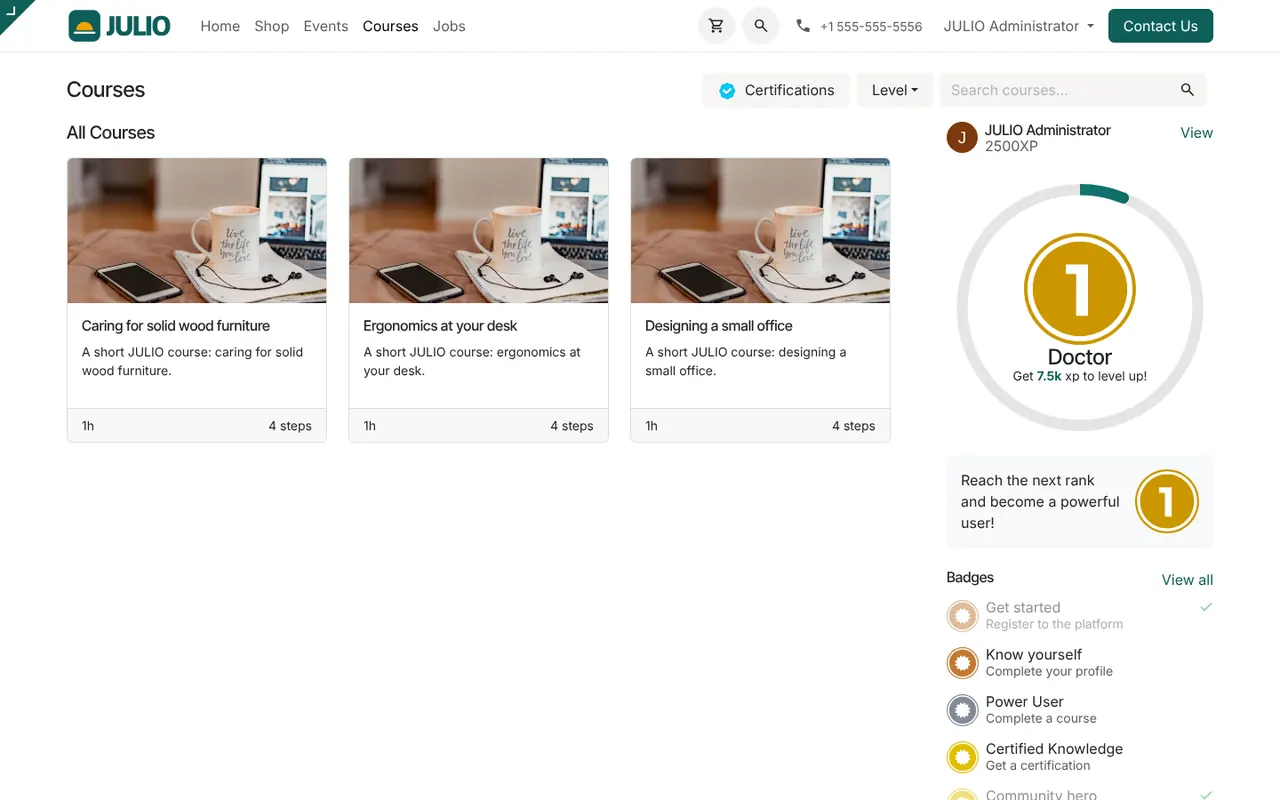
The website side lists courses as cards with a duration and a step count, a search box, a level filter and a Certifications button. A side panel shows the learner's experience points, a rank and badges such as Get started, Know yourself and Power User. Small rewards like these keep people returning to finish.
Reporting for the person who runs training
The Reporting menu of the elearning module for staff training summarises attendance and completion across courses, so a manager can see which course is stuck at ongoing and needs a nudge.
How the elearning module for staff training connects to JULIO
Courses are tied to the same people records the rest of the system uses. Learners are staff held in Employees or customers held in Contacts, so you never build a separate list of trainees. The course catalogue lives on the built-in Website, which means a public course needs no extra site. Feedback after a course can be gathered with Surveys, and a workshop that needs a physical room can be run through Events.
A short walk through one course
Take a furniture workshop that wants every new joiner to know how to care for solid wood. The owner records a short video of the finishing process, adds a one-page care sheet and writes a five-question quiz. These become three of the course steps. She publishes the course in the elearning module for staff training and invites the two new joiners. Over the next week the cards show both as ongoing, then one as finished. The owner now knows, without asking, that one person still needs the quiz explained.
Who starts with an elearning module for staff training
Training is a core activity for some businesses and a side task for others. These kinds of business commonly begin with the module in their first set. Open a page to see the full list for that business.
Course states in the elearning module for staff training
| State | What it tells you |
|---|---|
| Invited | The person has a place but has not started |
| Ongoing | Started, not yet at the last step |
| Finished | Completed every step |
| Total | Everyone linked to the course |
Before you use the elearning module for staff training
A course library is only as useful as what goes into it. Decide these early.
- Which five courses come first. Start with training you repeat most often, such as induction, safety or product knowledge, rather than a library of thirty.
- Who is allowed to see what. Decide which courses are open, which are for signed-in users and which are invite only.
- What counts as finished. Choose whether finishing means viewing every step or passing a quiz.
- Who writes the content. The system holds the course, but someone in your team still has to record or write the lessons. Plain phone videos and a one-page sheet are enough to begin.
Conclusion
An elearning module for staff training does not replace a good teacher; it makes sure the lesson is taught the same way twice and leaves a record. At DigiGrowvity, we set up JULIO ERP for growing businesses, and in our experience ERP projects go smoother when people learn the new system from a short course rather than from whoever is free that day. Pair Employees, Surveys and this module, and training becomes part of how the business runs.
Key Takeaways
- The elearning module for staff training shows each course as a card showing views, contents, duration and invited, ongoing and finished counts.
- Courses are built from short steps and can be open, signed-in only or invited only.
- A public catalogue on the built-in website adds ranks, badges and certifications.
- Learners are the same people held in Employees and Contacts.
- It is included in the ₹10,000 JULIO Local plan.